Fliki AI Review 2026 Pricing, App, Free Plan, Alternatives, Login & FAQs

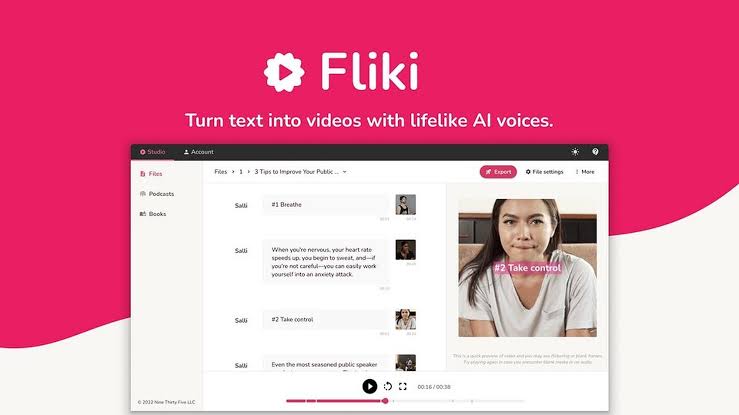
Table of Contents
Ease of Use | *** 1/2 | 3.5 / 5 |
Voice Quality | **** | 4.0 / 5 |
Video Output | *** | 3.0 / 5 |
Pricing Value | *** | 3.0 / 5 |
Mobile App | ** 1/2 | 2.5 / 5 |
Customer Support | *** 1/2 | 3.5 / 5 |
OVERALL: 3.3 / 5 | Decent tool for specific use cases, but not without its frustrations.
Fliki AI: Brand Profile at a Glance
Product Name | Fliki AI |
Category | Text-to-Video & Text-to-Speech Platform |
Founded | 2021 |
Headquarters | Delaware, USA |
Website | fliki.ai |
Free Plan | Yes (5 minutes/month, watermark) |
Paid Plans | Standard ($28/mo) | Premium ($88/mo) | Enterprise (Custom) |
Annual Billing | Standard $21/mo | Premium $66/mo (save ~25%) |
AI Voices | 2,000+ voices across 80+ languages and 100+ dialects |
Stock Media Library | 10 million+ assets |
Key Features | Text-to-Video, Text-to-Speech, AI Avatars, Voice Cloning, Blog-to-Video, PPT-to-Video |
Mobile App | Yes (iOS & Android) |
Best For | Content creators, marketers, educators, faceless YouTube channels |
Trustpilot Rating | 4.4 / 5 (based on nearly 3,000 reviews) |
G2 Rating | 4.5 / 5 |
Nubia Magazine Rating | 3.3 / 5 |
What Is Fliki AI?
If you have spent any time on YouTube or LinkedIn in 2026, you have almost certainly watched a video made with Fliki AI without knowing it. The faceless explainer videos, the crisp AI narration walking you through a listicle, the blog post someone conveniently turned into a five-minute video, that is often Fliki.
Fliki AI is a text-to-video and text-to-speech platform that launched out of Delaware, USA. In simple terms, you hand it your words, whether a blog post, script, PowerPoint, or just a rough idea, and it assembles a finished video around that content. It picks stock footage, adds an AI voiceover, drops in captions, and gives you something exportable in a matter of minutes.
The platform has now crossed the one million user mark. That is not a small number for a tool that costs money after a very limited free tier. So we decided to sit down with it properly and give it the honest review it deserves, the kind you would hope to read before spending $28 to $88 a month.
This review is based on our own testing, hundreds of user reviews across Trustpilot, G2, Reddit threads, and the App Store, plus a close look at how the platform has evolved through the first half of 2026. We are not here to sell you on anything. We are here to tell you what Fliki actually is like to use.
How Fliki AI Works
The workflow is straightforward by design. You paste in your content, or type a topic and let the AI write a script for you. Fliki then breaks it into scenes, one scene per chunk of text, and matches each scene to a stock video clip or image from its library of over 10 million assets.
You pick a voice from its library of more than 2,000 AI voices across 80 languages and over 100 dialects. The voiceover gets layered in automatically, captions are generated and synced, and background music can be added. The whole process for a short video typically takes under ten minutes, which is genuinely fast compared to traditional video editing.
In January 2026, Fliki added a Playground feature that lets you test AI image and video generation without tying it to a live project. This is useful because you can experiment with different output models before committing your credits. They also added First Frame and Last Frame controls for supported premium models, which gives you more say over how a video clip begins and ends.
The editing interface is slide-based rather than a traditional timeline. Some creators find this liberating because it removes complexity. Others who are used to Premiere Pro or Final Cut will find it restrictive. Know your own preference before you sign up.
Key Features of Fliki AI in 2026
1. Text to Video
This is the core product. Paste any text, from a full blog post to a product description, and Fliki generates a scene-by-scene video. It works best with structured, factual content. If you are trying to turn a creative short story or abstract concept into a video, the stock footage matching gets messy and generic. For informational content, tutorials, and marketing copy, it holds up well.
2. Voice Library
This is where Fliki genuinely earns its reputation. Over 2,000 AI voices across 80 languages and more than 100 dialects. The voice quality on the premium tier voices is impressive. For content creators producing multilingual content or teams localising videos for different markets, this library is one of the strongest in the category. Competitors like InVideo and Pictory do not come close on this particular metric.
3. Blog to Video
Drop in a URL and Fliki pulls the article, summarises it into video-friendly scenes, and builds a video. It does not always interpret the most important points correctly, so you will need to do some editing. But the starting point it gives you saves a significant amount of time compared to building from scratch.
4. PowerPoint to Video
Upload a PPT file and Fliki converts each slide into a video scene, adds transitions, and layers on a voiceover. Corporate teams that produce a lot of training content or internal presentations have found this useful. The output is not cinematic, but it is clean and functional.
5. AI Avatars
Fliki has an avatar library that lets you place a virtual presenter on screen. The avatars are decent for a general AI video tool but are noticeably less polished than dedicated avatar platforms like Synthesia. If your core need is realistic avatar-led video, Synthesia or HeyGen will serve you better. If avatars are a nice-to-have rather than the centrepiece, Fliki is fine.
6. Voice Cloning
Available on the Premium plan, voice cloning lets you replicate your own voice or build a unique voice profile. For creators running personal brands or businesses with consistent audio identity, this is a meaningful feature. It also opens up accessibility applications for individuals with speech differences.
7. AI Playground (New in 2026)
Added in January 2026, the Playground lets you test image and video generation models without affecting your active projects. This matters because the credit system means experimentation costs you money in a normal project. The Playground gives you a sandbox to test outputs across different model quality levels before deciding which one to spend credits on.
Fliki AI Pricing in 2026
Fliki operates on a subscription model with four tiers. Here is what each one actually looks like in practice.
Plan | Monthly Price | Annual Price | What You Get |
Free | Free | Free | 5 min/month, watermark, 720p, limited voices |
Standard | $28/month | $21/month | 180 min content, 1,000+ voices, no watermark, 6M+ stock media, commercial rights |
Premium | $88/month | $66/month | 600 min, voice cloning, API access, HD, priority support, dedicated account manager |
Enterprise | Custom | Custom | Unlimited, white-label, custom integrations, full API, SLA support |
One important thing most people do not realise until they have already signed up: Fliki's quotas are calculated annually, not monthly. So the Standard plan at $28/month gives you 180 minutes of content per year, not 180 per month. That breaks down to about 15 minutes per month, which goes quickly if you are a regular publisher.
The other billing frustration worth knowing upfront is that credits are consumed during editing and previewing, not only on final export. If you are the kind of user who previews a lot before settling on a scene, your credits will drain faster than you expect. Reddit threads on this topic are quite vocal, and it is a consistent complaint we saw across multiple review platforms.
Our verdict on pricing: the Standard plan makes sense for creators who produce a manageable volume of content and want to save time on voiceover. The Premium plan is a bigger ask and only justifies itself if you need voice cloning or API access at scale. The free tier is genuinely useful for testing but is not a production tool in any realistic sense.
Fliki AI Free Plan: What You Actually Get
The free plan exists and Fliki does not require a credit card to start, which is a point in its favour. Here is what the free tier gives you in 2026:
- 5 minutes of audio and video content per month
- Access to around 300 voices (not the premium library)
- Video export at 720p resolution
- Fliki watermark on all exports
- No commercial rights on free-tier exports
- No video creation, only audio on certain sub-tiers of the free plan
The free plan is best treated as a trial, not a working tool. Five minutes per month is enough to get a feel for the interface, test a couple of voices, and see whether the stock footage matching suits your content style. If you like what you see, the upgrade conversation becomes real. If not, you have lost nothing but a bit of time.
What the free plan will not do is let you build and publish a body of work. The watermark alone rules out any professional use, and the voice selection is noticeably thinner than the paid tier. Go in with low expectations and the free plan is perfectly adequate for evaluation purposes.
The Fliki AI App: Mobile Experience
Fliki has mobile apps for both iOS and Android. The gap between the desktop and mobile experience is significant, and it is worth addressing honestly because it trips up a lot of users.
On Trustpilot, Fliki carries a 4.4 out of 5 rating based on nearly 3,000 reviews. On the iOS App Store, it scores 2.1 out of 5. That gap tells you almost everything you need to know. The web platform works well. The mobile app, as of mid-2026, still has reliability issues that frustrate enough users to drag the rating down substantially.
The mobile apps are fine for quick tasks. Browsing your existing projects, making minor edits, checking on an export, these work reasonably well on phone. But the browser version is where the actual production work should happen. The editing interface simply needs more screen real estate than a phone provides, and the app has been slower to receive the feature updates that the web platform gets first.
If mobile-first is important to your workflow, Fliki in its current state is not the ideal fit. For desktop-centred creators, this is less of an issue.
Fliki AI Login: Getting Started
Getting into Fliki is straightforward. You sign up at fliki.ai, either through an email address or by connecting a Google account. No credit card is needed to start on the free plan, which removes the usual friction of trial signups.
Once inside, the dashboard is clean and not overwhelming. Projects are organised by media type. The left sidebar gives you access to your content files, voice settings, and account management. New users typically find their way around without needing a tutorial, which is a genuine design achievement for a tool with this many features.
Fliki does not currently offer SSO (Single Sign-On) for enterprise users in the traditional B2B sense unless you are on a custom Enterprise plan. For individuals and small teams, the standard login works without issue.
User Experience: What It Is Actually Like to Use Fliki
We tested Fliki across a range of content types: a long-form blog article converted to video, a product explainer built from a script, a multilingual piece using a non-English voice, and a short social media clip made from a one-paragraph prompt. Here is what we found.
The Good
The voice library is genuinely impressive. Switching between languages and accents is easy, and the quality on the premium voices is at a level that feels natural rather than robotic. For content creators producing educational material or informational videos where the voiceover carries most of the work, Fliki delivers.
The blog to video feature saved us real time. We dropped in a URL, watched it pull the content and segment it into scenes, and had a workable draft in about eight minutes. The scene matching was not always ideal but editing individual scenes is intuitive enough that cleaning up took another ten minutes at most.
The 2026 Playground update is a thoughtful addition. Being able to test different video generation models without spending your monthly credits on experiments makes the tool feel less punishing to explore.
The Frustrating
The credit system is the single biggest source of user frustration, and it is consistent across review platforms. Credits burn during previews and edits, not just on final export. If you do not know this going in, you will run out of credits faster than expected and feel cheated even if technically you were not.
The stock footage ceiling is real. Every video built on Fliki draws from the same shared library, and after you have used the platform for a while, you start recognising clips. There is no way around this with the current architecture. If visual originality is important to your brand, you will need to supplement with your own footage.
The AI avatar quality lags behind specialist platforms. If you want realistic, polished avatar-led content, Fliki's avatars feel like a bonus feature rather than a core strength.
Customer support has mixed reviews. G2 users and Trustpilot reviewers occasionally mention slow response times, particularly for billing questions. This is not universal, but it comes up enough to be worth noting.
Fliki AI Alternatives in 2026
Fliki is a solid tool but it is not the only option, and depending on what you need, something else might serve you better. Here are the most relevant alternatives we have looked at.
Tool | Starting Price | Best For | vs Fliki |
InVideo AI | $25/month | Script-to-video with large stock library | Broader AI add-ons, strong on price |
Pictory | $23/month | Blog-to-video for existing footage | Better for editors with own footage |
Synthesia | $22/month | Corporate training with AI avatars | More polished avatars, enterprise focus |
HeyGen | $29/month | Realistic avatar video creation | Far better avatar quality |
ElevenLabs | $5/month | Standalone AI voice generation | Superior voice cloning, but no video |
If your main need is voice quality and multilingual content, Fliki is difficult to beat at its price point. If you need realistic avatars, go HeyGen or Synthesia. If you want more video editing control, InVideo AI gives you a larger toolkit. If you only need the voice and you will handle the video separately, ElevenLabs is far cheaper.
Who Should Use Fliki AI?
- Faceless YouTube channel creators who need regular narrated content without filming themselves
- Bloggers and content marketers repurposing written content into video for social platforms
- Educators producing lesson summaries or explainer videos at volume
- Multilingual teams that need consistent voiceover across many languages
- Small businesses producing product demos, explainers, or training videos on a budget
Who Might Want to Look Elsewhere
- Personal brand creators who need their actual voice or a convincing clone of it (ElevenLabs does this better)
- Teams that need polished AI avatar presenters as the centrepiece (Synthesia or HeyGen)
- Creators who require original AI-generated footage rather than stock library visuals
- Mobile-first workflows where the phone is the primary production device
Frequently Asked Questions About Fliki AI (2026)
These are the questions people are actively searching for answers to about Fliki AI right now. We have answered each one based on our research and direct testing.
1: Is Fliki AI free to use?
Yes, there is a free plan and it does not require a credit card to sign up. The free tier gives you 5 minutes of audio and video content per month, access to around 300 voices, and video export at 720p. However, all free exports carry a Fliki watermark and there are no commercial usage rights. The free plan is realistic for testing but not for producing content you intend to publish or use professionally.
2: How much does Fliki AI cost in 2026?
Fliki's paid plans start at $28 per month on monthly billing. If you pay annually, the Standard plan drops to $21 per month. The Premium plan is $88 per month on monthly billing, or $66 per month when billed annually. Enterprise pricing is negotiated directly with the Fliki team and is custom to your usage needs. Annual billing saves you roughly 25 percent across both paid tiers.
3: What is the Fliki AI credit system and why are people frustrated with it?
Fliki uses a credit-based quota system tied to your subscription plan. The frustration comes from two things. First, credits are consumed during editing and previewing, not just on final export. Users who experiment with multiple scenes or preview their work frequently will burn through credits faster than they expect. Second, the monthly-sounding plans are actually calculated on annual quotas, so the 180 minutes on Standard works out to roughly 15 minutes per month, not 180. Reddit threads and G2 reviews are full of users who felt misled by this, even when Fliki's pricing page does technically explain it.
4: How does Fliki AI compare to InVideo AI?
Both tools convert text and scripts into video using AI. Fliki wins clearly on voice library size and multilingual support, which is where its 2,000 plus voices across 80 languages make a real difference. InVideo AI tends to offer a broader set of AI add-on features, a larger stock library in some categories, and a pricing entry point that some users find more accessible. For pure voice variety and language range, Fliki is stronger. For overall video editing flexibility and features, InVideo is often the preferred choice.
5: Is the Fliki AI mobile app worth using?
This depends on how you define worth. The mobile app exists and covers basic functions like reviewing projects, minor edits, and checking on exports. But the iOS App Store rating of 2.1 out of 5 reflects real frustrations with stability, speed, and the feature gap between the app and the web version. The web platform on a desktop or laptop is where Fliki performs best. If you specifically need a strong mobile video creation experience, Fliki is not currently the tool for that.
6. What are the best Fliki AI alternatives in 2026?
The most commonly recommended alternatives depend on what you need. For multilingual content teams who just want voiceover without video, ElevenLabs is the cleaner, cheaper solution. For blog-to-video conversion aimed at existing footage, Pictory is the closest competitor at a lower entry price. For AI avatar-led video, Synthesia and HeyGen are both ahead of Fliki on output quality. For a broader text-to-video toolkit with more editing control, InVideo AI is the most direct competitor. Fliki still holds its position for users who specifically need a combined text-to-video and text-to-speech platform with wide language support.
7: Can Fliki AI clone your voice?
Yes, voice cloning is available but only on the Premium plan, which starts at $66 per month with annual billing or $88 per month on a monthly subscription. The voice cloning feature lets you replicate your own voice or create distinct voice profiles for different characters or brand personas. It is one of the stronger use cases for the Premium tier and is particularly relevant for personal brand creators and businesses that want audio consistency across all their content. The cloning quality is solid, though dedicated voice tools like ElevenLabs offer finer control and generally higher fidelity at a lower price if you do not need the video features.
8. Is Fliki AI legitimate and safe to use?
Yes, Fliki is a legitimate company registered in Delaware, USA. It has over one million registered users, a Trustpilot rating of 4.4 out of 5 from nearly 3,000 reviews, and has been operating since 2021. It is used by content creators, educators, and marketing teams at companies of varying sizes. The platform processes payments through standard secure payment gateways and has a clearly documented cancellation policy. You can cancel your subscription at any time through your account settings without needing to contact support, which is a detail worth noting positively. There are occasional complaints on Reddit about billing clarity and credit consumption, but no widespread reports of fraudulent practices.
Nubia Magazine Verdict
Fliki AI is a useful tool for a specific kind of creator. If you are producing high volumes of narrated, stock-footage-based video and you need strong multilingual voice support, Fliki is genuinely one of the better options in the market right now. The 2026 updates, particularly the Playground feature and expanded model support, show that the team is iterating in the right direction.
But the credit system frustrations are real and the mobile app still needs work. The stock footage ceiling will eventually feel limiting to anyone producing content at scale, and the avatar quality is not where it needs to be to compete with dedicated platforms.
At $28 per month on the Standard plan, it is defensible if you are the right user. At $88 on Premium, the value calculation becomes harder unless voice cloning and API access are specific requirements.
We rate it 3.3 out of 5. Not a bad tool. Not a great one. A decent one for a specific job, priced at a point where you should know what you are signing up for before you commit.
Related Posts



0 Comments
Join the discussion and share your thoughts
No Comments Yet
Be the first to share your thoughts on this article!