Noisli Review 2026: App, Free Plan, Extension, Alternatives & FAQs

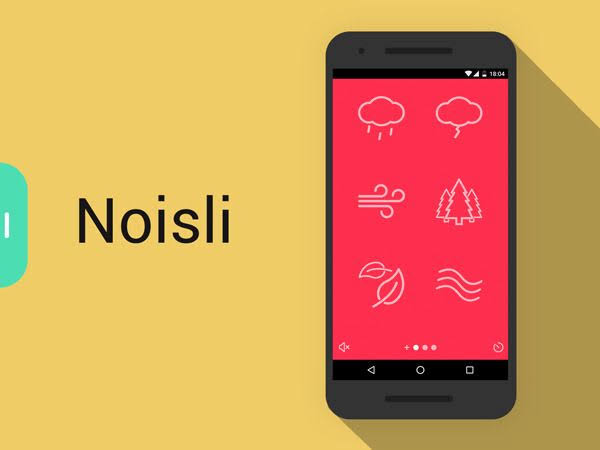
Table of Contents
Noisli has been around for over a decade, which already sets it apart from the wave of focus apps that show up for a year and quietly disappear. We spent several weeks going through the web app, the Chrome extension and the iOS app to see whether the service still holds up in 2026, and whether it is worth the money it now asks for. This review covers the things people keep typing into Google: the app itself, whether Noisli is free, how the extension works, where to download it, what using it day to day actually feels like, and the alternatives worth knowing about.
What Is Noisli, Exactly?
Noisli is a background sound generator built for people who need help concentrating, relaxing or sleeping. Instead of handing you a single looped track, it lets you mix several ambient sounds at once, such as rain, a crackling fire, a coffee shop and brown noise, and adjust each one individually until you land on a combination that works for you. It was started in 2013 by Stefano Merlo and Sabine Staggl, two Italian designers who built it out of their own frustration with working from home, and the small Berlin based team behind it has kept the product alive and quietly updated ever since.
Here is the quick profile for anyone who just wants the facts before reading further.
Attribute | Detail |
App name | Noisli |
Founded | 2013, by Stefano Merlo and Sabine Staggl |
Headquarters | Berlin, Germany |
Category | Focus, productivity and ambient sound |
Platforms | Web app, Chrome extension, iOS, Android |
Free plan | 16 sounds, 1.5 hours of streaming a day, 3 playlists, 5 saved favorites |
Pro plan (web) | From $10/month billed yearly, or around $12/month billed monthly |
Business plan | From $24/month billed yearly, built for teams |
iOS app price | $1.99 one time purchase, separate from the web Pro plan |
Chrome extension | Free to install |
Sound library | Up to 28 mixable sounds on Pro |
Nubia Magazine rating | 3.5 out of 5 |
The Noisli App in 2026
The first thing worth knowing is that Noisli is not really one app. It is a web app at noisli.com, a Chrome extension, and separate iOS and Android apps, and Noisli itself says these are built on different code with different feature sets. The Pro features you pay for on the website, things like the advanced timer, oscillation and the larger sound library, do not carry over to the mobile apps automatically. If you buy the iOS app, you are paying for a standalone product with its own limits, not unlocking the web version on your phone.
That split annoys some users more than the pricing does, because it means there is no single Noisli subscription that covers everything everywhere. Our testing confirmed this is still true in 2026. If your plan is to use Noisli mainly at a desk, the web app is the one to focus on. If you want something on your phone for a commute or for sleep, treat the mobile app as a separate purchase decision.
Is Noisli Free?
Yes, and the free plan is genuinely usable, not just a locked demo. As of 2026 the Free tier gives you:
- 16 ambient sounds to mix and layer
- 1.5 hours of streaming per day on the web app
- 3 curated playlists
- Up to 5 saved favorite combinations
- A simple timer and a simple text editor
The daily streaming cap is the detail most reviewers and forum posts zero in on, and it is the one thing that pushed us toward upgrading during testing. An hour and a half sounds generous until you are three hours into a writing session and the sound cuts out mid afternoon. For occasional use, naps, a short study block, or trying the app before committing, the free plan does the job well. For anyone who wants ambient sound running for a full work day, it will start to feel restrictive within the first week.
Upgrading to Pro removes the daily cap, unlocks 28 sounds instead of 16, adds oscillation (which gently varies volume over time so the sound feels less static) and a shuffle feature, plus a more capable timer and text editor. Pro currently runs from around $10 a month when billed yearly, or closer to $12 a month billed monthly, and Noisli also sells a Business plan starting at $24 a month for teams. Pricing has shifted a little over the years, so it is worth checking the current numbers on their site before you commit.
Noisli Extension for Chrome
The Chrome extension is free and, in our experience, the most convenient way to use Noisli if you live in a browser all day. Once installed, it sits in your toolbar and gives you quick access to saved combos and the timer without needing to keep a Noisli tab open. Adding or editing a sound combination still opens the full site in a new tab, so the extension works best as a shortcut to things you have already set up rather than a place to build new mixes from scratch.
It carries the same free and Pro limits as the web app, since it is pulling from the same account. There is no separate Firefox or Edge version as of this review, so Chrome (and Chromium based browsers that support Chrome extensions) remains the only browser route.
How to Download Noisli
Where you get Noisli depends on how you plan to use it.
- Web: no download needed, go to noisli.com and use it directly in the browser
- Chrome extension: install free from the Chrome Web Store
- iOS: available on the App Store as a $1.99 paid download, separate from the web Pro plan
- Android: available on Google Play as a standalone app
A common point of confusion in search is whether there is a free Noisli app to download. The web app and extension are free to use, with the daily limits described above. The iOS app itself is a paid download, so there is no way to get the iPhone version for $0, though the Android listing and the web app remain free to start with.
User Experience: What Using Noisli Is Actually Like
The design has not changed drastically in a while, and that is mostly a compliment. The interface is still a clean grid of sound icons you click to toggle on or off, with sliders to balance volume between them. It loads fast, does not nag you with pop ups, and there are no ads anywhere in the experience, which is rare for a free tier in this category.
Sound quality held up well across our test sessions. The loops are long enough that we did not notice obvious repetition, even with rain and white noise running for over an hour. The built in timer is genuinely handy for Pomodoro style sessions, and the text editor, which lets you jot notes while your soundscape plays and save them to Dropbox or Google Drive, is a small touch we did not expect to like as much as we did.
A few things stood out, good and bad, after extended use:
- Setting up a custom mix takes seconds and saving it as a favorite is one click
- The free plan's daily streaming limit resets at a fixed time, which can feel arbitrary if you work odd hours
- Mobile and web feel like two different products, which breaks the experience if you switch devices mid day
- No offline mode on the web app, so a shaky connection means the sound can stutter
- The visual design still feels calm and uncluttered next to newer, more cluttered competitors
Noisli Alternatives Worth Knowing in 2026
Noisli is not the only option in this space anymore, and several competitors exist specifically because people were looking for a cheaper or more generous version of what Noisli offers. Some of the names that come up most often:
- myNoise: a free, ad free sound generator with a large library and an optional paid tier for extra packs
- Coffitivity: free coffee shop ambience, narrower focus but no cost at all
- A Soft Murmur: a long running free web mixer with a low cost mobile app
- NSDR: free guided audio and binaural tracks aimed more at rest and recovery than background noise
- Foyer: a one time purchase Mac and iPhone app with spatial sound placement, aimed at people tired of subscriptions
- myNoisli: a free, unofficial clone built to mirror Noisli's exact sound set without the daily cap or the subscription
If price is the main objection, myNoise and Coffitivity are the two most consistently recommended free options. If it is the subscription model itself that bothers you, Foyer's one time payment is worth a look, though it is Mac and iPhone only.
Our Rating: 3.5 out of 5
Noisli earns its reputation as one of the more polished tools in this category. The sound quality, the interface and the little extras like the text editor are genuinely well made, and the free plan is fair rather than a bait and switch. What holds it back from a higher score is the split between web and mobile, which still feels unresolved after years of user complaints, and a price that newer free competitors have made harder to justify unless you specifically want Noisli's particular sound set and design.
Category | Score |
Sound library and quality | 4.0 / 5 |
Ease of use | 4.0 / 5 |
Value for money | 3.0 / 5 |
Consistency across devices | 3.0 / 5 |
Overall Nubia Magazine rating | 3.5 / 5 |

Frequently Asked Questions About Noisli
1. Is Noisli free to use?
Yes. The Free plan includes 16 sounds, 1.5 hours of streaming a day, 3 playlists and up to 5 saved favorites, with no ads anywhere on the free tier.
2. How much does Noisli Pro cost in 2026?
Pro currently starts at around $10 a month when billed yearly, or close to $12 a month billed monthly. Business plans for teams start at roughly $24 a month. Check Noisli's own pricing page for the exact current figures, since subscription prices do shift.
3. Is there a Noisli Chrome extension?
Yes, it is free on the Chrome Web Store and gives you one click access to your saved sound combos and the timer without keeping a browser tab open.
4. Is the Noisli app free on iPhone and Android?
The iOS app is a one time $1.99 purchase and is a separate product from the web app, with its own feature set. The Android app is also a standalone listing on Google Play. Neither one simply unlocks your web Pro subscription.
5. What is the difference between the Noisli website and the mobile app?
Noisli has confirmed that the web app and the mobile apps run on different code with different features. Pro features purchased on the website, such as the advanced timer and the full 28 sound library, do not transfer to the iOS or Android apps.
6. Can I download Noisli sounds to listen offline?
The web app streams and needs an internet connection. Noisli's mobile apps are documented as supporting offline playback once sounds are downloaded within the app, which the web version does not offer.
7. Is there a good free alternative to Noisli?
myNoise and Coffitivity are the two most commonly recommended free alternatives, and both run in a browser with no account required. There is also an unofficial free clone called myNoisli built to mirror Noisli's sound set without the daily limit.
8. Is Noisli worth paying for?
If you specifically like Noisli's sound design, the text editor and the timer, and you plan to use it for full work days, Pro removes the one limitation that actually gets in the way, the daily streaming cap. If you only need background sound occasionally, the free plan or a free competitor will likely cover what you need without a subscription.
9. Does Noisli help with sleep as well as focus?
Many users do use it for sleep, since sounds like rain, white noise and ocean waves are common sleep aids, and the timer can be set to fade out after a chosen stretch of time. It is not marketed as a dedicated sleep app the way something like Calm is, so it lacks features such as guided sleep stories.
10. Is Noisli still being updated in 2026?
Yes. The small Berlin based team behind it has continued maintaining the web app, extension and mobile apps, and the core product and pricing structure described in this review reflect what is currently live on their site.
Nubia Magazine Verdict
Noisli is a solid, well designed tool that has earned its long run in a crowded category, and our testing found nothing that felt broken or neglected. It loses points for the ongoing split between its web and mobile experience and for a price that is easier to question now that free alternatives have caught up on raw sound variety. For focused desk work paired with the Chrome extension, it remains one of the more pleasant tools of its kind. For anyone comparing purely on cost, it is worth trying the free plan first before deciding whether the upgrade is worth it for you.
Related Posts


0 Comments
Join the discussion and share your thoughts
No Comments Yet
Be the first to share your thoughts on this article!