SpeakPulse Review 2026: Download, Free Plan, Windows Access & FAQs


Table of Contents
If you have spent any time browsing app stores looking for something that can judge how you sound in an interview or a presentation, chances are SpeakPulse has crossed your feed at some point. It markets itself as a speech coaching tool that scores how clearly you talk, counts your filler words, and gives you a report you can actually act on. We spent several weeks testing the app across a phone, a laptop browser, and a handful of real practice scenarios (mock interviews, a short toast, and a five minute pitch) to see whether it holds up in 2026, and whether it is worth your download or your money.
This review covers everything people are actually typing into search engines about SpeakPulse this year: how to download it, whether there is a free version, whether it runs on Windows, what using it day to day actually feels like, and which alternatives are worth a look if it is not the right fit for you.
What Is SpeakPulse?
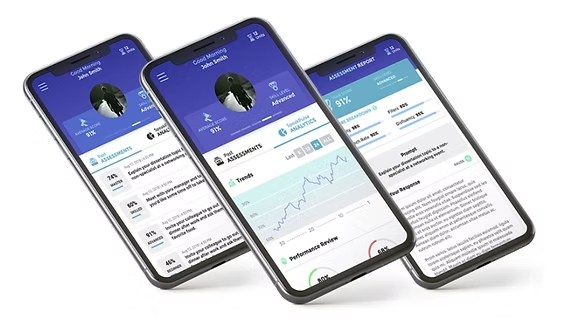
SpeakPulse is a speech assessment platform built for job seekers, students, and speech or communication coaches. You record yourself answering a prompt or speaking on a topic, and the app runs your recording through its scoring engine. What comes back is a composite score along with a breakdown of things like filler words, pace, repetition, and overall clarity. Coaches can also use it with clients, tracking multiple learners from one dashboard.
The company started small, reportedly with nothing more than a recorder and a notepad used by a communication coach trying to help clients sound sharper in interviews. It has since grown into a proper app with account logins, analytics, and a paid tier for coaches managing groups.
SpeakPulse Profile at a Glance
App name | SpeakPulse |
Category | Speech assessment and communication coaching |
Developer | SpeakPulse Inc. |
Headquarters | Henderson, Nevada, United States |
Platforms | iOS, Android, web browser |
Dedicated Windows app | Not available (browser access only) |
Pricing model | Free download, paid per-assessment and subscription plans |
Best for | Job seekers, students, coaches, and public speaking trainees |
Core feature | AI-scored speech recordings with filler word and clarity feedback |
Our rating | 2.9 out of 5 |
SpeakPulse Download: Where To Get It
SpeakPulse is available as a native app on both major mobile platforms.
- iOS: available through the Apple App Store, compatible with iOS 10 and later
- Android: available through Google Play
- Web: accessible directly from a browser at the official SpeakPulse website, no install required
Installation itself is simple and takes under a minute on either platform. You will be asked to create an account, either with an email address or by logging in through Google, before you can record your first assessment.
Is SpeakPulse Free?
Downloading SpeakPulse costs nothing, and the app itself is listed as free with in-app purchases. In practice, this means the core download and account creation do not cost anything, but taking assessments beyond a limited trial usually requires either a single-user subscription or a pack of individual assessment credits.
Coaches or small teams pay a separate rate per user, which the company lists at around sixty dollars per user for small groups. Pricing for individual plans has shifted a few times over the years, so it is worth checking the current numbers on the official site before you commit, rather than relying on older screenshots floating around the internet.
Our take: calling it a free app is technically accurate but a little generous. Treat it as a freemium tool with a light trial rather than something you can use indefinitely without paying.
Does SpeakPulse Work on Windows?
This is one of the more common questions we saw people searching, and the honest answer is that SpeakPulse does not have a dedicated Windows desktop application. There is no installer you download and run on a PC the way you would with a typical piece of desktop software.
That said, Windows users are not completely locked out. Because SpeakPulse also runs as a web app, you can open it in any modern browser on a Windows machine and use most of the same features, including recording through your laptop or an external microphone. It is a workaround rather than a true native experience, so if you were expecting a downloadable Windows program similar to dictation software like Dragon or SpeechPulse (a similarly named but entirely different transcription tool), you will want to adjust expectations.
SpeakPulse User Experience
We tested SpeakPulse across roughly a dozen recorded sessions, ranging from a mock behavioral interview question to a short off the cuff toast. Here is what stood out.
The good
- Assessments are genuinely fast. Most reports came back in under two minutes, which matches what the company advertises
- The interface is clean and easy to navigate, with very little clutter between recording and reviewing results
- The scoring breakdown (filler words, pace, and clarity) gives you something concrete to work on rather than a vague number
- Coaches managing several clients get a genuinely useful dashboard with recordings, transcripts, and score history in one place
The not so good
- The scoring algorithm can be a little unforgiving toward speakers with accents, docking clarity points in a way that feels more like a pronunciation match than a true clarity measure
- Free usage is limited, and the paywall shows up sooner than some users expect
- No dedicated Windows or desktop app, which is inconvenient for coaches who prefer working from a larger screen
- Feature updates and interface changes have been frequent over the years, which occasionally means small design inconsistencies between updates
Overall, the day to day experience feels closer to a lightweight coaching tool than a heavyweight AI platform, and for a lot of users that is exactly the point. It is not trying to be everything. It is trying to tell you, quickly, how you sound and what to fix.
SpeakPulse Alternatives
SpeakPulse sits in a fairly specific niche (verbal communication scoring for interviews and presentations) so most true alternatives come from that same corner of the market rather than from general transcription software. Depending on what you actually need, these are worth comparing:
- Orai: a mobile app focused on public speaking practice with AI feedback on pace, filler words, and confidence
- Yoodli: a browser based speech coach that reviews recorded or live practice sessions and gives structured feedback, popular with interview prep users
- Speeko: a communication coaching app aimed at building daily speaking habits through short guided exercises
- VirtualSpeech: a more immersive option that uses VR style simulations for presentation and interview practice
If what you actually need is dictation or transcription rather than speech coaching (turning spoken words into typed text) tools like Otter.ai or Dragon Professional serve a different purpose entirely and should not be confused with SpeakPulse, despite the similar sounding names floating around app stores.
Nubia Magazine Verdict
SpeakPulse does what it says on the tin. It gives you a fast, fairly digestible score on how you sound, and for job seekers prepping for interviews or students working on presentations, that feedback loop has real value. Coaches managing multiple clients will likely get the most consistent use out of it.
Where it falls short is polish and reach. The lack of a proper Windows app, a paywall that arrives quicker than the free label suggests, and an algorithm that is occasionally rougher on accented speech all keep it from being a clear standout in 2026. It earns a solid but unremarkable

Frequently Asked Questions
1. What exactly does SpeakPulse do?
It records your speech, usually answering a prompt or speaking on a topic, and returns a score based on clarity, pace, filler words, and repetition, along with a transcript of what you said.
2. Is SpeakPulse actually free to use?
The download and account creation are free, but full use of the assessment features generally requires a paid plan or assessment credits after a limited trial. It is better described as freemium than fully free.
3. Can I use SpeakPulse on a Windows laptop?
There is no dedicated Windows desktop app. You can use SpeakPulse through a web browser on Windows, which covers most of the same functionality as the mobile apps.
4. Is SpeakPulse available on Android and iPhone?
Yes, it has native apps on both the Apple App Store and Google Play, and both are kept reasonably up to date with regular feature releases.
5. How accurate is the SpeakPulse scoring system?
It is reasonably consistent for general clarity and filler word detection, though several users, including our own testers, noticed it can penalize speakers with strong accents more than seems fair.
6. Is SpeakPulse good for job interview preparation?
Yes, this is one of its strongest use cases. Practicing with recorded, scored answers to common interview questions is a large part of what the app was originally built for.
7. What are the best SpeakPulse alternatives?
Orai, Yoodli, Speeko, and VirtualSpeech are the closest comparable tools, each with a slightly different approach to speech coaching and feedback.
8. Do coaches get extra features on SpeakPulse?
Yes, coaches can manage multiple learners under one account, with a dashboard showing each client's assessments, scores, transcripts, and recordings, priced on a per-user basis for small teams.
9. Does SpeakPulse store my voice recordings?
Recordings and transcripts are saved to your account so you can review past assessments over time. If data handling is a concern, it is worth reading the developer's current privacy policy before signing up, since practices can change between updates.
Related Posts


0 Comments
Join the discussion and share your thoughts
No Comments Yet
Be the first to share your thoughts on this article!