Raycast Review 2026: Careers, AI, Windows, Download, Pricing, & FAQs

Table of Contents
If you have spent any meaningful time on the productivity side of tech Twitter or in developer forums over the past two years, you have probably seen the name Raycast pop up more than once. The little command bar that started life as a slick Spotlight replacement has, in 2026, grown into something much bigger. It is now a launcher, a clipboard manager, a window controller, a snippet expander, an AI assistant and, for many people, the first app they install on a brand new machine.
At Nubia Magazine, we spent several weeks putting Raycast through real working conditions. We tested it on Mac, dabbled with the Windows public beta, pushed its AI features against everyday writing and coding tasks, and dug into the company itself, its team, its careers page, its funding and its pricing model. This is our honest verdict, written for readers who want a clear picture before they commit a single dollar or megabyte to it.
Raycast at a Glance: Brand Profile
Before diving into features and opinions, here is a quick snapshot of the company behind the product.
Attribute | Details |
|---|---|
Product Name | Raycast |
Category | Productivity launcher and command center |
Founders | Thomas Paul Mann and Petr Nikolaev |
Headquarters | London, United Kingdom |
Team Size | Around 39 employees, fully remote across Europe |
Funding Raised | Roughly $47.8 million across multiple rounds |
Notable Investors | Atomico, Accel, Coatue, Y Combinator, Atlassian Ventures |
Platforms | macOS (primary), Windows (public beta), iOS |
Pricing | Free forever tier; Pro at $8 per month annual or $10 monthly; Teams at $12 per user; Advanced AI add-on $8 extra |
Core Features | App launcher, AI chat, clipboard history, window management, snippets, extensions store, MCP support |
Extensions Library | Over 2,000 community and official extensions |
Website | raycast.com |
Nubia Rating | 4.0 out of 5 |
What Exactly Is Raycast in 2026?
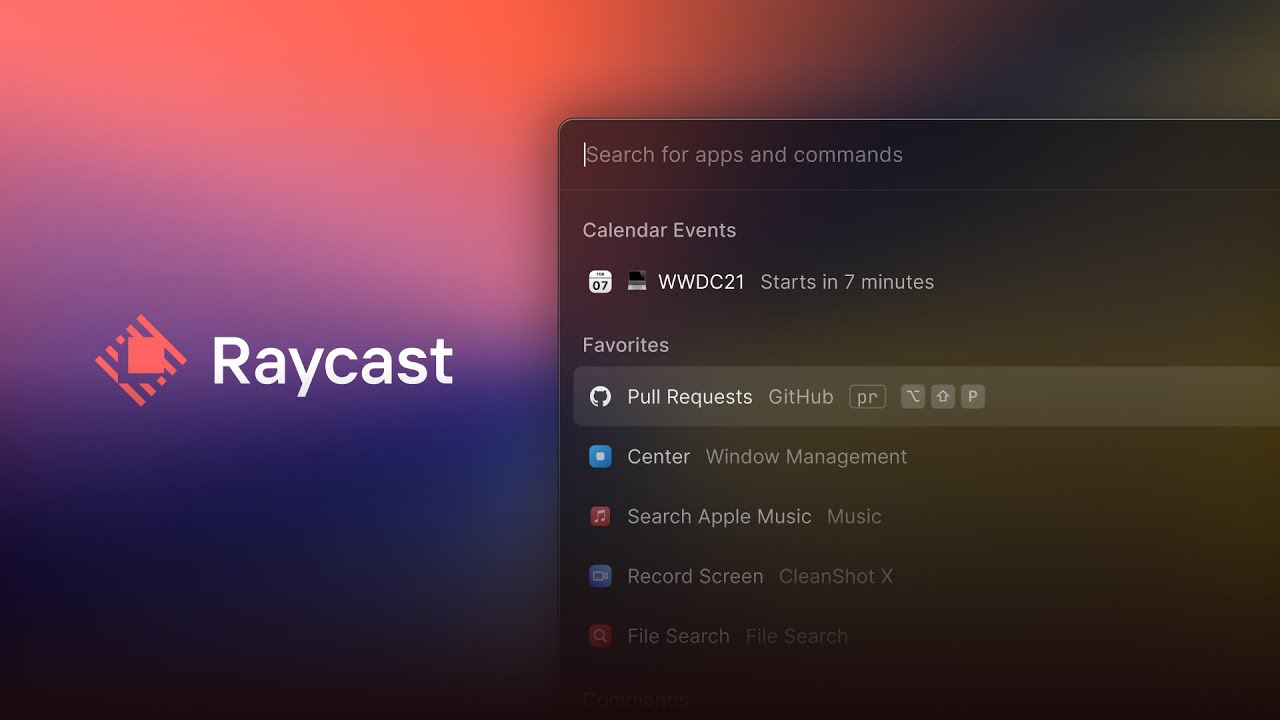
Raycast is a keyboard-first command launcher. You tap a hotkey, usually Option plus Space on Mac, a small bar appears in the middle of your screen, and you type what you want done. Launch an app. Search a file. Resize a window. Paste something you copied two days ago. Ask an AI a question. Create a GitHub issue. Translate a sentence. Run a script. The idea is simple. The execution is what makes Raycast different.
Founded by Thomas Paul Mann and Petr Nikolaev, Raycast is based in London and has raised close to $48 million from heavyweight investors including Atomico, Accel, Coatue and Y Combinator. The team is small, fewer than 40 people at the time of this review, and fully remote across Europe. That lean structure shows in the product. Updates ship on a tight cadence, the design language is consistent, and the bugs that do appear tend to get squashed quickly.
In 2026, Raycast lives on macOS as its mature flagship product, on iOS as a companion, and on Windows as a public beta that is growing more capable every few weeks. The free tier remains generous, the Pro tier has held steady at $8 per month for years, and the AI layer has matured into something genuinely useful rather than a chatbot bolted onto a launcher.
User Experience: Fast, Quiet and Slightly Addictive
The first thing you notice about Raycast is the speed. The team rebuilt the activation pipeline in their 2026 updates, and on Apple Silicon Macs the window now opens in under 50 milliseconds. There is no perceptible delay between hitting your hotkey and the bar appearing. That kind of responsiveness is the unglamorous foundation of every good productivity tool, and Raycast nails it.
The interface design is restrained and confident. Compact mode keeps things tidy. The recent v2 update for Mac was redesigned to align with macOS Tahoe, and Raycast now respects your system accent colour, which is the sort of small touch that signals real care. There is also a Theme Studio for users who want to tweak or share their own colour palettes.
Where Raycast earns its reputation is in how features stack on top of each other without becoming overwhelming. Clipboard history alone replaces a separate paid app. So does the window manager. So does the snippet expander. Each one is good enough on its own that you stop thinking about it. After a week of daily use, the muscle memory takes over and you forget how much friction you used to live with.
The learning curve is real but short. New users sometimes complain that file search feels secondary to app and command search, and that is a valid criticism. If your workflow leans heavily on finding obscure files buried deep in folders, you will probably want to keep a tool like Alfred in your back pocket. For everyone else, the trade-off is fair.
What Works Beautifully
- Speed of activation and search, with near-instant feedback.
- Clipboard history with smart categorisation and instant paste.
- Built-in window management that genuinely replaces Rectangle or Magnet.
- A polished extensions store with over 2,000 options covering GitHub, Notion, Linear, Jira, Slack, Docker and more.
- Snippets and Quicklinks that quietly save real minutes across the day.
- Theme Studio for users who want their launcher to match their setup.
What Could Be Better
- File search remains the weakest pillar compared with Alfred.
- Community extensions vary in quality and some go stale without warning.
- The free tier limits clipboard history to three months, which power users notice.
- Some advanced features still feel buried for first-time users.
Raycast AI: The Quiet Star of 2026
If there is one area where Raycast has changed dramatically, it is AI. What started as a basic chat feature has grown into a layered system that, in 2026, looks more like a personal assistant than a chatbot. Pro users get unlimited AI messages, and Raycast added an Auto Model feature in v1.102 that picks the best model for each task automatically rather than forcing you to choose.
The lineup of supported models is impressive. With a Pro subscription and the Advanced AI add-on, you can route conversations to Claude from Anthropic, several OpenAI models, Google Gemini and more. If you already pay for API access elsewhere, Raycast lets you plug in your own keys from Anthropic, OpenAI, Google or OpenRouter and skip the Pro AI tier entirely. That kind of flexibility is rare in this category.
Since v1.99, Raycast integrates with Ollama to run more than 100 open-source models locally. No cloud, no API keys, complete privacy. For developers working on sensitive codebases or anyone uneasy about sending prompts to external servers, this is a meaningful option. Local models work even on the free tier.
Then there is MCP, which stands for Model Context Protocol. This is the feature that turned Raycast AI from a chatbot into something approaching an agent. MCP lets Raycast AI connect to external tools such as GitHub, Notion, Google Drive and Brave Search through a simple at-mention syntax. Ask it to create a GitHub issue from a bug description and it actually does it. Ask it to pull notes from Notion and summarise them and you get a working summary back, not an apology about lacking access.
The AI Extensions beta takes this even further by letting you build natural language workflows for coding and task automation. It is still rough at the edges, but the direction is clear. Raycast is positioning itself not just as a launcher but as the keyboard-driven layer between you, your tools and your AI.
Raycast on Windows: How the Beta Is Holding Up
For years, the most common complaint about Raycast was that it was Mac only. That changed in late 2025 when Raycast launched a public beta for Windows. By mid 2026 the Windows version is still in beta, but it has grown rapidly and now supports Windows 10 version 1903 and later, as well as Windows 11.
You can download Raycast for Windows directly from raycast.com, through the Microsoft Store, or by installing it with Winget using the command winget install raycast. A free Raycast account is required to get started. Core features such as the command palette, AI commands, clipboard history, snippets and window management are all functional on Windows. The extension store on Windows currently has around 300 extensions, with more being ported every month.
There are still gaps. Some Mac-only integrations such as Apple Shortcuts do not have Windows equivalents yet, and a handful of features such as cloud-synced notes are still being built out. The Raycast team has been transparent about the roadmap. Q1 and Q2 of 2026 are focused on expanding the extension store and adding deeper integrations with Slack, Linear, GitHub and Notion. Later in the year, the plan is to add full Script Commands support for PowerShell and CMD, Windows-specific system commands such as Task Manager and Services shortcuts, and finally feature parity with the Mac version by Q4.
If you are on Windows and you have lived with PowerToys Run or Flow Launcher, Raycast already feels noticeably more refined. It is the only major Windows launcher in 2026 that ships with built-in AI, a curated extension store and cloud sync. The beta status is worth respecting, but for many users it is already a daily driver.
How to Download Raycast
Getting Raycast onto your machine is refreshingly simple. There is no email gate, no card required, no demo to sit through.
On macOS
Head to raycast.com and download the Mac installer. Drag the app into your Applications folder, launch it, and walk through the short onboarding. Most users replace the default Spotlight shortcut with Option plus Space so that Raycast becomes their main entry point.
On Windows
Visit raycast.com and grab the Windows installer, or open the Microsoft Store and search for Raycast. If you prefer the command line, run winget install raycast from PowerShell. The app supports Windows 10 version 1903 and later, and Windows 11.
On iOS
The Raycast iOS app is available on the App Store and acts as a companion for your Mac, giving you access to your snippets, quicklinks, AI chat and notes on the go. You can create a Raycast account directly from the iOS app on first launch.
Raycast Pricing in 2026
Raycast operates on a freemium model, and the value of the free tier is one of the strongest reasons the product has grown so quickly. The free plan is not a demo or a teaser. It is a complete productivity tool that you can use forever without paying.
Here is how the plans stack up in 2026.
Plan | Price | Best For | Highlights |
|---|---|---|---|
Free | $0 | New users, light productivity | Full launcher, clipboard (3 months), window management, snippets, 50 AI trial messages, all extensions |
Pro | $8 monthly billed yearly, or $10 monthly | Daily power users, freelancers | Unlimited AI chats, Cloud Sync, unlimited clipboard, custom themes, translator, unlimited notes |
Advanced AI add-on | $8 extra | Heavy AI users | Adds frontier models from Anthropic, OpenAI and Google with higher rate limits |
Teams | $12 per user monthly | Startups and small teams | Shared snippets, quicklinks and extensions, admin controls |
Enterprise | Custom | Large organisations | SAML and SCIM SSO, domain capture, 2FA enforcement, IP allow-lists, extension allow-lists |
Annual billing on Pro saves you roughly 20 percent compared with monthly billing. Raycast also offers a 14-day free trial on all paid plans, and verified students get a 50 percent discount on the Pro plan, applied through a form on the Raycast website. The price of Pro has been remarkably stable, holding at $8 per month on the annual plan since the tier launched in 2023. In a market where most subscription tools have raised prices at least once over the past few years, that consistency is worth noting.
Is Pro worth it? For most casual users, the free tier is enough. For developers, freelancers, founders and anyone who lives in a keyboard-first workflow, Pro pays for itself within days. The AI integration alone, especially with unlimited messages and access to multiple frontier models, replaces a separate ChatGPT or Claude subscription for many people.
Careers at Raycast: A Small Team Punching Above Its Weight
One of the more interesting parts of researching Raycast is the company itself. With fewer than 40 employees and just over $47 million raised, Raycast is not trying to be a unicorn-by-headcount. The team is deliberately small, fully remote across Europe, and built around a culture that values asynchronous work and shipping over meetings.
The careers page reads less like a recruitment pitch and more like a manifesto. The team has one all-hands meeting per week. Fridays are reserved for hack days where engineers and designers build whatever they want, and several beloved features such as Raycast Notes and the ray.so design tool came out of those days. Every employee owns a piece of the company and is trusted to make their own calls about what is best.
As of mid 2026, Raycast was actively hiring for a Design Engineer and its first ever Sales and Solutions Specialist, the latter being the founding commercial hire as the company starts to formalise its enterprise motion. Both roles are remote and open to candidates in the EEA or UK. Compensation includes competitive salary, stock options and health insurance, and the team places a strong emphasis on individual contributors rather than a heavy management layer.
If you are a designer, engineer or product person who has ever wanted to work on a tool that other developers genuinely love, Raycast is the kind of place that lands on most short lists. The bar is high, but so is the autonomy.
Frequently Asked Questions About Raycast in 2026
We pulled the most common questions readers and search users are asking about Raycast right now and answered them honestly, with no marketing fluff.
1. Is Raycast actually free, or is it a trial?
Raycast is free forever for individuals. The free tier includes the core launcher, window management, snippets, quicklinks, a three-month clipboard history, 50 trial AI messages and access to the full extensions store. There is no expiration date and no credit card required to get started.
2. Is Raycast available on Windows in 2026?
Yes, Raycast is available on Windows as a public beta. It runs on Windows 10 version 1903 and later, and on Windows 11. You can install it from raycast.com, the Microsoft Store, or with Winget. Most core features work, but feature parity with the Mac version is still being completed throughout 2026.
3. How does Raycast compare with Alfred?
Both are excellent. Alfred has a more mature file search, a one-time purchase option through its Powerpack, and a long history of advanced scripting workflows. Raycast offers more out of the box in 2026, including built-in AI, MCP support, a curated extensions store, cloud sync and a polished modern interface. For most new users in 2026, Raycast tends to be the stronger starting point. For long-time Alfred users with deep custom workflows, there is no urgent reason to switch.
4. Is my data safe with Raycast?
Raycast stores most data locally and encrypts sensitive items. Clipboard history is local and excludes content from password managers automatically. AI prompts sent through Pro models do go to the relevant provider, but you can also run local models through Ollama for complete privacy. Enterprise users get extra controls including SAML and SCIM SSO, IP allow-lists and extension allow-lists.
5. What is MCP and why does it matter?
MCP stands for Model Context Protocol. It is the system that lets Raycast AI connect to external tools and services such as GitHub, Notion, Google Drive and Brave Search using a simple at-mention syntax. Instead of just answering questions, MCP turns Raycast AI into an agent that can take real actions like creating issues, pulling notes or running searches across your tools.
6. Can I use Raycast without paying for AI?
Yes. The launcher, clipboard, window management, snippets, quicklinks and the entire extensions store are free. You also get 50 trial AI messages to test the AI feature. If you want AI but not a subscription, you can bring your own API keys from Anthropic, OpenAI, Google or OpenRouter, or run local models through the Ollama integration for free.
7. Does Raycast offer a student discount?
Yes. Verified students receive 50 percent off the Pro plan. You apply through a form on the Raycast website using a valid university email address. The discount applies to the Pro plan only, not the Advanced AI add-on.
8. Is Raycast hiring, and what is it like to work there?
Raycast is a small, fully remote team of around 39 people based across Europe. As of 2026 the company is hiring for a Design Engineer and its first Sales and Solutions Specialist, with more roles likely to open as the enterprise side grows. The culture is asynchronous, with one company-wide meeting per week, weekly hack Fridays and a strong individual contributor focus.
9. Can teams or companies use Raycast?
Yes. Raycast offers a free Teams tier with shared extensions, snippets and quicklinks, plus a paid Teams plan at $12 per user per month for the full feature set. Enterprise pricing is custom and includes SAML and SCIM SSO, domain capture, 2FA enforcement, IP allow-lists and extension allow-lists for organisations that need stricter controls.
The Verdict: Why Raycast Earns 4.0 from Nubia
Raycast is one of the most thoughtfully designed productivity tools available in 2026. The free tier is unusually generous, the Pro tier offers real value especially for AI-heavy workflows, and the company behind it ships at a pace that few competitors can match. The AI layer is no longer a gimmick. It is genuinely useful, and the MCP integration points toward where keyboard-first productivity is heading next.
So why 4.0 and not higher? A few things hold it back from a perfect score. File search still trails Alfred in raw power. The Windows version, while impressive, is not yet at full parity with the Mac experience and some users will hit those gaps in daily use. Community extensions can be inconsistent, and some advanced features still require more setup than they should. The subscription model, while fair, will also be a friction point for users who prefer one-time purchases.
Even with those caveats, this is a tool that quietly earns its place in your daily workflow. After a few weeks, most users stop noticing it the way you stop noticing a good keyboard. It just works. For Mac users, it is an easy recommendation. For Windows users, the beta is already worth a try. For teams, the Pro and Teams plans deliver clear value. For developers and AI-curious power users, this is one of the most interesting pieces of software being built today.
Raycast does not try to do everything. It tries to make the things you already do faster, quieter and more enjoyable. In 2026, it succeeds at that more often than not.
Related Posts

0 Comments
Join the discussion and share your thoughts
No Comments Yet
Be the first to share your thoughts on this article!