FunBlocks AI Review 2026: Features, Pricing, App, Login & FAQs


Table of Contents
If you spend any amount of time online looking for AI tools that actually help you think, and not just generate fluff, you have probably stumbled on FunBlocks AI. We kept seeing it pop up on Product Hunt threads, Chrome extension recommendations, and in those long Reddit debates about Notion alternatives. So we did what we usually do at Nubia Magazine. We signed up, paid for the upgrade, and used it for several weeks across writing, research, and content planning before sitting down to write this review.
This is the full breakdown of FunBlocks AI in 2026. We cover what it does, how the app feels, whether the free plan is worth your time, what the pricing actually looks like, the login flow, the user experience, and the questions people keep asking on Google. We finish with a clean profile table and a Frequently Asked Questions section that answers what most readers are searching for right now.
What is FunBlocks AI?
FunBlocks AI markets itself as an all in one AI workspace, but that description undersells it a little. After using it for a few weeks, we would describe it as a thinking suite first and a productivity suite second. The platform is built around the idea that thinking, writing, presenting, and publishing should not live in five separate tabs.
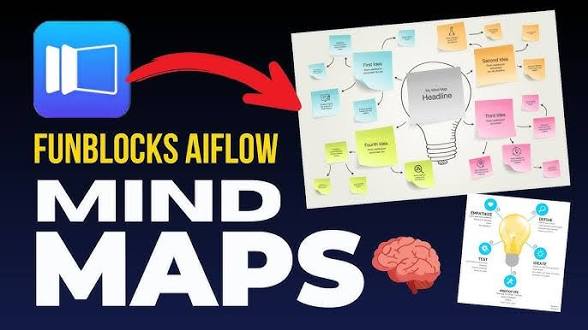
At the centre of FunBlocks is a product called MindMax, which is their visual AI canvas. From there, the same structure flows into AI Docs (a Notion style block editor with AI baked in), AI Slides (a markdown driven presentation maker), AI Markdown Editor (a clean, distraction free writing tool with slash commands and an @AI summon feature), and a browser extension that follows you around the web.
What makes it interesting in 2026 is the multi model approach. One FunBlocks subscription gives you access to several leading large language models, including OpenAI GPT, Anthropic Claude, and Google Gemini, without you needing separate subscriptions for each. The company has been pushing this as a cost saving angle, and on paper the math works out for anyone who would otherwise pay for two or three AI tools at once.
FunBlocks AI Suite: What is Actually Inside
This is the part that confused us at first. FunBlocks is not a single product. It is a family of connected tools that share one account and one credit pool. Here is what you get when you log in.
1. MindMax (AIFlow)
This is the flagship. MindMax is an infinite visual canvas where you can branch ideas, drop in PDFs, pull from YouTube videos, paste links, and let the AI extend your thinking node by node. It also includes mental model frameworks like SWOT, First Principles, Six Thinking Hats, and the newer Lattice of Mental Models node, which applies six to eight thinking models to the same problem at once. For anyone who has ever felt that ChatGPT gives you one tidy answer when you needed three perspectives, this is the feature that changes things.
2. AI Docs
A block based editor that feels a lot like Notion, but with a stronger AI layer. You can ask the AI to continue your writing, polish a paragraph, flag weak logic, or pull an outline from a mind map you already built in MindMax. The critical thinking feature, which checks your writing for bias and unstated assumptions, is unusual for a writing tool and surprisingly useful for anyone drafting essays, reports, or business proposals.
3. AI Slides
Markdown first presentation tool. You write your slides like a document and FunBlocks turns them into a deck. You can also push an existing MindMax map or a Doc straight into Slides format. It is fast, and the speaker notes feature is genuinely thoughtful, with the AI generating detailed talking points that work well for recorded presentations.
4. AI Markdown Editor
If you have ever wanted a writing tool that opens instantly, has no clutter, and lets you summon AI with a simple @AI command anywhere in the document, this is that tool. It is keyboard first, minimalist, and clearly built for people who think in markdown. The one downside, which the team itself acknowledges, is that documents save to your browser by default rather than the cloud, so you need to remember to push them to the FunBlocks workspace if you want cross device access.
5. Browser Extension
The FunBlocks AI Chrome and Edge extension is probably the easiest way to start. It pops out as a sidebar on any webpage and lets you summarise articles, generate mind maps from YouTube transcripts or PDFs, draft emails inside Gmail, translate selected text, or run critical thinking prompts on whatever you are reading. The extension is rated 5 out of 5 on the Chrome Web Store at the time of writing, which is rare for any AI sidebar tool.
FunBlocks AI App: Web and Browser Experience
Let us be clear about one thing. FunBlocks does not have a dedicated mobile app or a downloadable desktop app as of May 2026. It is a web based platform, with the main workspace at app.funblocks.net and the browser extension as your secondary entry point. The mobile web experience works, but the platform is clearly built for a laptop or desktop screen where you can spread out a mind map and split your attention between docs and slides.
On the desktop, the interface is clean. The sidebar gives you quick access to MindMax, Docs, Slides, Markdown, and your saved memo. We did not run into significant lag, even with maps that had thirty or forty nodes branching across the canvas. The one nitpick is that switching between products sometimes asks you to wait a second while the AI context loads, especially when you are bringing a mind map structure into a doc.
FunBlocks AI Free Plan: How Much Can You Actually Do?
This is the question we get asked most often. The short answer is yes, FunBlocks has a generous free tier.
When you sign up, you receive a one time bonus of around 30 to 40 free AI service accesses to explore the platform. After that, you get 10 free AI accesses every day, which refresh on a 24 hour cycle. That is enough to run a few mind maps, polish a couple of documents, or summarise three or four articles per day.
There is also a clever workaround that not enough people talk about. If you bring your own LLM API key from OpenAI, Anthropic, Google Gemini, Groq, or any OpenAI compatible provider, FunBlocks lets you use the entire platform at no extra subscription cost. You only pay the underlying API provider for whatever you consume. For power users who already have an OpenAI or Anthropic account, this is a real way to get the full FunBlocks experience without paying a separate monthly fee.
You can also earn extra credits by inviting friends. Both you and the friend receive bonus accesses when they sign up using your link, which is a nice touch for students sharing the tool with classmates.
FunBlocks AI Pricing in 2026
FunBlocks runs a freemium model with paid plans for heavier usage. Based on the information available from the official site and third party reviews, the entry level paid plan starts at around 6 US dollars per month, which is on the affordable end of the AI productivity tool spectrum. Higher tiers unlock unlimited AI access, more advanced models, and additional features like priority support.
Because FunBlocks updates its pricing periodically and sometimes runs promotional discounts, we recommend checking the official pricing page at funblocks.net for the current rates before subscribing. One subscription covers all five products, which is a major selling point compared to stacking separate subscriptions for a presentation tool, a mind map tool, and a writing assistant.
Our take on the value: if you are an active knowledge worker who already pays for ChatGPT Plus or Claude Pro, FunBlocks is worth considering as either a replacement or a complement. The visual thinking layer is genuinely something the major chat tools do not offer. If you are a casual user, the free tier is probably enough.
FunBlocks AI Login: How Sign Up and Sign In Works
The sign up process is refreshingly simple. You go to funblocks.net, click sign up, and create an account using your email or a social login. You do not need a ChatGPT account or any separate AI subscription to get started, which removes a barrier that catches a lot of people off guard with other tools.
Once registered, you log in at app.funblocks.net to access the main workspace. If you are using the browser extension, you log in once and the extension stays connected. We did not run into any login bugs during our testing, and password recovery worked normally. One small note for users in countries where ChatGPT itself is blocked: FunBlocks works in all regions, since it routes AI requests through its own infrastructure.
User Experience: What Worked and What Did Not
What we liked
- Visual thinking that actually thinks. MindMax is the standout feature. Instead of a linear chat, you get a canvas that makes complex ideas easier to break down. Researchers, founders, and consultants will get the most out of this.
- One subscription, many tools. Paying once and getting access to GPT, Claude, and Gemini through one workspace is a real cost saving for anyone juggling multiple AI subscriptions.
- The browser extension is genuinely useful. It captures context from the page you are on, which means you do not have to copy and paste content into a separate tab to get help.
- Critical thinking features. Bias detection, logic checks, and mental model frameworks are rare in AI productivity tools and we found them useful for serious writing.
- Generous free tier. 10 daily accesses plus the bring your own API key option means you can get real value before paying anything.
What needs improvement
- No native mobile or desktop app yet. Everything runs in the browser. If you are a mobile first user, this is a noticeable limitation.
- Documents save locally by default. The Markdown Editor saves to your browser, which means you can lose work if you clear cache. You have to remember to push files to the workspace.
- Slight learning curve. There are five products and a lot of features. New users sometimes feel overwhelmed in the first week. The onboarding could be smoother.
- Support channels are limited. Support is mainly through email and documentation. There is no live chat, which can slow things down if you hit a billing issue.
- English is the primary language. While the AI itself can translate and write in many languages, the platform interface is mainly English.
Who Should Use FunBlocks AI
Based on our testing, FunBlocks fits best for:
- Students and researchers who need to break down readings, summarise videos, and build study maps quickly.
- Content creators and YouTubers who want to plan scripts, structure storyboards, and turn outlines into slides in one workflow.
- Founders, product managers, and consultants who need to think through complex strategy problems using structured frameworks.
- Knowledge workers who are tired of paying for ChatGPT, Claude, and Gemini separately and want one workspace that bundles them.
- Educators who want to build visual learning materials and engage students with mind maps instead of static slides.
It is less ideal for casual users who only need quick chatbot answers, or for teams that need deep real time collaboration on the level of Google Docs or Notion. FunBlocks is improving on collaboration, but it is not the main reason to choose it yet.

FunBlocks AI Profile Table
Attribute | Details |
Brand Name | FunBlocks AI |
Official Website | https://www.funblocks.net |
Category | AI Productivity Suite / Visual Thinking Workspace |
Core Products | MindMax (AIFlow), AI Docs, AI Slides, AI Markdown Editor, Browser Extension |
AI Models Supported | GPT (OpenAI), Claude (Anthropic), Gemini (Google), Llama, Groq, DeepSeek |
Free Plan | Yes (30 to 40 sign-up credits + 10 daily AI accesses) |
Paid Plans Start From | Around $6 per month (entry tier) |
Free Alternative | Use your own LLM API key at no extra cost |
Platform Type | Web app, Chrome and Microsoft Edge browser extensions |
Best For | Students, researchers, writers, founders, consultants, product managers |
Languages | Primarily English (with multilingual writing and translation support) |
Customer Support | Online support and email ([email protected]) |
Integrations | OpenAI, Claude, Gemini, DeepSeek, Markdown, Notion-style workspace |
Nubia Rating | 4.2 / 5 |
Nubia Magazine Verdict
FunBlocks AI earns a solid 4.2 out of 5 from us. It is one of the more thoughtful AI suites we have tested in 2026, and the focus on thinking and not just generation is exactly what the AI productivity space needed. The mental models, the visual canvas, and the multi model access at one price make it a real contender against the bigger names.
It loses points for the lack of a native mobile or desktop app, the local save default in the Markdown Editor, and a learning curve that can feel steep in the first few sessions. But once you adapt to the workflow, FunBlocks rewards you in a way that a typical AI chatbot does not. You leave the session with a structure you can reuse, not just an answer you have to copy out.
Bottom line: if you do serious knowledge work and you are willing to invest a week in learning the platform, FunBlocks AI is one of the smarter places to spend your AI budget in 2026.
Frequently Asked Questions (FAQs)
1. Is FunBlocks AI free to use?
Yes. FunBlocks offers a free plan that gives new users about 30 to 40 bonus AI accesses on sign up, plus 10 free AI accesses every day. You can also use the platform for free by connecting your own API key from OpenAI, Anthropic, Google Gemini, Groq, or any compatible provider. In that case, you only pay the API provider directly, with no extra charge from FunBlocks.
2. How much does FunBlocks AI cost in 2026?
Paid plans start at around 6 US dollars per month according to current third party listings. One subscription unlocks all five FunBlocks products and access to multiple leading AI models. Pricing tiers may change, so check funblocks.net for the latest rates.
3. Does FunBlocks AI have a mobile app?
Not yet. As of 2026, FunBlocks is a web based platform with a browser extension for Chrome and Microsoft Edge. The mobile web version works, but there is no native iOS or Android app. The team has mentioned plans to expand platform support over time.
4. How do I log into FunBlocks AI?
Visit funblocks.net or app.funblocks.net and use your registered email or social login. If you are using the browser extension, click the FunBlocks icon in your toolbar and log in once. The session stays active across the workspace and the extension.
5. Which AI models does FunBlocks support?
FunBlocks supports several major large language models, including OpenAI GPT, Anthropic Claude, Google Gemini, Groq Llama and Mixtral, and DeepSeek. You can switch between models inside the workspace without leaving your project, which is one of the platform's biggest selling points.
6. Is FunBlocks AI safe and is my data private?
FunBlocks states that all data transmitted to and from the platform is encrypted using industry standard protocols. Documents in the Markdown Editor save to your browser locally by default. The company says it does not use your content to train its models without explicit consent. For sensitive work, you can also use your own API key, which routes your data through your chosen provider.
7. How is FunBlocks different from Notion, ChatGPT, or Miro?
FunBlocks combines elements of all three but with a stronger thinking layer. Notion is great for structured docs but light on visual thinking. ChatGPT gives fast answers but does not preserve structure across products. Miro is a visual whiteboard but lacks deep AI integration. FunBlocks tries to connect thinking, writing, and presenting in one workflow, with mental model frameworks built into the AI itself.
8. Can I use FunBlocks AI for content creation and YouTube scripts?
Yes, and this is one of its most popular use cases. Users praise FunBlocks AIFlow for YouTube scripting, content structuring, and breakthrough brainstorming. You can pull YouTube transcripts directly into a mind map, structure your script with AI assistance, and then push the same outline into a document or slide deck.
9. Does FunBlocks work in countries where ChatGPT is restricted?
Yes. FunBlocks operates in all regions and routes AI requests through its own infrastructure, so the platform works in countries where ChatGPT or other AI services are blocked. You do not need a separate ChatGPT account to use FunBlocks.
10. Can I cancel my FunBlocks AI subscription anytime?
Yes. You can cancel from the Upgrade AI section in your account settings. There is a cancel button in the subscription description area. Once cancelled, you keep paid access until the end of your billing period, then drop back to the free tier with 10 daily AI accesses.
FunBlocks AI is not the loudest AI tool in the room, but it might be one of the smartest. The team has clearly thought about how knowledge workers actually move from a messy idea to a finished output, and they have built tools that respect that journey instead of trying to shortcut it. At 4.2 out of 5, it earns a strong recommendation from Nubia Magazine for anyone serious about getting more out of AI in 2026.
Related Posts



1 Comment
Join the discussion and share your thoughts