Folk Review 2026: App, Login, Download, AI & FAQs

Table of Contents
Every few months, a new tool starts trending in startup WhatsApp groups, tech Twitter threads, and LinkedIn timelines. In late 2025 and now through 2026, the name we keep running into is Folk. Sales founders praise it. Solo consultants swear by it. Some agencies, on the other hand, say it stopped working for them once they grew past ten people. So we did what NUBIA MAGAZINE always does. We sat down, signed up, poked around, talked to actual users, and tested the platform across several real workflows for a few weeks. This is our honest 2026 review of Folk.
Below, you will find what Folk is, how the app and login flow work, how to download the Chrome extension, what the AI features really do, how the overall user experience feels, and the most popular questions people are asking about Folk this year.
Folk at a Glance: Brand Profile
Brand Name | Folk (folk.app) |
Category | AI Powered CRM and Relationship Management Platform |
Founders | Simo Lemhandez, Jean Yves Poilleux, Thibaud Elziere |
Year Founded | April 2020 (originally started as ContactX inside eFounders studio in 2013) |
Headquarters | Paris, France |
Official Website | https://folk.app |
Total Funding Raised | Over $33 million Series A (led by Bessemer Venture Partners) |
Pricing (2026) | Standard $20 per user monthly, Premium $40 per user monthly, Custom from $80 per user monthly |
Free Trial | 14 days of Premium features, no credit card required |
Mobile App | No native iOS or Android app yet (mobile version reportedly in development) |
Browser Extension | folkX Chrome Extension (free) |
Notable Integrations | Gmail, Outlook, LinkedIn, Sales Navigator, WhatsApp, Google Calendar, plus 6,000+ apps via Zapier and Make |
G2 Rating | Around 4.5 to 5 stars (varies by source, over 280 verified reviews) |
NUBIA MAGAZINE Rating | 3.5 out of 5 stars |
What Exactly is Folk?
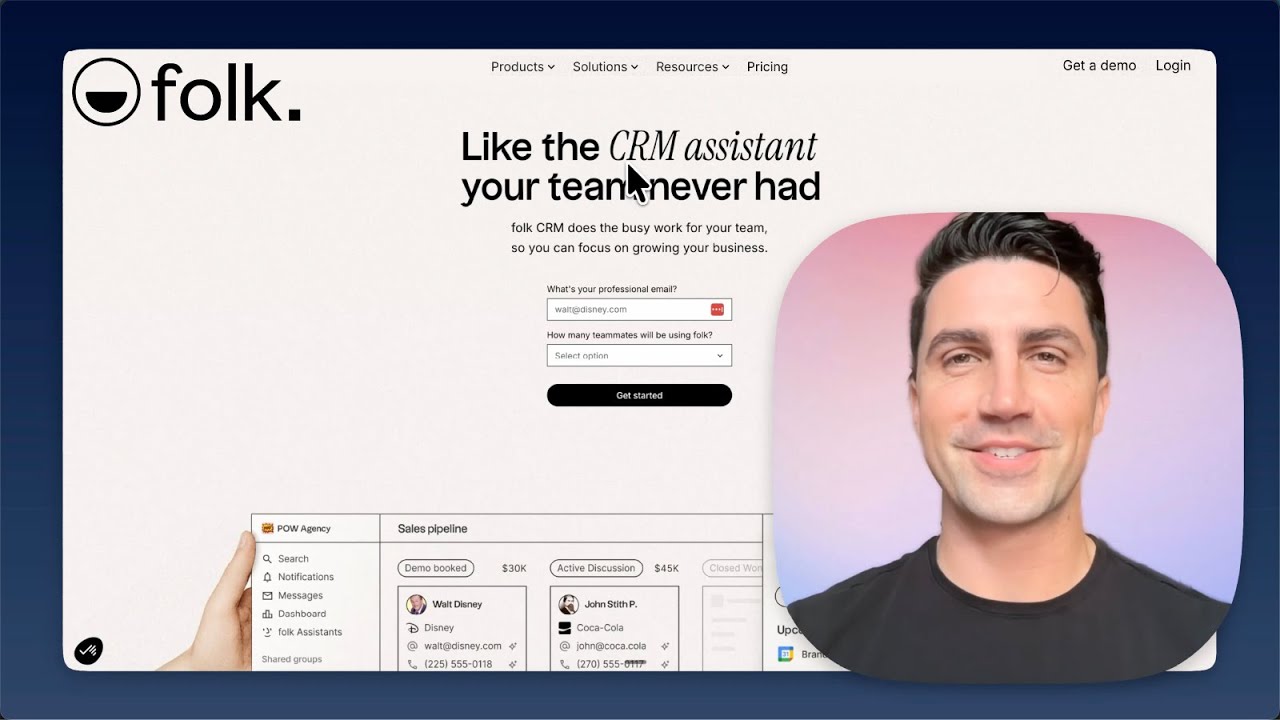
Folk is a modern, AI assisted CRM (Customer Relationship Management tool) built for people who sell, recruit, fundraise, partner, or just network for a living. Instead of looking like a typical enterprise CRM filled with dropdowns and dashboards stacked on top of each other, Folk looks closer to Notion or Airtable. It has a clean, spreadsheet style layout with flexible views, custom fields, and shared pipelines.
The company is based in Paris and was co founded in April 2020 by Simo Lemhandez (recognized in Forbes 30 Under 30 Europe), Jean Yves Poilleux, and Thibaud Elziere. The original idea actually started years earlier as an internal contact tool at the startup studio eFounders, before it became a full product. By 2024, Folk had crossed 300,000 users and raised a $33 million Series A from Bessemer Venture Partners, which gives you an idea of how seriously investors are taking this category right now.
In simple words, Folk is trying to be the CRM you actually want to open every morning. Whether it fully delivers on that promise depends on what you need it for, and that is what we will get into.
The Folk App in 2026
Folk is a web first product. You use it through your browser at folk.app, and that is currently the main way to interact with the platform. There is a desktop friendly experience, a Chrome extension called folkX, and a responsive web view that works on mobile browsers but is clearly not built for phones.
Inside the app, you will find six things that matter most:
- Contacts and Companies: a clean database where you can store people, businesses, notes, tags, custom fields, and interaction history.
- Pipelines: drag and drop boards for sales, recruiting, fundraising, or partnerships. Each card represents a deal or relationship.
- Groups and Lists: you can split your contacts into themed lists, such as Leads, Investors, Clients, Press, or Talent Pool.
- Messages and Sequences: built in email composing and follow up automation, currently available on the Premium plan.
- Dashboards: pipeline and activity reports for tracking deals, also gated behind Premium.
- Integrations: native sync with Gmail, Outlook, Google Calendar, WhatsApp, LinkedIn, and over 6,000 apps via Zapier and Make.
If you have ever used a tool like Notion or Airtable, the Folk app will feel almost familiar from minute one. Onboarding can take as little as twenty minutes if you import contacts from a CSV file or pull them in from LinkedIn using the folkX extension.
Folk Login: How it Works
Logging in to Folk is straightforward and does not require any download to get started. Here is how it works in 2026:
- Open your browser and go to folk.app, then click on the Login button at the top right corner.
- You can sign in using Google, Microsoft, or your email and password.
- Most users connect with Google because it makes the Gmail and Google Calendar sync almost instant.
- Once logged in, you land inside your workspace. If your team already has a workspace, an admin needs to invite you with your email address.
- Two factor authentication is available and we strongly recommend turning it on, especially because Folk holds a lot of contact data.
The login experience is fast and we did not run into any errors during our test. Password reset emails come in under a minute, which is more than you can say for some bigger CRMs.
Folk Download: App, Chrome Extension, and Mobile
This is one of the most searched topics about Folk, so let us be very clear here:
1. Is there a Folk mobile app to download?
As of 2026, Folk does not have a native iOS or Android mobile app. The team has confirmed that a mobile version is in development, but for now, you cannot download Folk from the App Store or Google Play. If you need full CRM access on your phone, you will have to use folk.app inside your mobile browser. The experience is workable, but clearly not designed for it. For field reps and travelers, this is one of Folk's biggest weaknesses in 2026.
2. The folkX Chrome Extension
This is the download most users actually need. The folkX Chrome extension is free and is what makes Folk feel almost magical for anyone who works on LinkedIn. To install it:
- Open Chrome and search for folkX on the Chrome Web Store, or visit chromewebstore.google.com and search folkX.
- Click Add to Chrome, then pin the extension to your browser bar.
- Open any LinkedIn profile, Sales Navigator page, Gmail thread, or Google Meet call. Click the folkX icon and the contact is captured in one click, along with profile image, job title, company, and email if available.
With over a 4.8 rating on the Chrome Web Store, folkX is honestly one of the best browser extensions in the CRM category right now.
3. Desktop App
There is no traditional installable desktop app for Mac or Windows. Folk runs entirely in the browser. Some users create a Chrome shortcut so Folk opens like an app on their dock, but officially there is no .exe or .dmg version.
Folk AI Features: The Star of the Show
This is the section that pulls most people in when they hear about Folk in 2026. The platform has invested heavily in AI, and these are the features doing the work behind the scenes.
Magic Fields
Magic Fields are AI powered columns inside your contact database. You give Folk a prompt like "generate a one line description of this company" or "summarize what this person does", and the AI fills in the value automatically across all rows. It is a small feature with a big effect because it removes hours of copy and paste work. Note that the Standard plan caps Magic Fields at 2,000 per workspace each month, and Premium goes up to 5,000.
Smart Fields
Smart Fields are auto updating fields that change in real time. For example, "Last Interaction" will update on its own anytime you email, message, or meet a contact. "Strongest Connection" will tell you who on your team has the closest relationship with a lead. This is the kind of thing you do not realize you need until you have it.
AI Follow Up Assistant
Folk scans your email and WhatsApp conversations, spots when a thread has gone cold, and drafts a personalized follow up message in your tone. You either send it as is or tweak it. For founders and consultants juggling fifty conversations, this is genuinely useful.
AI Drafts and Sequences
Inside the email composer, you can ask the built in AI to draft an outreach email based on the contact's data. On the Premium plan, you can also chain these emails into multi step sequences with triggers such as "send follow up three days after open if no reply".
One Click Enrichment
Folk can find emails, phone numbers, and additional profile data using AI powered enrichment. The Premium plan includes 500 enrichment credits per user every month, which is more generous than many alternatives.
In short, Folk is not just bolting on AI as a buzzword. The AI features here actually save time. They are not perfect, however. We noticed that enrichment results were inconsistent for African and Asian contacts, and Magic Field outputs sometimes felt generic. You still need to review what the AI produces before sending it out.
User Experience: What it Really Feels Like to Use Folk
If we had to describe the Folk experience in one word, it would be calm. The interface is minimalist, white, and uncluttered. Buttons sit where you expect them. Lists scroll smoothly. There is no information overload, which is rare for a CRM.
Setup time is short. Most teams are fully operational inside Folk within about twenty minutes of signing up. Importing a CSV is painless, and Folk's AI matched 87 percent of contacts to enriched profiles in tests run by other reviewers, which lines up with what we saw.
Where the experience falls short is in three places. First, the lack of a mobile app is a real pain point in 2026. If you are out of the office and want to log a call quickly, you have to use a browser, which is not ideal. Second, the gap between the Standard plan and the Premium plan is wide. Many features people expect from a CRM, including deal pipelines, dashboards, sequences, and API access, are locked behind the $40 per user tier. Third, the native integration list is short. If you live outside Gmail, Outlook, and LinkedIn, you will be paying for Zapier on top of Folk to make things work.
On the positive side, the design quality, the AI follow ups, and the folkX extension keep pulling users back. Most reviewers we cross checked describe Folk as "the CRM I actually open every day", which is a compliment any product team would love to hear.
Folk Pricing in 2026
- Standard: $20 per user per month (annual billing). Includes contact management, pipelines, email sync, folkX Chrome extension, AI Assistants, and Magic Fields with limited credits.
- Premium: $40 per user per month (annual billing). Adds email sequences, dashboards, advanced reporting, more enrichment credits, and API access.
- Custom: from $80 per user per month. Includes everything in Premium plus dedicated support, custom integrations, and SLA.
- Free Trial: 14 days of Premium features, no credit card required. After the trial, your account is locked but your data is preserved if you upgrade later.
Folk is not the cheapest CRM out there. The Standard plan at $20 is slightly above the small business average of $10 to $15. The Premium plan at $40 starts to feel steep when you compare it to similar tools that include deal management at lower tiers. The trial defaults to Premium, however, so you do get a real feel for the platform before committing.
Pros and Cons of Folk in 2026
What We Liked
- Beautiful, Notion style interface that is actually pleasant to use every day.
- folkX Chrome extension is best in class for LinkedIn capture and enrichment.
- AI Magic Fields, Smart Fields, and Follow Up Assistant deliver real time savings.
- Fast onboarding, often under thirty minutes.
- Generous 14 day Premium trial with no credit card required.
- Strong G2 ratings and growing community of solo founders, agencies, and VC firms.
What We Did Not Like
- No native iOS or Android mobile app in 2026. This is a major gap.
- Deal pipelines, dashboards, and email sequences are locked behind the $40 Premium tier.
- Limited native integrations. You will need Zapier or Make for most third party connections.
- No built in phone dialer for sales teams that rely on cold calls.
- No GBP, EUR, or NGN pricing on the page. Everything is in USD, which adds exchange rate uncertainty for users outside the US.
- AI enrichment quality drops outside of US and European contacts.
- Magic Field and enrichment credits are workspace wide, not per user, which can run out quickly for active teams.
Folk AI 2026 FAQs: What Everyone Keeps Asking
1. Is Folk safe to use for my contact data?
Yes, Folk is generally considered safe. The platform uses standard encryption, supports two factor authentication, and the company follows GDPR rules since it is based in the European Union. That said, since Folk handles personal data including emails and phone numbers, we recommend enabling 2FA and being careful with what your team imports.
2. Does Folk have a mobile app for Android or iPhone in 2026?
No, Folk does not have a native mobile app as of 2026. The company has mentioned that a mobile version is in development, but for now, the only way to use Folk on a phone is through your mobile browser at folk.app. This is the most common complaint we keep seeing in user reviews.
3. Is there a free version of Folk?
No, Folk does not offer a free forever plan. The closest thing is the 14 day free trial, which gives you full access to Premium features without entering a credit card. After the trial, you must pick a paid plan to keep using your data.
4. How do I download the folkX Chrome extension?
Go to the Chrome Web Store at chromewebstore.google.com, search for folkX, and click Add to Chrome. Pin the extension to your browser bar, log in with your Folk account, and you can start capturing contacts from LinkedIn, Gmail, and other websites in one click. The extension is completely free.
5. What is the difference between Folk and HubSpot?
HubSpot is a full sales, marketing, and service platform with deep automation, reporting, and a free starter tier. Folk is a lighter, faster, relationship first CRM built mainly for small to mid size teams that sell through networking, especially on LinkedIn. If you need a full marketing stack and detailed reporting, HubSpot wins. If you need speed, simplicity, and great LinkedIn capture, Folk wins.
6. Can I use Folk for recruiting and not just sales?
Yes. Even though Folk markets itself heavily to sales teams, many users run their entire recruiting pipelines inside Folk. The flexible pipelines, custom fields, and folkX LinkedIn capture make it a great fit for talent sourcing, candidate tracking, and partnership management.
7. How accurate is the Folk AI enrichment feature?
Folk's AI enrichment is reliable for contacts in the US and Europe, and one independent test showed it correctly matched 87 percent of imported contacts with enriched profiles. Accuracy drops for African, Middle Eastern, and some Asian contacts, where social data is thinner online. Always do a quick manual check before relying on enriched data for important outreach.
8. How do I cancel my Folk subscription?
You can cancel anytime from inside your workspace. Go to Settings, then Billing, then click Cancel Subscription. Your account will remain active until the end of your current billing cycle, after which it gets locked but your data stays preserved in case you want to come back.
9. Does Folk integrate with WhatsApp?
Yes. Folk has WhatsApp sync available on the Premium and Custom plans. You can log WhatsApp conversations against contact records and even use AI to detect cold threads and draft follow ups. This is one of the features that makes Folk stand out for users in markets like Nigeria, India, and Brazil where business runs heavily on WhatsApp.
10. Is Folk worth the price for a freelancer or solo founder?
If you are a freelancer or solo founder who lives on LinkedIn and email, Folk is one of the better options on the market in 2026. The Standard plan at $20 per month gives you a clean CRM, AI fields, and the folkX extension. The Premium tier becomes harder to justify for a single user unless you really need sequences and dashboards.
Nubia Magazine Verdict
Folk earns a 3.5 out of 5 stars from us at NUBIA MAGAZINE.
Folk is one of the most thoughtfully designed CRMs we have tested in 2026. The interface is calm, the AI features work, and the folkX Chrome extension is a small piece of magic for anyone who prospects on LinkedIn. The 14 day free trial is generous, and the platform genuinely respects your time.
The reason we did not push the score higher is simple. The lack of a mobile app in 2026 feels outdated. The Standard plan is missing essential features like deal pipelines and sequences, which pushes most serious users to the $40 Premium tier. And the integration list, while broad through Zapier, is shallow on native connectors.
Folk is a strong choice for solo founders, small sales teams of five to thirty people, agencies, fundraisers, and recruiters who run their relationships through LinkedIn, Gmail, and WhatsApp. It is not the right pick for field sales reps who live on their phones, enterprise teams needing deep reporting, or anyone who needs heavy automation out of the box without paying for Zapier on top.
Related Posts

0 Comments
Join the discussion and share your thoughts
No Comments Yet
Be the first to share your thoughts on this article!