BuildShip Review 2026: Login, App, AI, Funding, Pricing & FAQs

Table of Contents
When BuildShip first showed up in late 2023, we honestly thought it was just another no-code tool trying to ride the AI wave. Three years later, here at NUBIA MAGAZINE, we decided to put the platform through proper testing. We signed up for accounts, built real workflows, talked to existing users, and stress tested the system to see whether it lives up to the hype. After several weeks of digging, signing up, breaking things, and rebuilding them, here is our honest take.
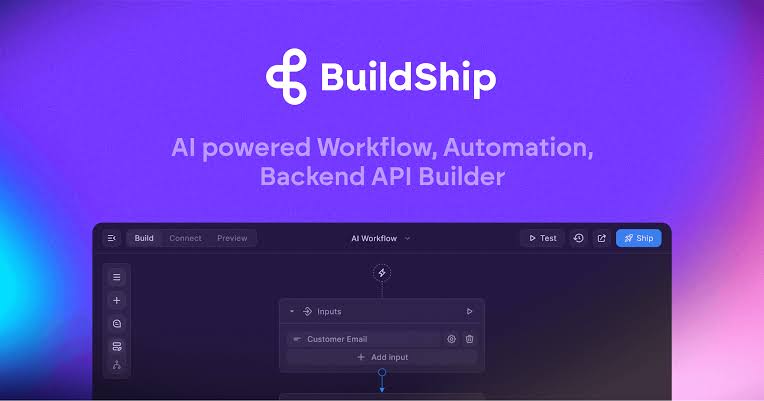
BuildShip is a low-code, AI-first visual backend builder that lets you ship APIs, scheduled jobs, chatbots, and cloud functions without writing thousands of lines of code. The platform is built by Rowy Inc. and has gathered a strong following among indie hackers, solopreneurs, and small startup teams who want to launch fast without hiring a full backend engineer.
Below is everything we found, broken down by the topics most readers have been searching for in 2026.
BuildShip Profile at a Glance
Before we dive into the review, here is a quick snapshot of the company so you know exactly who you are dealing with.
Field | Details |
|---|---|
Brand Name | BuildShip (by Rowy Inc.) |
Founders | Harini Janakiraman and Shams Mosowi |
CEO | Harini Janakiraman |
Year Founded | 2023 |
Public Launch | November 2023 |
Headquarters | San Francisco, California, United States |
Team Size | Around 17 employees |
Industry | Low Code / No Code Development, AI Workflow Automation, Backend Tools |
Product Type | Visual AI-powered backend builder for APIs, workflows, and cloud functions |
Funding Stage | Seed (amount undisclosed) |
Notable Investors | AI Grant (Nat Friedman & Daniel Gross), Guillermo Rauch (Vercel CEO), Balaji Srinivasan, Brianne Kimmel (Worklife VC), Joseph Jacks (OSS Capital), Austen Allred, Aarthi Ramamurthy |
Reported Revenue | Approximately $1.9 million annually |
User Base | Over 50,000 builders globally |
Starting Price | Free, paid plans from $15 to $25 per month |
Mobile App | None as of 2026 (web-based platform) |
Official Website | buildship.com |
NUBIA MAGAZINE Rating | 3.5 out of 5 |
BuildShip Login: How Easy Is It to Get Started?
Signing up for BuildShip is one of the smoother onboarding experiences we have tested this year. You head over to buildship.com, click the Get Started button at the top right of the page, and you are given the option to sign in using Google, GitHub, or your email address.
We used a Gmail account for our review, and the whole sign up process took less than 40 seconds. No credit card was required for the free plan, which is a small but appreciated detail. Once you are inside, the dashboard greets you with template suggestions, a Create New Project button, and a short walkthrough of the visual builder.
One small issue worth flagging: when we tried to log back in two weeks later from a different browser, the session token kicked us out twice before going through. It is a minor inconvenience, but for a platform that promises productivity, that kind of friction at the door does cost the brand a small mark in our books.
Is There a BuildShip App?
Short answer: not really.
BuildShip is primarily a browser based platform. There is no dedicated mobile app on Google Play or the Apple App Store as of 2026. The team appears focused on perfecting the web experience rather than spreading thin across multiple platforms.
The web app does work on mobile browsers, but we would not recommend trying to build a serious workflow on a phone screen. The node based interface is dense, and dragging connections between nodes is genuinely painful on a small touchscreen. On a tablet with a stylus, it becomes more manageable. On a desktop, it shines.
If you are looking for the mobile experience, you will need to wait. The team has hinted on social media that mobile improvements are on the roadmap, but no firm release date has been shared with the public.
BuildShip AI: How Smart Is the Engine?
This is the part of BuildShip that most users come for, and we get why.
The platform plugs directly into multiple AI providers. You can use OpenAI models including GPT-4 and GPT-4o, Anthropic's Claude, Stable Diffusion for image generation, HuggingFace for open source models, and several other tools. What sets it apart is that you can string these together visually. Need an image generated, captioned by a large language model, and then pushed to Google Sheets? You can build that in about ten minutes.
There is also a feature called AI-generated nodes. If a node does not exist for your specific use case, you can describe what you need in plain English, and BuildShip will write the JavaScript node for you. We tested this by asking it to build a node that scrapes product prices from a sample online store. The first attempt failed because of CORS restrictions, but the second prompt, where we specified using a server side fetch, worked perfectly.
It is not magic. The AI does get things wrong from time to time. But when it works well, it genuinely cuts your build time in half. For a solo founder racing to ship a prototype, that is a big deal.
BuildShip Funding: Who Is Backing the Platform?
This is where things get interesting. Although BuildShip has not raised a publicly disclosed Series A round, it has pulled in a roster of high profile angel investors and accelerator backers that most early stage startups would envy.
According to data on Crunchbase and reports from Cerebral Valley, the company has raised seed stage funding from AI Grant, run by Nat Friedman, former GitHub CEO, and Daniel Gross. Other backers include Guillermo Rauch (CEO of Vercel), Balaji Srinivasan (former CTO of Coinbase), Brianne Kimmel of Worklife VC, Joseph Jacks of OSS Capital, Austen Allred (CEO of BloomTech), and Aarthi Ramamurthy. BuildShip was reportedly the only company from the APAC region to be funded by AI Grant.
Crunchbase lists six known investors and a Seed round, with the exact amount not publicly disclosed. According to GetLatka, the company is generating around $1.9 million in annual revenue with a lean team of about 17 people. That is a strong signal. A bootstrap friendly burn rate with backing from people who understand developer tools and AI infrastructure deeply.
BuildShip Pricing: Is It Worth the Money in 2026?
BuildShip currently runs on a credit based pricing system with five main tiers. Here is the breakdown based on our review of their public pricing page and confirmations from third party sources like Lindy, AIChief, and SaaSworthy:
- Free Plan ($0 per month): 1 seat, access to core builder features, community support, unlimited projects with limited execution credits, and GPT-4 integration with limited usage. Good for hobbyists and early testing.
- Starter Plan (around $15 to $25 per month): 3 seats, unlimited project execution, custom domains, version control, higher GPT-4 token limits, and email support. Suitable for solo builders.
- Pro Plan ($49 to $79 per month): 10 seats, advanced features, priority support, more GPT-4 tokens, and access to premium templates. Best for small teams running customer facing workflows.
- Business or Expert Plan (around $279 per month): 25 seats, longer data retention, team collaboration features, dedicated account manager, and white labeling options.
- Enterprise (custom pricing): Self-hosting, SOC2, HIPAA, GDPR compliance support, dedicated infrastructure, and custom SLAs.
The credit system works like this: for the first three seconds of any node execution, you consume one credit. After that, every additional second costs one credit. Extra credit top ups cost about one dollar per 10,000 credits.
Honestly, the credit system is one of our biggest concerns. For light usage, it is fine. But if your workflow involves heavy AI calls or long running tasks, the costs can stack up quickly. We recommend you simulate your workload before committing to a paid plan.
BuildShip User Experience: What It Is Actually Like to Use
Here is where we get into the meat of the review.
The visual builder is well designed. Nodes are clearly labeled, the drag and drop motion feels responsive, and the canvas zooms smoothly. Connecting nodes is intuitive once you watch the first tutorial. Within thirty minutes of signing up, we had built a working webhook that received form data, ran it through GPT-4 for sentiment analysis, and stored the result in a Firestore database. That kind of speed is rare.
The template library is genuinely useful. Templates we tested included a document retrieval assistant, a Stripe checkout flow, a WhatsApp chatbot, and a Google Sheets integration. They all worked out of the box with minor configuration tweaks for our API keys.
Where the platform starts to wobble is in two specific places.
First, the documentation. While the basics are well covered, advanced topics like custom node development, edge cases in error handling, and complex authentication flows feel undercooked. We had to dig through their Discord community and a few YouTube tutorials to figure out things that should have been clearly documented inside the official help center.
Second, debugging. When a workflow fails, the error messages can sometimes be vague. We had a workflow that kept timing out, and it took us almost an hour to realize the problem was a recursive loop we had accidentally created. A better debug panel with detailed execution traces would help users a lot.
On the positive side, the Discord community is active and helpful, and the team responds to questions reasonably fast. That counts for something in a market where many tools throw you to chatbots.
Pros and Cons of BuildShip
What We Liked
- AI-first design that genuinely speeds up workflow creation
- Clean visual builder with smooth drag and drop
- Strong template library for common use cases
- Code export feature so you are not locked into the platform
- Active community and a responsive team
- Solid investor backing that suggests long term stability
- Integrates with multiple databases including Firestore, MongoDB, Supabase, Postgres, and MySQL
What We Did Not Like
- Credit based pricing can get expensive for heavy workloads
- No native mobile application
- Documentation has visible gaps for advanced topics
- Debugging tools need clear improvement
- Compliance certifications like SOC2 and HIPAA are marketed but not transparently audited in a public Trust Center
- Occasional login session issues that broke our testing flow
- Limited offline functionality since everything runs in the cloud
Nubia Magazine Verdict
BuildShip is a solid platform for indie hackers, solopreneurs, and small teams building AI powered automations and backend workflows. It is fast, visually intuitive, and packed with templates that get you to a working prototype quickly.
That said, it is not perfect. The credit based pricing model rewards light users and punishes heavy ones. The documentation lags behind the platform's growth. And for enterprise teams that need provable compliance and stable production performance, alternatives like Xano may offer more peace of mind.
At NUBIA MAGAZINE, we believe BuildShip earns a comfortable 3.5 out of 5. It is the kind of tool we would happily recommend to a friend launching their first AI side project, but we would think twice before betting a regulated enterprise product on it just yet.
Frequently Asked Questions About BuildShip in 2026
1. Is BuildShip free to use?
Yes, BuildShip offers a free plan that includes one seat, access to the visual builder, unlimited projects with limited execution credits, community support, and basic GPT-4 integration. The free plan is enough to learn the platform and build small test projects, but you will need a paid plan for production use or higher execution volumes.
2. Who founded BuildShip and where is it based?
BuildShip was founded in 2023 by Harini Janakiraman and Shams Mosowi. Harini serves as the CEO and is the most visible face of the company across social channels and live streams. The company operates under Rowy Inc. and is headquartered in San Francisco, California.
3. Is BuildShip safe for production use?
For early stage products, MVPs, and internal tools, BuildShip is safe enough and has been used by over 50,000 builders. For enterprise or regulated industries, you will want to request SOC2 attestation directly from the team. The platform markets HIPAA and GDPR readiness but does not publish a public Trust Center the way some competitors do.
4. Can I export my code from BuildShip?
Yes. BuildShip allows code export in JavaScript and TypeScript. This means if you ever decide to migrate off the platform, you are not stuck. Your workflows can be downloaded and self-hosted, which is a major plus compared to other no code tools that lock you in completely.
5. Does BuildShip have a mobile app for Android or iOS?
No, BuildShip does not currently offer a native mobile application on Android or iOS. The platform is web based and works best on a desktop or a large tablet. The team has mentioned mobile improvements are on the roadmap, but no release timeline has been confirmed as of 2026.
6. How much does BuildShip cost per month?
BuildShip pricing starts at zero dollars for the Free plan, around $15 to $25 for the Starter plan, $49 to $79 for the Pro plan, and around $279 for the Business or Expert plan. Enterprise pricing is quoted on request. Extra execution credits can be purchased at one dollar per 10,000 credits.
7. What AI models does BuildShip support?
BuildShip integrates with OpenAI (including GPT-4 and GPT-4o), Anthropic's Claude, Stable Diffusion, HuggingFace, and several other AI providers for text, image, and video generation. You can also bring your own API keys for custom AI integrations, which gives advanced users plenty of flexibility.
8. How does BuildShip compare to Xano, Make, or Zapier?
BuildShip is more AI first and visually focused, while Xano is built for production stability with strong compliance documentation. Make and Zapier are more like workflow automation tools for connecting third party apps without a real backend focus. If you are building an AI heavy MVP, BuildShip wins on speed. If you need enterprise reliability, Xano is the safer bet. For simple app to app automations, Make or Zapier may be enough.
9. Has BuildShip raised funding?
Yes, BuildShip has raised seed stage funding from a strong group of investors including AI Grant (Nat Friedman and Daniel Gross), Guillermo Rauch of Vercel, Balaji Srinivasan, Brianne Kimmel of Worklife VC, Joseph Jacks of OSS Capital, Austen Allred, and Aarthi Ramamurthy. The exact amount has not been publicly disclosed, but BuildShip is notably the only APAC region company to be backed by AI Grant.
10. Can BuildShip connect to my existing database?
Yes. BuildShip comes with a built in Firestore database, but you can also connect to Firebase, MongoDB, Supabase, Postgres, MySQL, and other databases. This flexibility makes it easier to integrate with your existing infrastructure rather than forcing a full migration to a proprietary backend.
Related Posts




0 Comments
Join the discussion and share your thoughts
No Comments Yet
Be the first to share your thoughts on this article!