WorkBuddy Review 2026: App, AI, Login, Download & FAQs

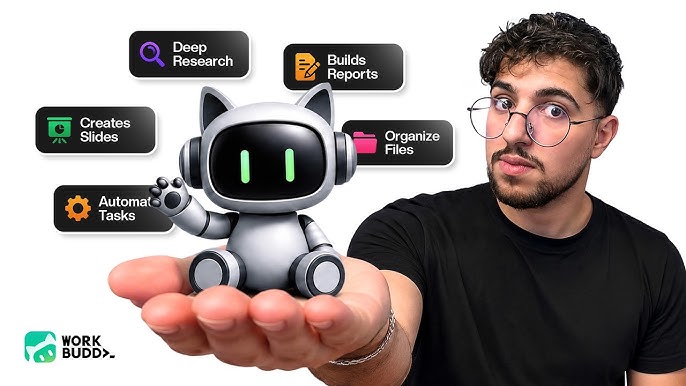
Table of Contents
WorkBuddy: Quick Profile
Category | Details |
Product Name | WorkBuddy |
Developer / Parent Company | Tencent Cloud (CodeBuddy Platform) |
Launch Date | March 9, 2026 |
Category | AI Agent / Office Productivity |
Primary Users | Knowledge workers, HR, ops, admin, product managers |
Platform Availability | Desktop (Windows, macOS), Web, Mobile (via WeChat/WeCom) |
AI Architecture | Multi-agent, parallel task execution |
Key Integrations | Enterprise WeChat, WeCom, Feishu, DingTalk, Slack, Telegram, Discord |
Free Plan | Yes (5,000 free credits on signup) |
Pricing Model | Credit-based (tiered plans) |
Official Website | workbuddy.ai |
Nubia Magazine Rating | 3.2 / 5.0 |
Introduction
We do not usually rush into reviewing a product before giving it a proper test run. WorkBuddy caught our attention earlier this year when it launched officially in March 2026 under Tencent Cloud's CodeBuddy platform. Since then, it has been generating genuine interest from office workers, small business owners, and productivity enthusiasts who are tired of switching between five different tools just to get one job done.
This is our full WorkBuddy review for 2026, covering everything from how you download and log in, to what the AI actually does, how the app feels in daily use, and whether the product lives up to the hype. We gave it a 3.2 out of 5, and we will explain exactly why.
What Is WorkBuddy?
WorkBuddy is a desktop AI agent that handles office tasks from start to finish. You give it a plain-language instruction like 'analyze this spreadsheet and write me a summary report,' and it does exactly that. It does not stop at generating a draft response in a chat window. It actually completes the work, saves the output to your folders, and presents it to you ready to send or share.
The tool runs a team of AI agents in parallel rather than queuing tasks one at a time. When you assign a complex project, multiple agents divide it up, cross-check each other's work, and combine the result into a single polished output. Tencent has described this internally as a 'multi-agent workspace,' and based on what we tested, that description is fair.
The product sits inside Tencent's broader developer ecosystem, alongside CodeBuddy for software development. WorkBuddy is aimed squarely at non-technical office workers: HR teams, operations managers, sales staff, administrators, and anyone whose day involves documents, reports, and data that needs organizing.
WorkBuddy Download and Login: How to Get Started
Getting started with WorkBuddy is one of the easiest parts of the whole experience. You go to workbuddy.ai, download the desktop application for your operating system, and install it. That's it. There is no lengthy configuration process and no need to involve your IT department just to run a basic task.
For login, WorkBuddy uses a unified account system tied to Tencent's platform. If you are already on WeChat or Enterprise WeChat (WeCom), the setup is faster since you can connect those accounts during onboarding. New users get 5,000 free credits when they sign up, which is enough to try out a decent range of tasks before needing to purchase more.
One thing we noticed is that the onboarding process asks you to authorize specific folders on your device. Some users skip this step and then wonder why WorkBuddy cannot access their files. Our advice: take the extra two minutes during setup to map your main working directories. It saves a lot of frustration later.
The WorkBuddy App: Interface and Daily User Experience
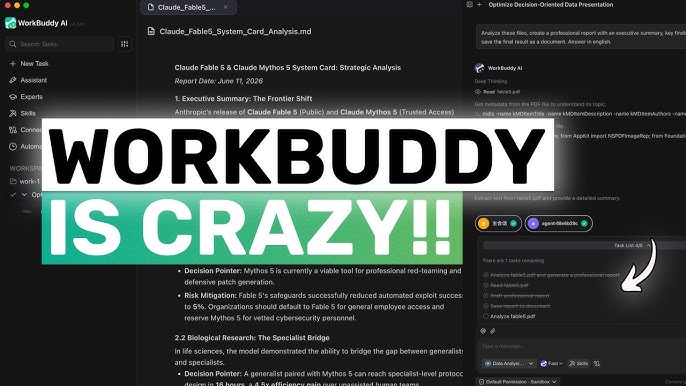
The interface is clean and does not try to do too much at once. You see a main chat-like input area where you type your task, and the app takes it from there. As it works, you can watch the expert team thinking through the problem in real time, which is genuinely interesting the first few times you try it.
The 100-plus pre-built expert teams is a feature that sounds impressive in the marketing material, and it more or less holds up in practice. There are preset teams for market research, HR document processing, sales analysis, report writing, and more. You can call them like a colleague: 'Hey, I need a competitive analysis of three companies in the fintech space.' The tool picks the right combination of agents, assigns the work, and comes back with a finished document.
Remote control via messaging apps is another highlight. You can send instructions to WorkBuddy from Enterprise WeChat or WeCom without even opening the desktop app. The setup for this takes under a minute, and once it's running, it means your AI agent is essentially always on call.
Where the experience slips a bit is with occasional lag and retry errors, especially on heavier tasks involving large files or multimodal inputs. Users in Tencent's own internal reviews mentioned this, and we ran into it ourselves. The tasks still get done, but the wait can be noticeable on busy days. The free credit balance also runs down faster than most new users expect if they are working with image-heavy or document-heavy tasks.
WorkBuddy AI: What It Actually Does
The AI inside WorkBuddy is the real selling point, and it is more capable than a standard chatbot in some meaningful ways. Where most AI tools give you a response and leave the rest of the work to you, WorkBuddy tries to close what the team calls the 'execution gap.' You describe the outcome you want, and the system handles the steps in between.
In testing, we used it to process a spreadsheet of sales data and produce a formatted summary report with charts. We used it to draft a weekly HR operations update based on raw meeting notes. We also tested a poster design task. All three tasks were completed without us having to break the job into sub-steps manually, which is the point.
The multi-agent setup does produce genuinely better outputs than a single-model approach on complex tasks. When different agents flag contradictions or flag gaps in the research, those signals actually change the final result. The synthesis layer behaves more like an editor reviewing a draft than a system just averaging outputs together. That is harder to build than it sounds, and it shows.
That said, outputs should always be reviewed before going out. WorkBuddy is not at the point where you can hand something directly to a client without checking it first. For internal use and first drafts, it is an excellent time-saver. For anything customer-facing, treat it as a starting point.
Security and Privacy: Worth Knowing About
WorkBuddy uses a sandbox execution model, which is a bigger deal than it might sound. All operations run in isolated containers on your local machine, meaning the tool only has access to the specific folders you authorize. Dangerous commands are blocked automatically. This design puts it ahead of many AI agent tools that still run with broad system access.
For teams handling sensitive documents, such as HR data, financial spreadsheets, or internal strategy files, that sandboxed approach is genuinely reassuring. Tencent has run the product through security audits, and their internal pilot with over 2,000 non-technical employees across departments did not surface data leakage issues.
The one caveat here is for international teams. Some of WorkBuddy's documentation, compliance materials, and pricing information is primarily structured for the Chinese market. Businesses with strict data residency requirements outside China should verify Tencent's compliance posture before going all in.
What We Liked and What We Did Not
What We Liked
+ No technical setup required. You download and run.
+ Multi-agent execution genuinely improves complex task outputs.
+ Sandbox security design is thoughtful and production-ready.
+ Remote control via WeChat and WeCom is seamless for existing Tencent users.
+ The synthesis layer produces coherent final outputs, not just a pile of agent responses.
+ Pre-built expert teams cover most common office workflows right out of the box.
What We Did Not Like
- Free credits run out faster than expected on heavy tasks.
- Occasional lag and retry errors on large file processing.
- International documentation and pricing support is limited.
- Some advanced integrations still require IT involvement to configure.
- Outputs need human review before going to clients or stakeholders.
- Folder authorization during setup is easy to skip, which causes headaches later.
Our Rating Breakdown
Category | Score | Out of |
Ease of Setup and Login | 3.8 | 5.0 |
AI Performance and Output Quality | 3.5 | 5.0 |
App Interface and User Experience | 3.2 | 5.0 |
Security and Privacy Design | 4.0 | 5.0 |
International Accessibility | 2.0 | 5.0 |
Value for Money | 3.0 | 5.0 |
Overall | 3.2 | 5.0 |
WorkBuddy FAQs: Questions People Are Actually Asking in 2026
1. Is WorkBuddy free to use?
WorkBuddy has a free tier. When you create an account, you get 5,000 credits to start. These are enough to run a fair number of basic tasks, but heavier work like processing large documents or running multimodal tasks with images will use credits faster than you might expect. Once you exhaust the free credits, you will need to choose a paid plan. Tencent adjusted pricing in May 2026, so the best place to check current rates is directly on the WorkBuddy or Tencent Cloud official pages.
2. How do I download and install WorkBuddy?
Go to workbuddy.ai, select your operating system (Windows or macOS), and download the desktop app. Installation is standard and does not require any technical setup or cloud configuration. During first launch, the app will prompt you to authorize specific folders on your device. Make sure you do this step properly, as skipping it will limit what WorkBuddy can access and do on your behalf.
3. What does WorkBuddy actually do that a normal chatbot does not?
A standard chatbot answers your question and stops there. WorkBuddy goes further: it interprets your goal, breaks it into steps, uses the right tools for each step, and delivers a finished file or document to your folder. If you ask it to analyze a spreadsheet and produce a report, you get the actual report, not a text response explaining how you might write the report yourself. That is the core difference.
4. Is WorkBuddy safe to use with sensitive company documents?
For most use cases, yes. WorkBuddy runs in a sandboxed environment, meaning it only accesses folders you specifically authorize. All operations happen in isolated containers on your local machine or managed cloud environments, and the system automatically blocks dangerous commands. Internal data from Tencent's pilot with over 2,000 employees across HR, finance, and operations showed no data leakage issues. That said, teams in industries with strict compliance requirements should verify Tencent's regulatory posture for their specific region before adopting WorkBuddy for sensitive workflows.
5. Can I use WorkBuddy on mobile or only on desktop?
WorkBuddy's main interface is a desktop application. However, you can control it remotely from your phone through messaging apps including Enterprise WeChat, WeCom, Feishu, DingTalk, Slack, Telegram, and Discord. This means once your desktop is running with WorkBuddy active, you can send it tasks from your phone and collect the results without needing to sit at your computer. The setup for this remote access takes under a minute.
6. Who is WorkBuddy built for?
WorkBuddy targets non-technical office workers who deal with documents, data, and reports in their daily work. That includes HR managers, operations staff, sales teams, administrators, and product managers. It is not primarily aimed at developers or highly technical users, though those users can customize the tool further through API-based model routing and integrations. If you spend a significant part of your day producing reports, organizing data, or handling documents across multiple tools, WorkBuddy is designed specifically for you.
7. How does WorkBuddy compare to other AI tools like ChatGPT or Copilot?
ChatGPT and Microsoft Copilot are conversational AI tools. They are good at answering questions, drafting content, and helping you think through problems. WorkBuddy is an execution tool. It does not just respond to you; it takes actions on your computer, coordinates multiple agents working in parallel, and delivers finished outputs. The positioning is closer to a digital assistant that completes tasks than one that simply advises you on how to complete them. If you want conversation and help drafting, ChatGPT does that well. If you want tasks done end to end, WorkBuddy is a stronger fit.
8. Are there any problems or limitations I should know about before signing up?
A few worth mentioning. First, the free credits go quicker than expected if you are using the tool heavily or working with image-based tasks. Second, occasional lag and retry errors can appear during complex file processing, especially on larger inputs. Third, WorkBuddy is most deeply integrated with Chinese enterprise tools like WeCom and Feishu; international users on Slack or other Western platforms will find the experience somewhat thinner. Finally, AI outputs, while generally solid, should always go through a human review before being sent externally. WorkBuddy is a time-saver, not a replacement for judgment.
Nubia Magazine Verdict
WorkBuddy launched in 2026 with a clear idea of what it wanted to be: an AI agent that actually finishes your work rather than just helping you start it. On that core promise, it largely delivers. The multi-agent architecture is genuinely well-designed, the security sandbox is thoughtful, and for users already inside the Tencent ecosystem, the remote control features through WeCom and WeChat are seamless.
Where it loses points is on accessibility for international teams, credit depletion rates, and occasional performance issues on heavy tasks. The 3.2 rating reflects a product that is genuinely useful and better than most of the competition at what it specifically does, but one that still has room to grow before it can claim a spot in every office worker's daily toolkit.
If you are already working within Tencent's tools, or if you handle a lot of multi-step document and data work, WorkBuddy is worth the download. Go in with your expectations set correctly, and it will probably impress you.
Related Posts




0 Comments
Join the discussion and share your thoughts
No Comments Yet
Be the first to share your thoughts on this article!



