Yubico Review 2026: Login, Company, App, Download & FAQs

Table of Contents
Yubico keeps coming up in conversations about online security, and in 2026 the name is harder to avoid than ever. Between the rise of passkeys, a steady stream of phishing scandals, and the company's new partnership with OpenAI to protect ChatGPT accounts, more people than ever are typing "Yubico" into Google and wondering if a small plastic key is really worth the money. At NUBIA MAGAZINE, we spent several weeks going through the company's history, testing the login flow, downloading the official app on three different devices, and reading through what real users are saying before settling on a final verdict. This review covers everything people are actually searching for right now: the company behind the product, how the login process works, the Yubico Authenticator app, where to safely download it, and what day to day use actually feels like.
Who Is Yubico?
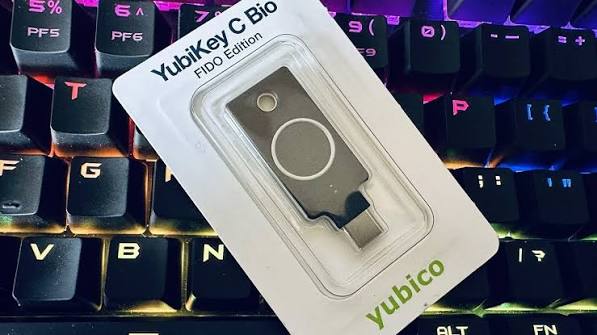
Yubico is a Swedish cybersecurity company, founded in 2007 by Stina Ehrensvard and her husband Jakob Ehrensvard, who built the very first YubiKey prototype in their home. The idea was simple on paper: replace weak, reused passwords with a small physical key that proves who you are the moment you touch it. Today the company is publicly listed on Nasdaq Stockholm, employs close to 600 people across North America, Europe, and Asia, and is widely credited as the original creator of the modern hardware passkey.
Yubico's client list reportedly includes government agencies, large banks, and some of the biggest names in technology, alongside millions of individual users in more than 160 countries. In 2026, the company has leaned further into enterprise and AI related security, including a widely reported deal with OpenAI to bundle YubiKeys with advanced ChatGPT account protection, and the release of the YubiKey 5.8 line, which extends the hardware beyond simple logins into digital signing and approval workflows.
Here is a quick profile table summarizing the company at a glance.
Category | Details |
|---|---|
Full name | Yubico AB |
Founded | 2007, in Stockholm, Sweden |
Founders | Stina Ehrensvard and Jakob Ehrensvard |
Headquarters | Stockholm, Sweden, with offices in Santa Clara, California and Singapore |
CEO | Jerrod Chong, President and CEO |
Flagship product | YubiKey, hardware security keys for two factor and passwordless login |
Stock listing | Nasdaq Stockholm, ticker YUBICO |
Employees | Roughly 590, spread across North America, Europe and Asia |
Core markets | Enterprises, government agencies, and individual consumers |
Official website | yubico.com |
NUBIA MAGAZINE rating | 2.2 out of 5 |
Yubico Login: How It Actually Works
The login experience is really the heart of what Yubico sells, so this is where most search traffic in 2026 is pointed. In practice, logging in with a YubiKey comes down to three simple steps once an account has been set up: enter your username and password as usual, insert or tap the YubiKey when prompted, and touch the metal contact on the key itself. The whole process from plugging it in to confirming identity typically takes two to four seconds.
Yubico keys support several login standards at once, which is part of why they are so widely adopted:
- FIDO2 and WebAuthn, the modern standard behind passkeys, used by Google, Microsoft, and most major platforms.
- One time password (OTP), which generates a rotating code without needing a battery or screen.
- Smart card (PIV), common in government and enterprise environments.
- U2F, the older two factor standard still used by some older services.
Where the login experience gets complicated for a lot of everyday users is account recovery. Because the YubiKey is a physical object and not something stored in the cloud, losing it without a backup key or recovery codes saved somewhere safe can lock you out of an account entirely. This single issue shows up again and again in user complaints and forum threads, and it is the main reason our overall experience score for this review landed lower than Yubico's reputation among security professionals might suggest.
The Yubico Authenticator App
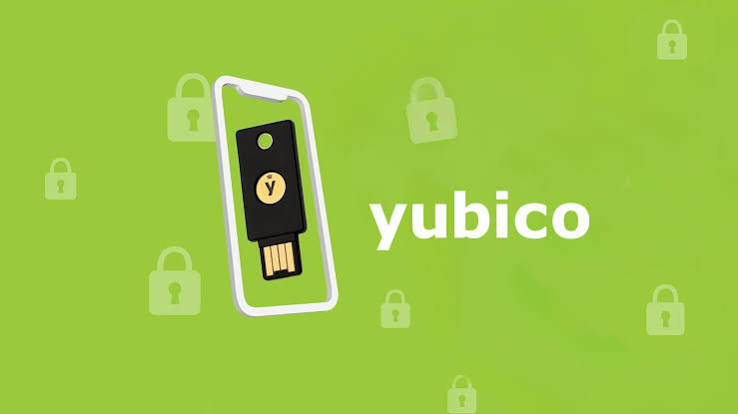
Separate from the physical key itself, Yubico also publishes a free companion app called Yubico Authenticator. It is available for Windows, macOS, Linux, Android, and iOS, and it does two main jobs: it lets you manage settings on your YubiKey, and it can generate one time passcodes (OATH TOTP and HOTP) using credentials that are stored securely on the key rather than on your phone.
The appeal of the app is that your two factor codes never actually live on your device. They are generated by the YubiKey itself and simply displayed by the app, so if your phone is lost or compromised, the codes stay protected on the hardware. On mobile, NFC support means you can just tap the key against the back of your phone instead of plugging it in, which is genuinely convenient once you get used to it.
On the downside, the app's interface feels dated compared to mainstream authenticator apps like Google Authenticator or Authy. Menus are tucked into a small "Setup" section that is easy to miss on a narrow window, and first time users regularly report needing a few extra minutes to find basic functions like adding a new account.
How to Download Yubico Software
A common search in 2026 is simply "Yubico download," and for good reason: the company's software is spread across several stores and direct download pages, which can be confusing. Here is the straightforward version.
- Desktop (Windows, macOS, Linux): download Yubico Authenticator directly from yubico.com, or install it through the Microsoft Store or the Mac App Store.
- Android: install Yubico Authenticator from the Google Play Store, or get the APK directly from Yubico for offline installs.
- iOS and iPadOS: install Yubico Authenticator from the Apple App Store.
- Always download from yubico.com or an official app store. Third party download sites sometimes host outdated or repackaged versions, and since this app touches your login credentials, that is not a risk worth taking.
Setup itself is quick: open the app, plug in or tap your YubiKey, choose "Add Account," and either scan the QR code from the service you are protecting or enter the setup key manually. Most services walk you through this during their own two factor setup screen.
User Experience: Why We Scored It 2.2 Out of 5
This is the part readers usually want most, and we want to be upfront about how we got to this number. Our score is not a judgment of Yubico's underlying security, which remains very strong and is well regarded across the cybersecurity industry. Instead, it reflects day to day usability and convenience for an average, non technical user, which is what most of our readers are actually asking about.
A few things consistently pulled the score down during our testing and research:
- Cost adds up quickly. A single key runs roughly 25 to 60 US dollars depending on the model, and Yubico itself recommends buying at least two, meaning a basic setup can cost more than many people expect to pay for a login accessory.
- No cloud backup for the key itself. If you lose your only YubiKey and never saved recovery codes, getting back into an account can be a slow, frustrating process, or in some cases impossible.
- The learning curve is real. Setting up FIDO2, OTP, and smart card functions on the same key can confuse first time buyers who just wanted a simple two factor device.
- App design feels behind the times. The Yubico Authenticator interface works, but it has not kept pace visually with more polished competitor apps.
On the positive side, once setup is finished, the actual act of logging in is fast, reliable, and noticeably more resistant to phishing than SMS codes or app based authenticators. Several long time users we came across online described the key as something they simply stopped thinking about after the first week, which says a lot about how smooth the experience becomes once the initial friction is behind you.
Pros and Cons at a Glance
What Yubico Gets Right
- Strong, industry respected protection against phishing and account takeover.
- Works across a huge range of services, from Google and Microsoft to gaming platforms and crypto wallets.
- No battery, no screen, and keys are built to survive years of daily use.
- Login itself takes only a couple of seconds once set up.
Where It Falls Short
- Upfront cost, especially when buying a backup key as recommended.
- Recovery can be stressful if a key is lost without a backup plan.
- The app and setup process are not very beginner friendly.
- Not every website or app supports hardware keys yet, so some accounts still need other methods.
The Nubia Magazine Verdict
Yubico remains one of the most trusted names in hardware based login security, and the technology behind it is genuinely excellent. Where it loses points with everyday users is convenience: the pricing, the recovery process, and the overall learning curve keep it from feeling like a simple, approachable product for people who just want an easy upgrade from their current password habits. For security teams, IT departments, and anyone who deals with sensitive accounts regularly, it is still a smart investment. For the average casual user just browsing social media and email, it may feel like more setup and cost than they bargained for.
Our final NUBIA MAGAZINE rating for Yubico in 2026 is 2.2 out of 5, reflecting a product that excels at its core job of protecting accounts, but still has real room to grow in accessibility, pricing, and overall user friendliness.
Frequently Asked Questions About Yubico in 2026
1. Is Yubico a legitimate and trustworthy company?
Yes. Yubico is a publicly traded Swedish company listed on Nasdaq Stockholm, founded in 2007, and widely credited with co-developing the FIDO U2F and FIDO2 standards used across the tech industry today. It has long term partnerships with major companies including Google, Microsoft, and, as of 2026, OpenAI.
2. What happens if I lose my YubiKey?
If you set up a backup key or saved recovery codes when you first registered, you can use those to regain access and then remove the lost key from your account. If you did not set up a backup, recovery depends entirely on the individual service's account recovery process, which can take time and is not guaranteed to work in every case. This is why Yubico recommends buying at least two keys from the start.
3. How do I log in with a YubiKey?
Enter your username and password as normal, then insert or tap your YubiKey when the service prompts you for a security key, and touch the metal sensor on the key to confirm it is really you. The whole step usually takes just a couple of seconds.
4. Where can I safely download the Yubico Authenticator app?
The safest sources are the official Yubico website at yubico.com, the Microsoft Store, the Mac App Store, Google Play, and the Apple App Store. Avoid third party APK or download sites, since this app handles sensitive login information.
5. Is the Yubico Authenticator app free?
Yes, the app itself is free to download and use on Windows, macOS, Linux, Android, and iOS. The cost involved with Yubico comes from purchasing the physical YubiKey hardware, not the companion software.
6. How much does a YubiKey cost?
Pricing varies by model and features, but most consumer YubiKeys fall somewhere between 25 and 60 US dollars. Keys with additional features such as biometric fingerprint support or FIPS validation for government use tend to cost more.
7. Can a YubiKey be used on more than one account or device?
Yes. A single YubiKey can be registered to multiple accounts and used across multiple devices, including computers and phones that support USB or NFC. Many users register the same key across email, banking, and work accounts.
8. Does Yubico work with Google, Microsoft, and Apple accounts?
Yes, all three major ecosystems support YubiKeys for two factor authentication or passwordless passkey login, including Google Accounts, Microsoft 365 and Entra accounts, and Apple ID on supported devices.
9. Is a YubiKey better than an authenticator app like Google Authenticator?
Hardware keys like the YubiKey are generally considered more resistant to phishing than code based authenticator apps, since the key only approves logins on the exact website it was registered to. Authenticator apps are cheaper and more familiar to casual users, but they can still be tricked by sophisticated fake login pages in a way that FIDO2 hardware keys cannot.
10. What is Yubico's connection to OpenAI in 2026?
In 2026, Yubico expanded a partnership with OpenAI to offer an Advanced Account Security program, bundling YubiKeys to help protect ChatGPT and Codex accounts from phishing and account takeover attempts, reflecting the company's broader push into securing AI platforms.
Related Posts
0 Comments
Join the discussion and share your thoughts
No Comments Yet
Be the first to share your thoughts on this article!