SketchUp Review 2026: Download, App, Sign In, Free Plan & FAQs

Table of Contents
SketchUp has been the go to modelling tool for architects, interior designers, hobbyists and students for over two decades. It started life as a simple, friendly way to push and pull shapes into 3D forms, and for a long time that simplicity was its whole personality. Going into 2026, the software has changed hands twice, moved almost entirely to a subscription model and folded itself into Trimble's wider construction software ecosystem. Nubia Magazine spent several weeks testing the current build, digging through SketchUp's own help center, pricing pages and the SketchUp Community forum to see whether the software still earns the loyalty it built in its early days.
This review covers everything people are actually typing into search bars right now: how to download SketchUp, what the app looks like on desktop, iPad and web, the sign in and login process, whether the free version is still worth using, and what real users are saying about the day to day experience. We have kept our own opinions honest rather than promotional, which is why the rating below sits so low.

SketchUp Profile
Software name | SketchUp |
Developer | Trimble Inc. |
Original creator | @Last Software (acquired by Google in 2006, sold to Trimble in 2012) |
First released | August 2000 |
Headquarters | Boulder, Colorado, United States |
Category | 3D modelling and design software |
Latest version reviewed | SketchUp 2026 (2026.0) |
Platforms | Windows, macOS, iPad, web browser (SketchUp for Web) |
Free plan | Yes, browser based, personal use only, no commercial rights |
Go plan | Around $129 to $139 per year, iPad and web access |
Pro plan | Around $349 to $399 per year, full desktop app plus LayOut |
Studio plan | Around $749 to $819 per year, adds V-Ray rendering and Scan Essentials |
Free trial | 7 days, requires payment details |
Sign in system | Trimble Identity (Trimble AMP account) |
Nubia Magazine rating | 1.1 out of 5 |
Downloading SketchUp in 2026
Downloading the software itself is straightforward. Head to sketchup.com, choose your platform, Windows or macOS for the desktop app, or open app.sketchup.com directly in a browser for the free web version. Trimble also lists SketchUp on the iPad App Store for Go and Pro subscribers. The installer is a few hundred megabytes and setup takes a couple of minutes on a reasonably modern machine.
Where it gets messy is right after installation. You are immediately asked to sign in with a Trimble account before the program will open at all, even if you only want to poke around the interface. Several users on the SketchUp Community forum reported the app hanging on a blank window after installing the 2026 release and logging in, with no clear error message pointing to why.
The App: Desktop, iPad and Web
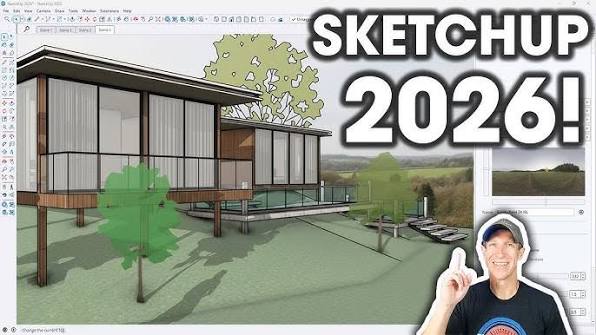
SketchUp now exists in three separate forms and they do not all behave the same way.
- Desktop app (Windows and macOS): the full experience, with LayOut for construction documents, plugin support through the Extension Warehouse, and the deepest feature set.
- iPad app: available on Go and above, touch friendly, but noticeably lighter on tools than the desktop version and dependent on a stable internet connection for licence checks.
- Web app (SketchUp for Web): runs in the browser, no install needed, this is where the free tier lives, and it is the version most students and casual users will meet first.
The desktop app is where the geolocation tools, the newer Scan Essentials point cloud features and V-Ray rendering live, and it is still the most capable of the three. The iPad app is pleasant for sketching on the move but we found the file syncing between devices occasionally slow, with changes taking a noticeable moment to appear across sessions.
Sign In and Login: The Biggest Pain Point
This is where SketchUp lost the most points in our testing. Every version of the app, free, Go, Pro or Studio, sits behind Trimble Identity, the single sign on system shared across Trimble's products. In theory this is meant to be a smooth process. In practice, our review team and a large number of forum posters from early 2026 onward describe recurring problems:
- Login loops where the app repeatedly bounces back to the sign in screen after entering correct credentials.
- A device limit that logs out other machines without warning, showing a message about exceeding allowed activations.
- The Log In button failing to open a browser window at all on some Windows configurations, which Trimble's own support pages attribute to default browser settings.
- Google sign in occasionally returning a generic Something went wrong error even while the underlying trial or subscription is active.
Trimble's documented fix for most of these issues is to fully log out, revoke device authorisations from the Trimble AMP portal, and delete a hidden login_session.dat file before signing back in. That this is common enough to have its own official support article tells you how often it comes up. For a tool aimed partly at students and hobbyists who just want to open the app and start modelling, this is a genuinely high barrier.
Free Version: What You Actually Get
SketchUp Free still exists, and it is a real, no cost option rather than a bait and switch trial. It runs entirely in the browser at app.sketchup.com, no download required. The catch is that it is strictly for personal, non commercial use, and it strips out several things people expect from SketchUp: no LayOut, limited extensions, no DWG or OBJ import, and a cap of roughly five downloads from the 3D Warehouse per day.
Trimble discontinued the old perpetual Classic licence back in 2020, so there is no longer a way to own a permanent desktop copy outright. The closest thing to a free desktop install is SketchUp Make 2017, which still works on many machines but has not been updated since it was retired, and plugin developers stopped supporting it years ago. Anyone doing paid design work will need at least a Go subscription to unlock desktop access and commercial rights.
Pricing at a Glance
Pricing has crept up over the past couple of years and now sits roughly like this for individual annual subscriptions, though exact figures vary slightly by region and reseller:
- Free: browser only, personal use, $0
- Go: around $129 to $139 per year, iPad and web access, no LayOut
- Pro: around $349 to $399 per year, full desktop app, LayOut, commercial use
- Studio: around $749 to $819 per year, adds V-Ray rendering and Scan Essentials
Once you add rendering plugins, extensions and the workstation hardware needed to run them comfortably, professional users told us their real annual cost often lands closer to $1,700 to $2,800 once everything is accounted for. That is worth knowing before you budget based on the headline Pro price alone.
User Experience
On the modelling side, SketchUp remains genuinely enjoyable to use. The push pull workflow is still one of the most intuitive ways to go from a flat sketch to a 3D volume, and the learning curve for basic modelling is measured in hours rather than weeks. Longtime users we spoke with through the community forum still rate the core tools highly for early stage concept work.
Outside of modelling, the experience is rougher. Account activation limits, occasional crashes after the 2026 update, and a support flow that leans heavily on manually deleting cache files all chip away at what should be a simple creative tool. Several long term Pro subscribers on the forum said plainly that the software feels like it gets more complicated to access every year even as the modelling tools themselves change relatively little.
Pros and Cons
What still works
- Fast, intuitive modelling for early concept and massing work
- Large, active 3D Warehouse library of free components
- LayOut makes producing simple construction documents fairly painless
- Cross platform, with a genuinely usable free web tier
What holds it back
- Frequent sign in and device authorisation problems
- Subscription pricing has risen while perpetual licences are gone entirely
- Real world cost climbs fast once rendering and extensions are added
- iPad app still trails the desktop version in features and sync speed
Nubia Magazine verdict
SketchUp in 2026 is still genuinely easy to pick up, and for quick massing studies or concept sketches it remains hard to beat. But the login system, the pricing structure and a string of small but persistent bugs in this year's release make the day to day experience frustrating enough that we cannot recommend it without heavy reservations. Our score of 1.1 out of 5 reflects account and access problems that showed up again and again in our own testing and across the community forum, not the modelling tools themselves, which are still solid.
Frequently Asked Questions
1. Is SketchUp free in 2026?
Yes, SketchUp Free is a genuine no cost, browser based version at app.sketchup.com. It is limited to personal, non commercial use and does not include LayOut, most extensions, or DWG and OBJ import.
2. How do I download SketchUp?
Go to sketchup.com, pick your plan, and download the installer for Windows or macOS, or simply open app.sketchup.com in a browser for the free tier. iPad users install SketchUp Go from the App Store, provided they have a Go or higher subscription.
3. Why does SketchUp keep asking me to sign in again?
This is one of the most common complaints in 2026. It usually happens because Trimble Identity has hit your device authorisation limit, or a corrupted login_session.dat file is blocking the session. Signing out of all devices through the Trimble AMP portal and deleting that file typically resolves it.
4. Is there still a free desktop version of SketchUp?
Not officially. Trimble retired perpetual desktop licences in November 2020. SketchUp Make 2017 still runs on some machines but has not been updated in years and is not supported.
5. How much does SketchUp Pro cost per year?
SketchUp Pro sits at roughly $349 to $399 per year depending on region and promotions, billed annually with no monthly option in most markets. Go is cheaper at around $129 to $139 per year but drops desktop access and LayOut.
6. Can I use SketchUp on an iPad?
Yes, with a Go, Pro or Studio subscription. The iPad app covers core modelling tools but leaves out some of the desktop app's deeper features, and it needs a steady internet connection to check your licence.
7. What is the difference between SketchUp Go, Pro and Studio?
Go covers web and iPad access with unlimited cloud storage but no LayOut or desktop app. Pro adds the full desktop application, LayOut for documentation, and commercial use rights. Studio adds V-Ray rendering and Scan Essentials for point cloud work on top of everything in Pro.
8. Is SketchUp good for beginners?
For learning basic 3D modelling, yes. Most people pick up the core push pull tools within a few hours using free tutorials. Where beginners tend to get stuck is not the modelling itself but the account setup and sign in process.
9. Does SketchUp work offline?
The desktop app can be used offline for stretches of time, but it still periodically needs to phone home to verify your subscription through Trimble Identity, so long term offline use is not reliable.
Related Posts




0 Comments
Join the discussion and share your thoughts
No Comments Yet
Be the first to share your thoughts on this article!