RoboForm Review 2026: Extension, Login, Download, App, Pricing & FAQs

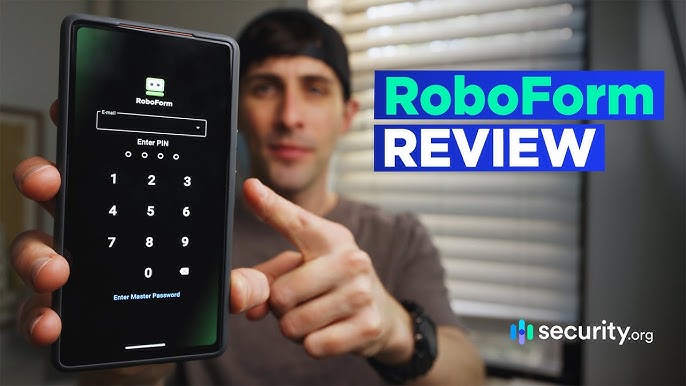
Table of Contents
Passwords have quietly become one of the most stressful parts of being online. Between work logins, banking apps, streaming accounts and every store that insists you create a profile, most people are juggling well over a hundred credentials. RoboForm has been trying to solve that problem since 1999, long before password managers became a mainstream category, and it is still standing while a lot of younger competitors have come and gone.
At NUBIA MAGAZINE, we spent several weeks going through RoboForm in 2026, testing the browser extension, the desktop app, the mobile app, the login flow and every pricing tier currently on offer. This review covers everything a reader is likely to search for right now: how the extension performs, what the login and setup process looks like, where to download it safely, how the mobile app compares to the desktop version, what it actually costs, and how it feels to use day to day. We closed things out with a set of frequently asked questions pulled directly from what people are typing into search engines about RoboForm in 2026.

RoboForm Profile
A quick reference table covering the essentials, for anyone who wants the facts without scrolling back through the full review.
Product name | RoboForm Password Manager |
Developer | Siber Systems Inc. |
First released | 1999 (one of the earliest password managers on the market) |
Headquarters | Fairfax, Virginia, United States |
Category | Password manager and form filler |
Platforms supported | Windows, macOS, Linux, iOS, Android, plus browser extensions for Chrome, Firefox, Edge, Safari, Opera and Brave |
Free plan | Yes, limited to one active device with no cloud sync |
Paid plans | Premium, Family, Business, Enterprise |
Starting price | Around $0.99 to $2.49 per month for Premium, depending on active promotions |
Encryption | AES 256 bit with a zero knowledge architecture |
Two factor authentication | Yes, including authenticator app, email, SMS, passkey and hardware security key |
Free trial | 30 days for Premium and Family, 14 days for Business |
Money back guarantee | 30 days |
Best known for | Best in class form filling and autofill accuracy |
Official website | roboform.com |
NUBIA MAGAZINE rating | 4.3 out of 5 |
What Is RoboForm?
RoboForm is a password manager and form filling tool built by Siber Systems, a company based in Fairfax, Virginia. It stores your login credentials, payment details and personal information in an encrypted vault, then autofills them whenever you land on a matching website or app. Unlike newer password managers that lean heavily on flashy dashboards, RoboForm has stuck close to its original identity: a tool that quietly fills forms and logs you in without asking for much attention.
It supports Windows, macOS, Linux, iOS and Android, along with browser extensions for Chrome, Firefox, Edge, Safari, Opera and Brave. The company undergoes regular independent security audits, and its most recent audit covered the desktop clients, mobile apps, browser extensions and the online portal, which is reassuring for anyone trusting it with sensitive data.
RoboForm Extension in 2026
The browser extension is really where RoboForm lives for most users. Once installed, it sits quietly in the toolbar and only becomes active when you visit a login page or a form that needs filling. During our testing, the extension recognised login fields reliably, even on sites with unusual layouts or multi step checkout forms, which has always been RoboForm's strongest skill.
When you log in to a new site, a small pop up asks whether you want to save the credentials. We found this prompt more consistent than what we have seen from some rival extensions, which occasionally fail to notice a new login entirely. The extension also handles two factor authentication codes, so if a site supports TOTP, RoboForm can generate and autofill that code alongside your password.
One small complaint: if you have a large vault, the extension's dropdown search can feel a bit cramped, and some advanced tools like the Security Center and Sharing Center open in a new browser tab rather than inside the extension itself. It is a minor friction point rather than a dealbreaker.
RoboForm Login: How It Works
Logging in to RoboForm starts with your Master Password, the single password that unlocks your entire vault. RoboForm never stores this password on its servers, which is what people mean when they describe it as zero knowledge: even RoboForm itself cannot see your data.
For everyday logins to your online accounts, the process works in reverse. You visit a site, RoboForm recognises the login form, and it fills your username and password automatically, or shows a small bubble you click to confirm. If you have enabled two factor authentication on your RoboForm account, you will be asked for a second verification step, which can be an authenticator app code, an SMS code, a passkey, a trusted device confirmation, or a hardware security key.
If you ever forget your Master Password, recovery depends on whether you set up account recovery options in advance, so it is worth doing that during setup rather than after the fact.
RoboForm Download: Getting Started
Downloading RoboForm is straightforward. The safest route is always the official RoboForm website, since third party download sites sometimes bundle outdated or modified installers. Once you download the installer for your operating system, you create an account, set your Master Password, and the app will prompt you to add the matching browser extension.
- Windows and Mac users get a full desktop client with a local vault and an offline access option.
- Linux users can access RoboForm mainly through the browser extension, since there is no dedicated Linux desktop app.
- Mobile users download the RoboForm app from the App Store or Google Play, then sign in with the same account used on desktop.
After installation, RoboForm offers to import passwords from other managers or your browser, including Google Password Manager, LastPass and CSV files, which makes switching over far less painful than starting from zero.
RoboForm App: Mobile Experience
The RoboForm mobile app has had a noticeable facelift going into 2026. The iOS version now uses a browser style layout that makes one tap logins faster to reach, and the Android app leans on both the native autofill framework and the accessibility service for smoother form filling across other apps, not just inside a browser.
In daily use, the app is lightweight and stable. We tested it across a normal week of logging into banking apps, email and a few shopping sites, and it filled credentials correctly almost every time. The one limitation worth flagging is that, like most password managers on desktop, RoboForm does not always autofill inside standalone desktop applications outside the browser, so you may occasionally need to copy a password manually for a native app like a music player or a work tool.
Offline access is one of the app's underrated strengths. Once your vault has synced, your logins remain available even without an internet connection, and any changes you make queue up and sync automatically once you are back online.
RoboForm Pricing in 2026
RoboForm remains one of the more affordable password managers on the market, and its pricing structure has stayed fairly simple. There are four main tiers for individuals and businesses, plus a custom Enterprise option. Note that RoboForm frequently runs discounts of up to 60 percent on Premium and Family plans, especially around Black Friday, so the price you see at checkout may be noticeably lower than the listed renewal rate.
Plan | Price | What you get |
Free | $0 | Unlimited password storage on one device, basic autofill and password generator, no cloud sync |
Premium | From about $0.99 to $2.49 per month, billed yearly | Cloud sync across unlimited devices, 2FA autofill, secure sharing, breach monitoring, priority support |
Family | From about $1.42 to $3.98 per month, billed yearly | Up to five Premium accounts, shared folders, individual vaults for each member |
Business | Around $39.95 per user per year | Admin console, role based permissions, directory integration, security reporting, free Family plans for staff |
Enterprise | Custom pricing | All Business features plus dedicated onboarding and tailored deployment for large organisations |
For most individual users, the Premium plan hits a sensible balance of price and features. Families will likely find the Family plan, which covers up to five people, considerably cheaper than equivalent plans from 1Password or Dashlane. Small businesses and larger teams that need centralised control over shared credentials tend to land on the Business tier, which adds an admin console and directory integration.
RoboForm User Experience
RoboForm has never tried to be the flashiest password manager on the market, and that is arguably its biggest strength. The interface has been getting a gradual modern redesign, moving away from its older, slightly clunky look, but the philosophy has stayed the same: stay out of the way until you need it.
During our testing period, RoboForm ran quietly in the background, popping up only when we logged into a new site or when the Security Center flagged a weak or compromised password. Setup was easy enough for a beginner, helped along by a video tutorial and a step by step guide for building out your vault. Password sharing worked smoothly between RoboForm users, though shared passwords cannot currently be viewed by people using a different password manager, which is worth knowing before you rely on it for sharing outside your household or team.
Customer support is another area where RoboForm holds up well. It offers 24 hour ticket support, live chat, callback requests and a multilingual help center, which is a wider spread of support options than several competitors provide at a similar price point.
Pros and Cons
What we liked
- Autofill and form filling accuracy is genuinely best in class, even on complicated multi step forms.
- Pricing is among the cheapest in the password manager category, especially for the Family plan.
- Strong security track record with regular independent audits and zero knowledge encryption.
- Wide platform support, including a dedicated TOTP authenticator built into the app.
- Generous customer support options compared with similarly priced competitors.
Where it falls short
- The free plan is limited to a single device with no cloud sync, which is more restrictive than some competitors.
- The Family plan tops out at five members, fewer than NordPass or Dashlane allow.
- Some advanced tools open in a separate browser tab instead of staying inside the extension.
- Autofill inside native desktop apps outside the browser is still hit or miss.
Nubia Magazine Verdict
RoboForm earns a solid 4.3 out of 5 from us. It is not the newest or most feature dense password manager on the market, but it does the fundamentals extremely well: strong encryption, dependable autofill, an increasingly modern interface, and pricing that undercuts most of its direct competitors. If you want a no frills password manager that simply works and does not try to upsell you into a bundle of unrelated security tools, RoboForm remains one of the smartest picks in 2026.
Frequently Asked Questions
1. Is RoboForm safe to use in 2026?
Yes. RoboForm uses AES 256 bit encryption and a zero knowledge architecture, which means the company itself cannot read your stored passwords. It also undergoes regular independent security audits covering its desktop apps, mobile apps, browser extensions and online portal.
2. Is RoboForm free?
RoboForm offers a free plan that lets you store unlimited passwords, but it is limited to one active device at a time with no cloud sync. To sync across multiple devices and unlock features like breach monitoring and secure sharing, you need the Premium or Family plan.
3. How much does RoboForm cost per year?
Pricing depends on active promotions, but Premium typically runs from around 12 to 30 dollars a year, Family plans usually land between 17 and 48 dollars a year for up to five people, and RoboForm for Business is priced at roughly 40 dollars per user per year.
4. How do I download RoboForm safely?
The safest way to download RoboForm is directly from the official RoboForm website, then install the matching browser extension when prompted. Avoid third party download mirrors, since installers from unofficial sources are not guaranteed to be up to date or unmodified.
5. Does RoboForm work on both iPhone and Android?
Yes. RoboForm has dedicated apps for both iOS and Android. The iOS app uses a browser style layout for quicker one tap logins, while the Android app combines the accessibility service with native autofill for smoother form filling across other apps.
6. Can I share passwords with family members using RoboForm?
Yes, the Family plan supports up to five Premium accounts with secure password sharing between members. Keep in mind that shared passwords can only be viewed by other RoboForm users, so sharing with someone on a different password manager will not work the same way.
7. What happens if I forget my RoboForm Master Password?
Because RoboForm uses zero knowledge encryption, it cannot see or reset your Master Password for you. Recovery depends entirely on the account recovery options you set up in advance, which is why it is worth configuring them the moment you create your account.
8. Is RoboForm better than 1Password or Dashlane?
It depends on what you value most. RoboForm tends to win on price and on raw autofill accuracy for complex forms, while 1Password and Dashlane often offer larger family plans and a more feature rich dashboard. For budget conscious users who mainly want reliable autofill and solid security, RoboForm is a strong choice.
9. Does RoboForm offer a free trial for paid plans?
Yes. RoboForm offers a 30 day free trial for both the Premium and Family plans, along with a 14 day trial for the Business plan, plus a 30 day money back guarantee if you decide it is not the right fit.
10. Can RoboForm autofill two factor authentication codes?
Yes. RoboForm includes a built in TOTP authenticator, so it can generate and autofill time based one time passcodes for sites that support two factor authentication, removing the need for a separate authenticator app.
Related Posts




0 Comments
Join the discussion and share your thoughts
No Comments Yet
Be the first to share your thoughts on this article!