Top 10 Best Reference Manager Softwares In The World 2026

Table of Contents
Managing citations and research papers is one of the most tedious parts of academic work. The right reference manager can save hours each week, but the wrong one can turn into a source of constant frustration. Our 2026 ranking of the top reference managers weighs several factors: pricing and value, citation style support, PDF annotation quality, collaboration features, integration with writing tools like Microsoft Word and Google Docs, and long-term sustainability of the platform itself. We also factored in user sentiment from G2 reviews and independent evaluations from research-focused publications like Research Gold and PapersFlow.
This list reflects the current state of the market as of early 2026. The landscape has shifted noticeably in the past two years. AI-powered features are no longer experimental add-ons; they are becoming core differentiators. At the same time, the old guard faces pressure from newer, more agile tools built for cloud-first workflows. Here is our ranking of the ten best reference managers available today.
List Of The Top 10 Best Reference Manager Softwares In 2026:
1. Zotero
Zotero, developed by the nonprofit Corporation for Digital Scholarship, remains the default choice for most researchers in 2026. Multiple independent evaluations this year, including those from Research Gold and PapersFlow, place it at the top of the field. The reasons are straightforward: it is free, open-source, and has the strongest plugin ecosystem of any reference manager on the market.
Zotero offers unlimited local storage, which means your library never hits a paywall. Its browser extension captures references from virtually any webpage with a single click, and it supports over 10,000 CSL citation styles. The plugin ecosystem is particularly notable. Better BibTeX, the most popular community plugin, makes Zotero work seamlessly with LaTeX workflows, a feature that keeps it relevant even among researchers who write in Overleaf rather than Word.
One of Zotero's biggest advantages is its ownership structure. Unlike Mendeley, which is owned by Elsevier, or EndNote, which belongs to Clarivate, Zotero is not controlled by a commercial publisher. That matters for researchers who worry about vendor lock-in or who have seen beloved tools get acquired and then neglected. The community support is active, and development continues at a steady pace. For most researchers, Zotero is simply the safest and most capable choice.
2. Paperpile
Paperpile is the best reference manager for anyone who lives inside the Google ecosystem. It is browser-based, which means there is no desktop application to install or sync. Everything happens in the browser, and your PDFs are stored in Google Drive, which makes them accessible across devices and compatible with Google's AI tools like Gemini.
The Google Docs integration is the standout feature. Paperpile's add-on inserts citations inline while you write, and it formats the bibliography automatically when you finish. No other tool matches this level of friction-free integration with Google Docs. The citation engine supports over 8,000 styles, which covers virtually every academic journal you might target.
Pricing is the main drawback. There is no free tier, and academic users pay about $2.99 per month. That is competitive with other paid tools, but it is a barrier for students who are used to free options like Zotero or Mendeley. Paperpile also lacks a desktop app, which some researchers find limiting. If you write exclusively in Google Docs, however, Paperpile is the most polished experience available.
3. Mendeley
Mendeley remains one of the most popular reference managers in the world, and its free tier is still the most generous among traditional tools. You get 2 GB of cloud storage at no cost, which is enough for a substantial library of PDFs. Paid plans start at $4.99 per month for 5 GB and go up to $14.99 for unlimited storage.
The PDF viewer is Mendeley's strongest asset. It allows you to highlight text, add sticky notes, and organize annotations directly within the PDF. Many researchers consider it the most polished annotation experience in the industry, and it is a big reason why Mendeley retains such a loyal user base. The Mendeley Cite plugin for Microsoft Word is also well-regarded, and the platform offers paper recommendations based on the contents of your library.
There are real concerns, though. Elsevier acquired Mendeley in 2013, and development has slowed noticeably since then. Users report occasional sync issues, and the Google Docs integration is unreliable. Mendeley's group functionality is still useful for research teams that share common sources, but the platform feels increasingly stagnant compared to newer tools. Its G2 rating sits at 4.3 out of 5 across more than 240 reviews, with 86 percent of reviewers saying they would recommend it. That is solid, but it reflects loyalty to a tool that many users wish would improve faster.
4. EndNote
EndNote, developed by Clarivate, is the most established paid reference manager on the market. It remains a common institutional standard, particularly in STEM fields where it has been the default for decades. The software handles libraries of tens of thousands of references without performance issues, and it integrates seamlessly with Web of Science, PubMed, and most university library systems.
The 2025 version added several AI-powered features, including "Key Takeaways" for summarizing articles and PDFs. The Manuscript Matcher tool suggests suitable journals for publication based on your manuscript, which is a genuinely useful feature for researchers preparing to submit. The Cite While You Write plugin for Microsoft Word is powerful, and advanced deduplication features make EndNote a strong choice for systematic reviews and meta-analyses.
EndNote's weaknesses are well documented. It is expensive, with a subscription costing around $274 per year or a one-time license in the $250 to $275 range. The learning curve is steeper than competitors, and there is no Google Docs support, which is a growing problem as more researchers move away from Word. EndNote supports over 7,000 citation styles, which is comprehensive, but the overall experience feels dated compared to cloud-native tools. It remains a powerful option for researchers who need its advanced features, but it has slipped in our rankings because of cost and inflexibility.
5. PapersFlow
PapersFlow represents the new wave of AI-integrated research platforms. It combines reference management with multi-agent AI paper analysis, counter-evidence search, and a built-in LaTeX editor. These are features you will not find in traditional reference managers, and they point toward where the category is heading.
The multi-agent AI system is the standout feature. It can analyze papers and search for counter-evidence, which is genuinely novel. Most reference managers are passive storage systems; PapersFlow actively engages with your sources. It draws paper discovery data from OpenAlex and Semantic Scholar, two major open scholarly databases, and the built-in LaTeX editor means you can write and cite in the same platform.
There are limitations. PapersFlow is web-based with no desktop application, and citation style support is currently limited to major styles rather than the thousands offered by competitors like Zotero or EndNote. A free tier is available alongside a Pro subscription, which lowers the barrier to entry. For researchers who want AI assistance built into their workflow, PapersFlow is worth watching closely. It is not yet a complete replacement for established tools, but it is the most innovative entry on this list.
6. Paperguide

Paperguide is an all-in-one research platform that combines reference management with a full suite of research tools and an integrated AI assistant. Its key differentiator is simplicity. Despite the breadth of features, the interface remains clean and uncluttered, which makes it accessible for researchers who find tools like EndNote overwhelming.
The free version is notably generous. It offers fewer restrictions and more open-access papers than many competitors' free tiers, which makes it an attractive option for students and early-career researchers. Paperguide was included in G2's evaluation of the seven best reference managers of 2026, where it was tested alongside established tools like Mendeley and EndNote.
Paperguide's relative newness is its main weakness. The user base is smaller than the established players, and there is less community support and fewer third-party integrations. But the AI assistant is genuinely useful, and the platform is well designed. It represents the growing category of AI-enhanced research platforms that go beyond simple citation management. For researchers who want one tool that does everything, Paperguide is a compelling option.
7. ReadCube (Papers)
ReadCube, sold commercially as Papers, is a reading-first reference manager built for researchers who spend their days inside PDFs. Its G2 profile is strong: a 4.4 out of 5 rating across more than 170 reviews, with 87 percent of reviewers recommending it. The user base is split between small businesses at 53 percent and enterprises at 34 percent, which indicates use by both individual researchers and larger universities and biotech teams.
Papers excels at marking up documents and keeping large libraries searchable. The annotation tools are excellent, and the platform is designed for heavy readers who need to move quickly between papers. It was ranked seventh in G2's 2026 evaluation of the best reference managers, and its research-led focus distinguishes it from more general-purpose tools.
The trade-off is that Papers lacks the broader citation management features of top-ranked tools. It is not the best choice for systematic reviews or complex bibliographies, and its collaboration features are more limited than Mendeley's or Zotero's. But for researchers whose primary need is reading and annotating PDFs efficiently, Papers is an excellent specialized tool.
8. JabRef
JabRef is a specialized reference manager designed specifically for LaTeX and BibTeX workflows. It is a favorite among researchers in mathematics, physics, and computer science, where LaTeX is the standard writing format. The software is free, open-source, and cross-platform, built on Java, with native support for BibTeX and BibLaTeX file formats.
JabRef offers advanced features for managing large bibliographies, including field sorting, filtering, and duplicate detection. It excels at direct manipulation of .bib files, which is essential for researchers who maintain their bibliographies by hand. Research Gold's 2026 evaluation identifies JabRef as competitive for LaTeX-heavy workflows, though it recommends pairing it with Zotero via the Better BibTeX plugin for most users.
The limitations are clear. JabRef lacks the browser capture and web integration of tools like Zotero, and it is not designed for researchers who write in Word or Google Docs. Its narrow focus means it will never be a general-purpose reference manager. But for LaTeX users who want precise control over their .bib files, JabRef remains the specialist choice.
9. RefWorks
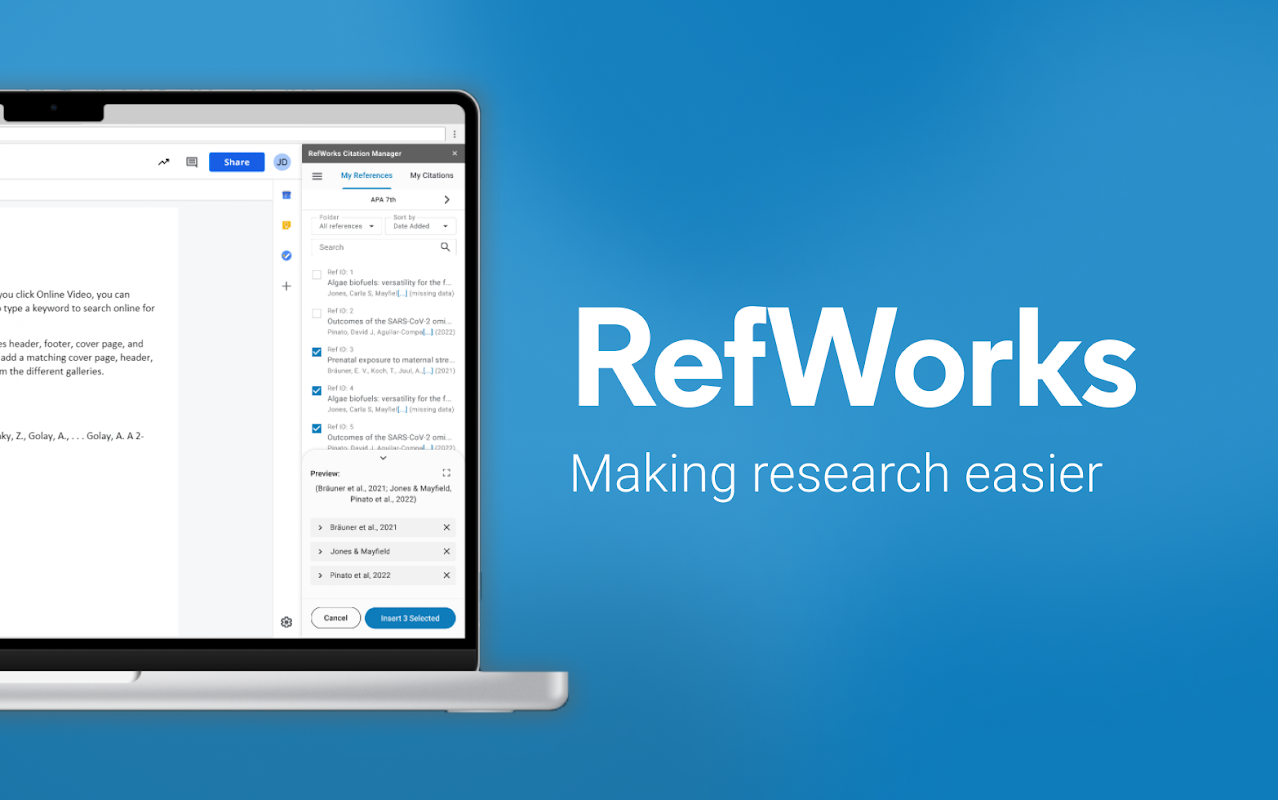
RefWorks, owned by ProQuest, is a web-based reference manager commonly provided through university subscriptions. The new version is cloud-based and offers collaboration features, citation generation in multiple styles, and integration with library databases. Oxford University's Bodleian Libraries includes RefWorks among its four recommended reference managers, which speaks to its institutional credibility.
A notable 2026 development is the addition of two pilot AI tools. The "Plagiarism & AI content checker" scans manuscripts for plagiarized and AI-generated content, and the "Preflight Pre-submission Check" reviews language quality and technical compliance. These tools are genuinely useful for researchers preparing manuscripts for journal submission.
RefWorks has significant drawbacks. It lacks a desktop application and the advanced PDF annotation features of competitors. Its availability is largely limited to institutional subscribers, which means individual researchers cannot easily purchase it on their own. The AI tools are still in pilot phase, and it remains to be seen how well they work in practice. RefWorks stays relevant through institutional adoption, but its standalone functionality is limited.
10. EasyBib.com
EasyBib.com is a web-based citation and reference tool that primarily serves students and early-career researchers. It offers automatic citation generation in multiple formats including APA, MLA, and Chicago, along with plagiarism checking and grammar tools in its paid version. EasyBib was included in G2's 2026 evaluation of reference managers, where it was tested among the top seven tools.
The strengths are simplicity and accessibility. Users can generate citations quickly without installing software or learning a complex interface. The free basic version is genuinely useful for students who need to produce a bibliography for a term paper.
But EasyBib is more of a citation generator than a comprehensive reference management system. It lacks the advanced library management, PDF annotation, and collaboration features of full reference managers. For serious research workflows, it is not a viable primary tool. It earns a place on this list because of its popularity among students, but it sits at the bottom of the top ten for good reason.
The reference manager market in 2026 offers more choice than ever. Zotero remains the best overall option for most researchers, combining free access with powerful features and a sustainable nonprofit ownership model. Paperpile is the clear winner for Google Docs users, while Mendeley and EndNote retain their institutional footholds despite aging platforms. The rise of AI-integrated tools like PapersFlow and Paperguide signals where the category is heading, even if they are not yet ready to displace the established leaders. Your choice ultimately depends on your writing workflow, your budget, and whether you prioritize PDF annotation, collaboration, or citation style support.
Related Posts

1 Comment
Join the discussion and share your thoughts