SuperWhisper Review in 2026: Pricing, App, Windows, Login, Recorder, AI & FAQs

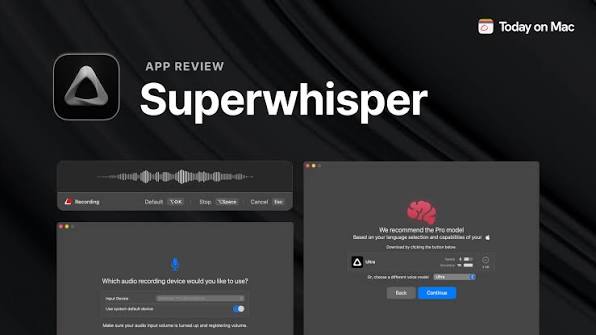
Table of Contents
Voice to text tools have quietly become part of how a lot of people work in 2026. Writers dictate first drafts, developers talk to their coding agents instead of typing prompts, and remote teams lean on automatic meeting notes to keep everyone in the loop. SuperWhisper is one of the names that keeps showing up in that conversation, especially among Mac users who care about privacy and want a tool that can actually run offline.
At Nubia Magazine, we spent time with SuperWhisper across Mac and Windows, read the changelogs, dug through user threads, and pulled together this honest breakdown of what the app does well in 2026 and where it still stumbles. Here is our full review.
SuperWhisper Profile at a Glance
Before we get into the details, here is a quick snapshot of the product, its maker, and how it is priced in 2026.
Feature | Details |
Product Name | SuperWhisper |
Developer | SuperUltra, Inc. (Toronto, Canada) |
Founder / CEO | Neil Chudleigh |
Category | AI Voice to Text and Dictation Software |
Platforms | macOS, Windows 10 and 11, iOS (iPhone and iPad) |
Free Tier | Yes, permanent free plan with small local AI models |
Pro Monthly | $8.49 per month |
Pro Annual | $84.99 per year |
Lifetime Licence | $249.99 one-time payment |
Student Discount | 40 percent off Pro plans |
Refund Policy | 30 days, no questions asked |
Offline Mode | Yes, on Apple Silicon Mac with local models |
Languages Supported | 100 plus languages and dialects |
Meeting Recording | Yes, with automatic summaries and action items |
Compliance | SOC 2 Type II certified, HIPAA compliant (Enterprise) |
Website | superwhisper.com |
Best For | Mac power users, writers, developers using AI coding agents |
Nubia Magazine Rating | 3.2 / 5.0 |
SuperWhisper Pricing in 2026
Pricing is usually the first thing people ask about, and SuperWhisper has a fairly straightforward structure. You get a real free tier, three paid tiers, and an enterprise plan for teams that need compliance paperwork.
The free plan is not a trial that runs out after seven days. It stays active for as long as you use the app. On it, you get voice to text in any app, meeting recording and transcription, support for over 100 languages, unlimited use of the smaller AI models, custom prompt control, and email support. New users also get a 15 minute Pro trial to test the premium engines before deciding whether to pay.
Pro pricing sits at around $8.49 per month, $84.99 per year (which works out to roughly $7.08 monthly), or $249.99 as a one time lifetime licence. That lifetime tag is the number that tends to spark the loudest debates online. It is easily the highest one time price in the on-device dictation category, and it breaks even against the annual plan somewhere around the three year mark. Students get 40 percent off, and every paid plan comes with a 30 day refund window.
There is also an Enterprise tier with custom pricing. This is the only plan that carries SOC 2 Type II certification, HIPAA compliance, centralised billing, and access controls, so teams in regulated industries essentially have no choice but this route.
Our take on pricing is that the Pro monthly and annual plans are fair for what you get. The lifetime is only worth it if you are certain you will use the app daily for three or more years, and if you plan to lean on the deeper features like custom modes and cloud AI processing.
The SuperWhisper App: What It Actually Does
At its core, SuperWhisper is a system wide dictation tool. You hit a global shortcut anywhere on your device (Option and Space by default), talk into your microphone, and the transcribed text lands directly wherever your cursor is. There is no separate window to open, no app to switch to, and no copy paste dance.
The floating recorder shows a live waveform while you speak, so you always know it is listening. Release the shortcut and the text appears. This single button flow is one of the things even critics of the app tend to praise. It genuinely gets out of your way.
Beyond that basic loop, SuperWhisper adds several layers on top. Custom Modes let you save configurations tied to specific apps or websites, so dictating an email applies formal formatting while dictating in Slack keeps things casual. Each mode can have its own hotkey, its own transcription model, and an optional AI post processing prompt that reshapes the raw transcript before it lands in your target app.
A custom vocabulary system fixes another common frustration. You add product names, technical terms, and proper nouns once, and the app stops mangling them. As of May 2026, you can bulk import a vocabulary list via CSV, which is a small but genuinely useful upgrade for anyone in a specialised field.
SuperWhisper on Windows
SuperWhisper started life as a Mac app, and that history still shows. In 2025, the team shipped an official Windows client for Windows 10 and 11, and a single licence now covers Mac, Windows, and iOS. That is good news on paper. In practice, the Windows build is still catching up.
The core dictation loop works fine on Windows. Press the hotkey, speak, and the text is typed into whatever app has focus. But the newer platform features, especially the AI coding agent integrations for tools like Claude Code and Open Code, are macOS only for now. On Windows, the AI cleanup layer routes to the cloud rather than running fully on device, which chips away at the offline privacy pitch that made the app popular on Mac in the first place.
Some reviewers have flagged stability issues on the Windows build, including reports of the app crashing or freezing the target application. We could not consistently reproduce these ourselves in our testing, but the pattern shows up often enough in user threads that it is worth mentioning. Windows updates ship less often than Mac updates too. If a particular feature is critical to your workflow, check the Windows changelog before you pay for lifetime.
If you are a Windows user shopping for dictation software in 2026, we suggest running the free tier on your own hardware first. It costs nothing, and it will tell you very quickly whether the tool feels right on your machine.
Login and Account Experience
Login is handled through a standard email based account tied to your licence. Once you purchase a plan or start on the free tier, your account works across Mac, Windows, and iOS with the same credentials. You can activate the licence on as many personal devices as you like, which is generous compared to some competitors that cap you at two or three seats.
The sign in process itself is clean. There is no complicated onboarding, no forced tutorial, and no aggressive upsell during setup. That said, the app does ask for microphone and accessibility permissions during first launch, which is expected but worth noting for anyone on a managed work device where those permissions may be locked down by IT.
One small pain point we ran into: there is no cloud sync for custom modes and vocabulary lists between devices yet. If you build a careful setup on your Mac and then install the Windows app, you have to recreate the configuration manually. For a paid app at this price point, that is a rough edge that should have been smoothed out already.
The Recorder and Meeting Mode
Meeting Mode is one of the features SuperWhisper leans on hardest in its marketing, and it works better than we expected. The app records audio directly from your device during a call, so nobody in the meeting sees a bot join the way they would with Otter.ai. When the call ends, you get a full transcript with speaker labels, plus an automatic summary and a list of action items.
By default, speaker separation is off, but you can enable it in the Advanced Settings sidebar. Speaker labels only show up in the segments view of the transcript. The AI generated summary and action items do not currently distinguish who said what, which is a limitation if you are trying to hand off notes to someone who was not in the room.
The recorder handles Zoom, Teams, Discord, Slack calls, and pretty much anything that plays audio on your device. You can also drop in existing audio or video files (MP3, MP4, M4A, WAV, WEBM, and most other common formats) and get transcripts back with the same speaker labelling. This part of the app runs entirely on device when you use local models, which is a genuine privacy win for anyone recording sensitive client calls.
One default worth changing right away: audio recordings are saved to disk automatically, and there is no simple in-app toggle to stop that behaviour. If you are recording anything sensitive, review the storage settings before you dictate the first sentence.
The AI Behind SuperWhisper
SuperWhisper does not rely on a single AI model. It runs two layers, and you can see both in the models library. The first is the speech engine, which turns your voice into raw text. Options range from the small Whisper Tiny model up through Whisper Large V3 Turbo, plus NVIDIA Parakeet V2 and V3 for offline transcription on Apple Silicon. Cloud options include ElevenLabs Scribe, Deepgram Nova models, and others.
The second layer is the AI cleanup and formatting engine. This is where a large language model rewrites the raw transcript into polished text, following whatever prompt you have configured for the mode you are in. On the lifetime plan, unlimited processing through frontier models from OpenAI and Anthropic is included, which is genuinely rare at a one time price.
For Pro users, you can also bring your own API keys and route requests through your own OpenAI, Deepgram, or Groq accounts. That gives developers and heavy users precise control over cost and model choice, though it does mean you are essentially paying twice: once for the app, once for API usage.
SuperWhisper added official integration with Claude Code, Open Code, Amp, and Codex over the course of 2026, mostly on macOS. If you are one of the growing group of developers who dictate prompts to AI coding agents instead of typing them out, the integration is smooth and legitimately useful. Andrej Karpathy famously coined the term "vibe coding" while using SuperWhisper with Cursor, which the marketing team never lets anyone forget.
User Experience
This is where our review lands somewhere between praise and frustration. SuperWhisper is powerful. It is also, in places, harder to set up than it should be.
On the positive side, the core dictation experience is fast, accurate, and quiet in the way good tools are supposed to be. The hotkey to typed text loop feels instant on Apple Silicon, and the app reads what you are working on and adjusts formatting accordingly. Email gets professional structure, Slack stays informal, and code editors get technical output. You do not configure this. The app figures it out from your screen.
On the negative side, the learning curve for the deeper features is steep. Custom modes, AI cleanup prompts, per app auto activation rules, and vocabulary imports are all excellent when they work, but they take real time to configure. The 15 minute Pro trial is way too short to properly evaluate this depth before deciding to pay.
A handful of privacy defaults also raised our eyebrows. Audio saves to disk by default with no opt out toggle. API keys for cloud models are stored in a plaintext JSON file inside Application Support rather than in the OS credential store. Neither of these is a security disaster on its own, but for an app that markets itself around privacy, we expected better defaults out of the box.
Customer support gets mixed reviews. Email support is included on every paid tier, and priority support comes with Pro. Response times, in our experience, were fine but not exceptional. A few independent reviewers have flagged the developer response time as below average for a product at this price point, and we saw enough of that pattern to think it is real rather than isolated.
Our Rating Breakdown: 3.2 / 5.0
The 3.2 rating reflects a genuinely capable product held back by some questionable defaults, a Windows build that has not caught up to the Mac original, and a lifetime price that most casual users simply will not extract full value from.
If you are a Mac power user who dictates every day, builds custom modes, and lives inside AI coding agents, SuperWhisper is one of the better dictation tools you can buy in 2026. Bump the rating up to a 4 for that audience. If you are a casual user on Windows looking for a simple voice to text app that runs offline, the free tier is worth a try but the paid tiers are hard to justify against cheaper alternatives. For that group, the rating drops closer to a 2.5.
Our 3.2 lands in the middle of those two experiences, which is roughly where most buyers will actually find themselves.
Frequently Asked Questions About SuperWhisper in 2026
1. Is SuperWhisper free to use?
Yes. SuperWhisper has a permanent free tier that covers voice to text in any app, meeting recording, support for over 100 languages, unlimited use of the smaller AI models, and email support. You also get a 15 minute Pro trial when you first sign up, which unlocks the larger cloud and local models for that window. The free plan does not expire.
2. Does SuperWhisper work on Windows?
Yes, SuperWhisper ships an official app for Windows 10 and 11, and one licence covers Mac, Windows, and iOS at no extra cost. Just be aware that the Windows build is younger than the Mac version and does not yet match it feature for feature. Some integrations, like the Claude Code agent hook, remain macOS only for now. If you plan to use SuperWhisper primarily on Windows, test the free tier before paying for lifetime.
3. Is SuperWhisper worth the $249.99 lifetime price?
That depends heavily on how you plan to use it. The lifetime licence breaks even against the annual plan at roughly three years of continuous use. If you dictate daily, rely on custom modes, and want unlimited AI cleanup through frontier models, the maths works out. If you only need occasional dictation for emails and notes, the monthly plan or even the free tier gives you the same core benefit at a fraction of the cost.
4. Does SuperWhisper run offline?
Yes, on macOS with Apple Silicon. Local models like Whisper Tiny through Large V3 Turbo, plus NVIDIA Parakeet V2 and V3, run entirely on device. Your audio never leaves the machine and no internet connection is required. Offline performance is weaker on Intel Macs, which are better served by cloud models. On Windows, some AI cleanup layers still route to the cloud in 2026, so the offline pitch is stronger on Mac.
5. Can SuperWhisper record and transcribe meetings?
Yes. Meeting Mode records audio from your device during calls on Zoom, Teams, Discord, Slack, and similar apps, then produces a transcript with an automatic summary and action items. You can also upload existing audio and video files (MP3, MP4, M4A, WAV, WEBM, and more) for transcription. Speaker separation is available but must be enabled in Advanced Settings.
6. Is SuperWhisper safe and private to use?
For local mode on Apple Silicon, yes. Audio never leaves the device and no data is sent to third party servers. For cloud mode, requests are proxied through SuperWhisper, so providers like OpenAI or Deepgram never see your account and no data is retained for training. Two defaults are worth adjusting though: audio recordings save to disk by default with no in-app opt out, and API keys are stored in a plaintext JSON file rather than the OS keychain. Fix those on first setup if you plan to handle sensitive content.
7. Does SuperWhisper support other languages besides English?
Yes. SuperWhisper supports over 100 languages and dialects with automatic language detection. Parakeet V3 covers 25 languages locally on Apple Silicon, and the app can translate any supported language into English during transcription. Meeting Mode also handles multilingual calls, though speaker labels perform best when everyone speaks clearly.
8. Can I use SuperWhisper for coding and AI agents?
Yes. As of 2026, SuperWhisper has official integrations with Claude Code, Open Code, Amp, Cursor, and Codex. You can dictate prompts to your coding agent instead of typing them, which developers have found significantly faster for long instructions. The agent integrations were added over the course of 2026 and are primarily macOS focused. Adding your library names and API terms to the custom vocabulary noticeably improves accuracy for technical dictation.
9. How does SuperWhisper compare with Wispr Flow and Otter.ai?
SuperWhisper sits between the two. Wispr Flow is a cloud subscription rival at around $15 per month with a polished experience and broader cross platform reach, but no offline mode and no lifetime option. Otter.ai joins meetings as a visible bot and transcribes live in the cloud, which is better for team collaboration but not ideal for privacy or personal dictation. SuperWhisper is the strongest pick if you want personal dictation with offline privacy and a one time payment option, while Otter is stronger for shared team meeting notes.
10. Does SuperWhisper have a mobile app?
Yes, on iOS. There is a dedicated iPhone app and a custom keyboard included in the same licence, so anywhere you can type on iOS you can dictate instead. Currently, iOS relies on cloud models for transcription rather than local ones, which means it needs an internet connection and does not offer the same offline privacy as the Mac app. There is no Android version as of 2026.
11. What refund policy does SuperWhisper offer?
Every paid plan, including the $249.99 lifetime licence, comes with a 30 day no questions asked refund policy. If you decide the app does not work for you within that window, the SuperWhisper team will refund the purchase in full. The free tier stays available afterwards, so you do not lose access to the basic app if you cancel.
12. Are there better alternatives to SuperWhisper?
Depends on the use case. On Mac, VoiceInk, MacWhisper, and Voibe all offer local Whisper dictation at a lower price point. On Windows, Wispr Flow, Whisperstream, and Spokenly cover the core dictation loop with fewer rough edges. For team meeting notes, Otter.ai and tldv remain the more collaborative picks. SuperWhisper still wins on depth of customisation and the lifetime purchase option, but it is not the cheapest or the simplest tool in the category.
Nubia Magazine Verdict
SuperWhisper in 2026 is a genuinely capable dictation app with a strong Mac heritage, real offline privacy options on Apple Silicon, and one of the deepest customisation systems in the category. The custom modes, vocabulary imports, and coding agent integrations make it a favourite among developers, writers, and other power users who spend all day inside their text fields.
It is held back by a Windows build that still trails the Mac original, a lifetime price that only makes sense for long term daily users, and a handful of privacy defaults that feel out of step with the app's marketing. The learning curve is real, and the 15 minute Pro trial is not enough to properly test the depth before you decide whether to pay.
Our final rating is 3.2 out of 5. Good for the right user, expensive for the wrong one, and worth trying on the free tier before committing to a paid plan. If you fit the profile, SuperWhisper will earn its keep. If you do not, there are cheaper and simpler tools that cover the basics just as well.
Related Posts



1 Comment
Join the discussion and share your thoughts