Spinach AI Review 2026: App, Pricing, Login, Logo, & FAQs

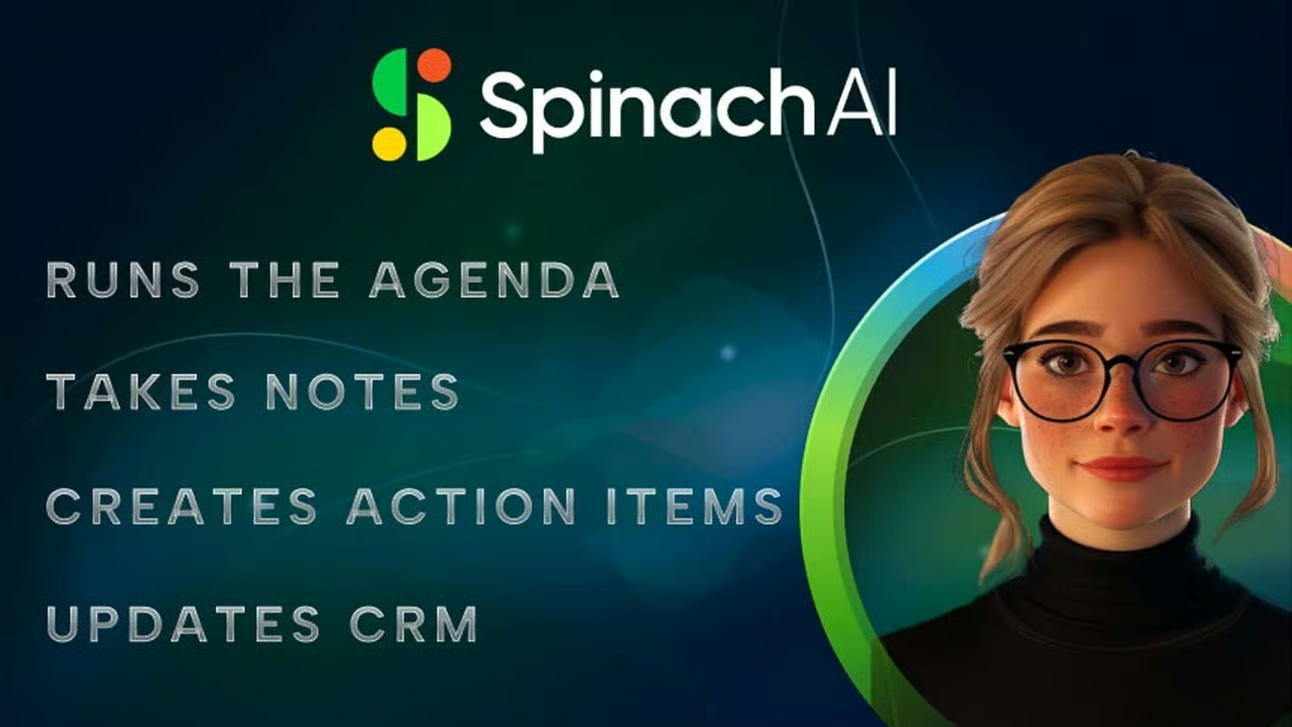
Table of Contents
If you have ever sat through a standup that felt longer than the sprint itself, you already understand the gap Spinach AI is trying to fill. Across the productivity space in 2026, meeting assistants are no longer a luxury. They have become a quiet expectation, the kind of tool teams reach for the same way they reach for Slack or Notion. At Nubia Magazine, we spent several weeks testing Spinach AI inside live meetings, comparing it with competing tools, reading user feedback across G2, Product Hunt and Trustpilot, and pulling apart its pricing structure to give you a clear, honest picture.
This 2026 review covers everything our readers keep asking about: the Spinach AI app, the pricing tiers, the login experience, the logo, the overall user experience, and the questions people are actively searching online. We have given it a rating of 4.2 out of 5, and below, we explain exactly why.
Spinach AI Brand Profile
Before we get into the experience, here is a snapshot of who Spinach AI actually is as a company. This profile table pulls together the verified details our research team confirmed across the brand's own materials, investor disclosures and independent databases.
SPINACH AI BRAND PROFILE | |
Brand Name | Spinach AI (also known as Spinach.io) |
Legal Entity | StayIn Inc. |
Founders | Matan Talmi, Yoav Grossman, Josh Willis |
CEO | Matan Talmi |
Year Founded | 2021 |
Headquarters | Nashville, Tennessee, United States |
Industry | AI Productivity, Meeting Intelligence, SaaS |
Product Category | AI Meeting Assistant / Scrum Facilitator |
Website | www.spinach.ai |
Login Portal | app.spinach.ai |
Notable Backers | Y Combinator, Atlassian, Zoom Ventures, Cardumen Capital, Maven Ventures, Tuesday Capital |
Total Funding | Approximately 9.25 million USD across 3 rounds |
Compliance | SOC 2, GDPR and HIPAA certified |
Languages Supported | Over 100 languages |
Key Integrations | Zoom, Google Meet, Microsoft Teams, Slack, Jira, Trello, Asana, ClickUp, Linear, Notion, HubSpot, Salesforce, Zapier |
Free Plan Available | Yes |
Pricing Range | Free to about 29 USD per user per month (Enterprise on quote) |
Best Suited For | Engineering teams, product managers, scrum masters, remote teams |
Nubia Magazine Rating | 4.2 / 5 |
What is Spinach AI?
Spinach AI is an AI powered meeting assistant built mainly for product, engineering and agile teams. In simple terms, it joins your Zoom, Google Meet or Microsoft Teams calls, listens to the conversation, transcribes it, then turns the discussion into structured notes, decisions, blockers and action items. From there it pushes that information into the tools you already use, things like Slack, Jira, Trello, Asana, Linear, Notion, HubSpot and Salesforce.
The brand often markets itself as a digital scrum master, and that description fits. Spinach AI is not trying to be a general consumer note taker like an audio recorder app. It is built specifically for teams running standups, sprint planning sessions, retrospectives, client syncs and one on ones. The platform was founded in 2021 by Matan Talmi, Yoav Grossman and Josh Willis, is headquartered in Nashville, Tennessee, and is backed by serious names including Y Combinator, Atlassian and Zoom Ventures.
The Spinach AI Logo and Brand Identity
The Spinach AI logo is one of the more memorable identities in the meeting assistant category, mostly because it leans hard into the literal name. The brand uses a leafy green spinach motif, often paired with a clean, modern wordmark, and the green leaf emoji has practically become part of how the company refers to itself in marketing materials and on social platforms.
The colour palette is deliberately fresh, sitting on rich greens with white space, which gives the product page and dashboard a calm, healthy feel. It is a smart choice. In a category crowded with cold blues and serious enterprise grey, Spinach AI feels approachable. The logo communicates exactly what the brand wants you to feel about your meetings, which is lighter, leaner and less of a chore.
The Spinach AI App in 2026
Spinach AI works primarily as a web based application, with deep integrations into video conferencing platforms rather than a heavy standalone mobile app experience. Once you sign up, the platform connects to your calendar and quietly joins any meeting you have invited it to. There is no clunky download process, no slow desktop installer, and no fight with permissions on your laptop.
Core App Features We Tested
- Automatic transcription across more than 100 languages, which we confirmed in our tests with mixed accent calls.
- Smart meeting summaries that organise content into decisions, action items, blockers and key topics.
- Ask Spinach, an AI chatbot you can use to query past meetings instead of scrolling through transcripts.
- Automatic Jira ticket suggestions based on what was discussed, which is a serious time saver for dev teams.
- Slack delivery of meeting recaps almost immediately after a call ends.
- AI agents library, including configurable roles like Product Researcher and Project Manager.
- Searchable meeting archive with full transcripts and bullet summaries.
- Calendar integration that automatically attaches Spinach to recurring standups and sprint reviews.
During our testing, the platform behaved exactly as advertised for most calls. Summaries arrived within a few minutes of meetings ending, action items were generally accurate, and the Jira ticket suggestions saved our test team from a fair amount of admin work. That said, the app is not perfect. On longer calls with overlapping speakers, the summarisation occasionally missed nuance, and a small number of users we spoke to mentioned that name detection can stumble in heavily accented multinational meetings. Spinach AI is aware of this category of feedback and the product team has been actively shipping improvements.
Spinach AI Pricing in 2026
Pricing is one of the areas where Spinach AI has stirred the most conversation among users. The platform uses a tiered structure with a generous free plan, a usage based Pro tier, a Business tier and a custom Enterprise option.
Free Plan
The free plan costs nothing and gives you unlimited recordings, transcripts in more than 100 languages, basic AI summaries and integrations with calendar and Slack. The retention window on recordings is limited to a few days on the free tier, which is worth knowing if your team needs longer access to old meeting data.
Pro Plan
The Pro plan starts at around 2.90 USD per meeting hour. This is where Spinach moves from being a useful note taker to a genuine workflow assistant. You unlock advanced AI summaries, the Ask Spinach assistant, CRM integrations and project tool integrations like Jira, Asana, ClickUp and Linear. The pay per meeting hour model is unusual in the category. For light users, it can be very economical. For teams that meet constantly, it can creep up faster than a flat seat based plan.
Business Plan
The Business plan sits at around 29 USD per user per month. This level gives unlimited meetings, the full AI agent library, advanced summaries and full integrations across the stack. For mid sized teams running daily standups, sprint planning and retrospectives, this is usually the most predictable option.
Enterprise Plan
Enterprise pricing is custom and quote based. It is aimed at larger organisations with compliance heavy needs, where SOC 2, GDPR and HIPAA certification matter, and where IT teams want single tenant deployments, custom data governance and API access with webhooks.
Honest take from Nubia: the free plan is genuinely useful, the Pro per meeting hour model is clever for startups, but teams with heavy daily meeting volume should probably skip straight to Business to avoid surprise bills at the end of the month.
The Spinach AI Login Experience
Spinach AI uses a simple, friction free login flow that should be familiar to anyone who has signed into a modern SaaS tool. You head to the official site at spinach.ai and click on the login or get started button. The login portal sits at app.spinach.ai.
Authentication is handled through Google or Microsoft single sign on, which is the right choice for a meeting tool since most of your calendar and conferencing accounts already live with one of those providers. Once you are in, the app immediately requests calendar access to identify upcoming meetings. There is no long onboarding form and no card required to start with the free plan.
We did not encounter login bugs during our review window. Password reset and account recovery flows are also straightforward. The one small piece of feedback we would offer is that for users running multiple Google workspaces, switching the connected calendar after initial sign up is not as obvious as it could be. Most users will never need to do that, but it is worth noting for agencies and freelancers managing several client environments.
User Experience: How Spinach AI Actually Feels to Use
This is where Spinach AI earns most of its goodwill. The platform is built around a clear philosophy that the best meeting assistant is the one you do not have to think about. After the first setup, Spinach largely disappears into the background. It joins your meetings, takes notes, then quietly delivers a recap into Slack or your inbox. For users who already feel buried in tools, that invisibility is a feature, not a bug.
What We Liked
- Clean, lightweight dashboard that does not overwhelm new users.
- Fast summary delivery, often within minutes of a meeting ending.
- Structured output with clear separation between decisions, action items and blockers.
- Genuinely useful Jira and Trello integrations that go beyond simple link sharing.
- Responsive support team based on multiple user reports across G2 and Product Hunt.
- Strong data privacy stance, including the commitment that user data is not used to train AI models.
Where Spinach AI Could Improve
- Summary structure is sometimes inconsistent across different meeting types.
- Name detection occasionally trips up on diverse accent groups.
- Account setup for freelancers managing multiple clients with different tool stacks remains clunky.
- The per meeting hour Pro plan can be unpredictable for teams with high call volume.
- Mobile experience is less developed than the desktop and integration based experience.
Taken together, Spinach AI feels mature and trustworthy but not flashy. It is the kind of tool you stop noticing after two weeks because it just works. That is high praise for an AI assistant in 2026, where many competitors are still figuring out where the line sits between being helpful and being intrusive.
Pros and Cons at a Glance
Pros
- Strong focus on agile and scrum teams, with features built specifically for that workflow.
- Backed by serious names like Y Combinator, Atlassian and Zoom Ventures.
- Generous free plan with unlimited recordings and transcripts.
- Excellent integrations with Slack, Jira, Trello, Asana, ClickUp, Linear, HubSpot and Salesforce.
- SOC 2, GDPR and HIPAA compliant, which matters for regulated industries.
- More than 100 languages supported, useful for global teams.
- Data privacy commitment that your meetings are not used to train AI models.
Cons
- Pricing for heavy meeting users can climb quickly under the Pro per hour model.
- Summary quality is inconsistent across different meeting types and longer calls.
- Less suited for solo creators, lecturers or interviewers compared with broader tools like Otter or Fireflies.
- Mobile experience is limited compared with the web and integration ecosystem.
Nubia Magazine Rating: 4.2 out of 5
After several weeks of hands on testing, conversations with active users, and reviews of independent feedback across G2, Product Hunt and Trustpilot, Nubia Magazine rates Spinach AI at 4.2 out of 5.
The score reflects a tool that genuinely delivers on its promise for its target audience of agile teams, while acknowledging real limitations around pricing structure, edge case accuracy and the relatively niche positioning. Spinach AI is not the most exciting product in the AI meeting assistant space in 2026, but it is one of the most reliable for the use case it was built to serve. For teams running daily standups, sprint planning and retrospectives, it remains one of our recommended picks.
Frequently Asked Questions About Spinach AI in 2026
Below are the questions our readers and search data show people are actively asking about Spinach AI right now. We have answered each one based on our testing and verified research.
1. Is Spinach AI free to use?
Yes, Spinach AI offers a genuinely useful free plan that includes unlimited recordings, transcripts in more than 100 languages, basic AI summaries and core integrations like calendar and Slack. The free plan has a shorter retention window on saved meetings and does not include the most advanced AI agents, but it is more than enough for small teams to get started without paying.
2. How much does Spinach AI cost in 2026?
Spinach AI has three main paid tiers. The Pro plan starts at around 2.90 USD per meeting hour, the Business plan is around 29 USD per user per month, and Enterprise pricing is custom and based on your team size and compliance needs. Pricing is best confirmed directly on the official Spinach AI website since plans can shift.
3. How do I log in to Spinach AI?
You can log in by visiting spinach.ai and clicking the login or sign in button, which routes you to app.spinach.ai. Most users sign in using Google or Microsoft single sign on, since the tool needs calendar and meeting access anyway. There is no separate password to remember if you use SSO.
4. Is Spinach AI safe and is my meeting data private?
Yes, Spinach AI is built with security as a core priority. The platform is SOC 2, GDPR and HIPAA compliant. Spinach has publicly committed that customer meeting data is not used to train its AI models, and the company supports zero data retention agreements with AI providers for Enterprise customers.
5. Which meeting platforms does Spinach AI work with?
Spinach AI joins meetings on Zoom, Google Meet and Microsoft Teams. It connects to your calendar and automatically attends meetings you invite it to. Recap delivery happens via Slack, email and direct integrations into project tools like Jira, Trello, Asana and Notion.
6. Is Spinach AI better than Otter, Fireflies or Granola?
Spinach AI is generally stronger than Otter for agile and engineering teams because of its deep Jira, Linear and ClickUp integrations and its scrum master style summaries. Fireflies and Granola are arguably better for general purpose note taking and for sales heavy workflows. The honest answer is that the best tool depends on your team type. For developer and product teams, Spinach is usually the closest match.
7. Does Spinach AI have a mobile app?
Spinach AI does not currently lead with a heavy mobile app experience. The platform is primarily web based and integrates into your existing meeting tools and project software, which is where most of your work already happens. You can access summaries and the meeting archive through any modern browser on mobile, but the desktop and integration experience is still the strongest.
8. Who owns Spinach AI and is it a legitimate company?
Spinach AI is owned by StayIn Inc. It was founded in 2021 by Matan Talmi, Yoav Grossman and Josh Willis, with Matan Talmi serving as CEO. The company is headquartered in Nashville, Tennessee, and has raised approximately 9.25 million USD across three funding rounds, backed by Y Combinator, Atlassian, Zoom Ventures, Cardumen Capital and others. It is a legitimate, well backed company, not a fly by night operation.
9. Can I cancel my Spinach AI subscription anytime?
Yes, Spinach AI operates on a standard SaaS subscription model. You can cancel or downgrade your plan from inside your account settings at any time. If you cancel a paid plan, you typically retain access until the end of your current billing period and then revert to the free tier.
10. Does Spinach AI support non English meetings?
Yes, Spinach AI supports transcription and summarisation in over 100 languages. This is one of the platform's stronger selling points for global and remote first teams, and several user reviews specifically praise the quality of its non English meeting support.
Nubia Magazine Verdict
Spinach AI in 2026 is a mature, well built and trustworthy AI meeting assistant that knows exactly who it is for. It is not trying to be everything for everyone. It is trying to be the best possible digital scrum master for product, engineering and agile teams, and on that promise, it delivers.
The brand is backed by serious investors, the product is supported by genuine compliance credentials, the pricing is mostly fair if you pick the right tier for your meeting volume, and the user experience is calm, clean and quietly powerful. The areas that hold it back from a higher score are the inconsistent summary structure on longer calls, the per hour pricing model that can sting heavy users, and a mobile experience that has room to grow.
At 4.2 out of 5, Spinach AI earns a confident recommendation from Nubia Magazine for any team that runs regular standups, sprint planning, retrospectives or client syncs. If you have been losing notes, missing action items or burning energy on meeting admin, Spinach is one of the cleanest fixes in the market right now.
Related Posts


0 Comments
Join the discussion and share your thoughts
No Comments Yet
Be the first to share your thoughts on this article!