Mini Course Generator Review 2026: AI Features, Free Plan, Login, Pricing, Alternatives & FAQs

Table of Contents
Mini Course Generator: Platform Profile at a Glance
Product Name | Mini Course Generator (MCG) |
Founded | January 9, 2021 |
Headquarters | Tallinn, Estonia |
Company Size | 1 to 10 employees |
Website | minicoursegenerator.com |
Category | Course Authoring / Microlearning / AI E-Learning |
Best For | Coaches, Marketers, Educators, HR Teams, SaaS Companies |
Free Plan | Yes (up to 3 mini-courses, forever free) |
Paid Plans | Pro: $49/month | Elite: $99/month |
AI Feature | Yes (AI Course Creator, AI Quiz Builder, Interaction Builder) |
SCORM Export | Yes (Elite plan only) |
Integrations | Zapier, Make, Stripe, Pabbly Subscriptions |
Mobile App | No dedicated mobile app (web-based, mobile-responsive) |
Support | Email, Chat, Knowledge Base, Video Tutorials, Live Sessions |
Nubia Magazine Rating | 4.3 / 5 |
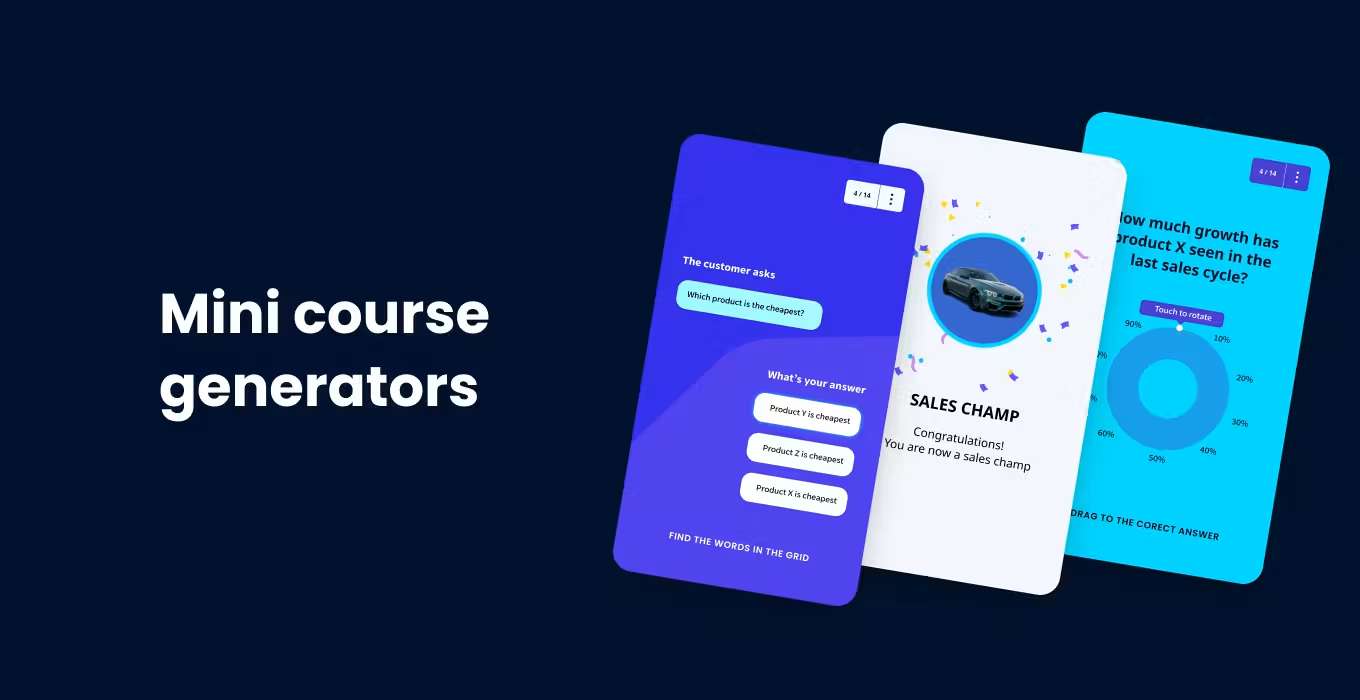
Our Honest Take: What Is Mini Course Generator?
If you have been sitting on a topic idea for months wondering how to package it into something learners will actually finish, Mini Course Generator might be the answer you did not know you were looking for. We spent a good amount of time with the platform at Nubia Magazine, testing everything from its AI course builder to its checkout flow and support responsiveness, and we came away genuinely impressed, with a few caveats we will get into.
Mini Course Generator, often shortened to MCG, is a cloud-based course authoring platform built specifically for short-form, interactive microlearning. It was founded in January 2021 and is based out of Tallinn, Estonia. The founding team, led by Onur Oz, positioned MCG from day one as a faster, lighter alternative to the heavyweight LMS platforms that cost small creators a fortune and take months to learn.
In 2026, that original vision has held up surprisingly well. While tools like Teachable and Thinkific went deeper into full-blown course ecosystems, MCG stayed focused on speed, brevity, and lead generation. The result is a tool that genuinely gets out of your way and lets you create something useful in a single afternoon.
Mini Course Generator AI Features: What Can It Actually Do?
The AI story at Mini Course Generator has grown considerably since the platform launched. In 2025 alone, the team shipped several major AI updates, and by mid-2026 the AI capabilities are arguably the strongest reason to choose this tool over building a course manually or using a traditional authoring platform.
AI Course Creator
The AI Course Creator is the centerpiece. You start by giving it a topic, uploading a PDF or document, or simply pasting in some notes. The AI then generates a full structured course, complete with learning objectives per page, lessons organized into a logical flow, and suggested quiz questions. The platform claims to maintain over 95% accuracy when sticking to your source material, which we found to be mostly true during our testing. It does not hallucinate facts as long as you give it something concrete to work with.
AI Interaction Builder
This is one of the more genuinely unique features MCG released in 2025. The interaction builder lets the AI generate context-aware educational elements, like Wordle-style games, crossword puzzles, and interactive quizzes, based on your actual course content. We have not seen this kind of AI-powered interactive element generation in many other tools at this price point.
YouTube to Course Conversion
Drop in a YouTube URL and MCG will parse the video and generate a structured course from it. For content repurposers and coaches who already have a video library, this is a serious time saver.
ChatGPT and Claude Integration
MCG added integrations that let you generate and manage courses without ever leaving ChatGPT or Claude. You can essentially prompt your AI assistant of choice and have the course scaffolded directly through MCG. This is a clever move that positions MCG as an AI-native tool rather than one that just bolted AI onto an existing product.
AI Voiceovers
The platform added AI voiceover support for course slides, which is useful for creators who want to deliver audio explanations without recording their own voice. Quality is decent, though not quite at the level of dedicated tools like ElevenLabs.
Free Plan: Is It Actually Usable?
Yes, and that matters. A lot of SaaS tools offer a free tier that is barely functional, just enough to tease you into paying. Mini Course Generator's Basic plan is different. You get up to three mini-courses, one landing page, unlimited learner access (no seat limits), basic analytics, digital badge issuing, and the ability to share via link or embed on a website.
For a solo creator testing ideas or a small business that needs one or two courses as lead magnets, the Basic plan is genuinely workable. The AI credits on the free tier are limited, so you will not be generating twenty courses with it, but you can absolutely ship something real.
The free plan does not expire. There is no 14-day trial countdown, no credit card required to sign up. You create your account, build your course, and publish it the same day.
Mini Course Generator Login: Getting Into the Platform
Signing up and logging in is about as simple as it gets. You head to minicoursegenerator.com and create an account with your email address. There is no complicated onboarding wizard that takes forty-five minutes to get through. Within a couple of minutes of signing up, you are inside the dashboard and can start building.
The login experience is clean and stable. We did not encounter any session issues or loading problems during our testing period. The dashboard loads quickly and keeps your courses organized in a card-based view that makes it easy to pick up where you left off. There is also a collaboration feature that allows you to give team members access to specific courses, which some early reviewers missed but is now documented in their help center.
One thing worth noting: MCG does not currently offer a dedicated mobile app. The platform is web-based, but it is mobile-responsive, so you can review and share courses on your phone. Course creation, however, is best handled on a desktop.
Mini Course Generator Pricing in 2026
Here is how the pricing breaks down as of June 2026:
Plan | Price | Courses | AI Credits | Key Features |
Basic | $0/month | 3 courses | Limited | 1 landing page, basic analytics, digital badges, embed/link delivery |
Pro | $49/month | Unlimited | 1,000 credits | 5 custom domains, gateways (email, paywall, invite), certifications, remove MCG branding |
Elite | $99/month | Unlimited | 3,000 credits | SCORM export, unlimited domains, in-app auth (250 learners/mo), in-academy hosting (1,000 learners/mo), dedicated account manager |
A few things worth knowing about the pricing structure:
- There are no transaction fees. MCG does not take a cut of course sales, which is better than platforms like Teachable that charge revenue sharing on lower plans.
- There are no setup or onboarding fees, even for paid plans.
- NGOs, charities, and schools can contact the team for discounted rates.
- Annual billing is available and comes with a discount over monthly rates.
- The 14-day trial on paid plans lets you test premium features before committing.
Compared to competitors, MCG's pricing is competitive. Easygenerator, for example, starts at around $1,399 per year. Teachable's transaction fees on its basic plan can add up quickly. For solo creators and small teams who need speed and simplicity over enterprise compliance features, MCG's $49 Pro plan represents solid value.
User Experience: What It Feels Like to Actually Use It
We want to be honest here because a lot of reviews gloss over the UX and just list features. Mini Course Generator feels fast to use, and that is its biggest selling point. The card-based editor is intuitive enough that most people can figure out the basics without watching a tutorial. You add blocks, drag them around, drop in images or video, and publish.
The AI course generation is the part that actually wows new users. You paste in a topic or upload a file, hit generate, and within a couple of minutes you have a structured course draft. It is not perfect on the first pass, but it gives you something to edit rather than a blank page to fill, and that matters enormously for creative momentum.
Where the UX can use improvement is in discoverability. Some features, like the collaboration tools and the WordPress plugin, are not prominently surfaced during onboarding. Multiple AppSumo reviewers mentioned not finding these features until they dug into the knowledge base or reached out to support. The team has acknowledged this and made improvements, but there is still room to grow.
Performance has been a complaint in older reviews, particularly around image uploads. In our 2026 testing, this was noticeably better than what reviewers experienced in 2023 and 2024. Image uploads were fast, and we did not hit the slowdowns that some earlier users reported.
The platform supports custom branding on paid plans, including your own colors, fonts, and domain. Courses look clean and modern out of the box. They are mobile-responsive by default, which means learners on phones get a good experience without any extra work from you.
Ratings Breakdown
Ease of Use: ★★★★★ 5/5
AI Quality: ★★★★☆ 4/5
Course Customization: ★★★★☆ 4/5
Pricing and Value: ★★★★★ 5/5
Support and Response Time: ★★★★☆ 4/5
Feature Depth: ★★★★☆ 4/5
Overall Experience: ★★★★☆ 4/5
Nubia Magazine Overall Rating: 4.3 / 5
Mini Course Generator Alternatives in 2026
MCG is not the only tool in this space, and depending on your needs, something else might actually serve you better. Here is how it stacks up against the main alternatives:
Teachable
Teachable is more full-featured for traditional online courses with video, community, and coaching products. It is significantly more expensive, and it takes a revenue cut on the basic plan. If you are building a $2,000 signature course with video modules, Teachable might make more sense. If you want a fast lead magnet or a short onboarding course, MCG wins on speed and price.
Thinkific
Thinkific is another full LMS with community and live session features baked in. Like Teachable, it is built for larger, more traditional courses. It has a free tier but its AI features are not as developed as MCG's.
Easygenerator
Easygenerator is an enterprise authoring tool that starts at around $1,399 per year. It is built for corporate learning and compliance training. If you are an instructional designer at a Fortune 500 company, Easygenerator might be the right call. For everyone else, MCG is faster and far more affordable.
Articulate 360
Articulate is the industry standard for corporate e-learning with SCORM and xAPI support. It costs significantly more and has a steep learning curve. MCG borrowed some of its SCORM export functionality for the Elite plan, but it is not trying to compete with Articulate's depth.
Kajabi
Kajabi is an all-in-one platform for creators covering courses, email marketing, membership sites, and podcasting. It is the most expensive option, with plans starting around $149 per month. If you want everything in one place and have the budget, Kajabi is compelling. But for pure course creation speed and affordability, MCG still holds its own.
The bottom line on alternatives: Mini Course Generator wins most clearly on speed, AI-driven content creation, and affordability. If you need a full LMS or a community platform, you will want to look elsewhere. But if you want to create professional micro-courses or lead magnets without a massive learning curve or budget, MCG is one of the best options available in 2026.
What We Liked and What Could Be Better
What We Liked
- Genuinely fast course creation, most users can publish something in under 30 minutes
- Free plan that is actually functional and never expires
- AI tools that improve with each update, especially the interaction builder and YouTube-to-course feature
- No transaction fees on course sales, which adds real savings over time
- Responsive support team with a documented response time of under 24 hours
- Clean, mobile-responsive course design out of the box
- Regular product updates with transparent communication from the founding team
- Integration with Zapier and Make for workflow automation
What Could Be Better
- Some features like collaboration and the WordPress plugin are not obvious on first login
- SCORM export is locked to the most expensive plan at $99 per month
- No dedicated mobile app for course building on the go
- AI credit consumption on longer or more complex courses can feel high on lower tiers
- Occasional updates can temporarily break features that were previously working
- No API access, which limits custom workflow options for developer-heavy teams
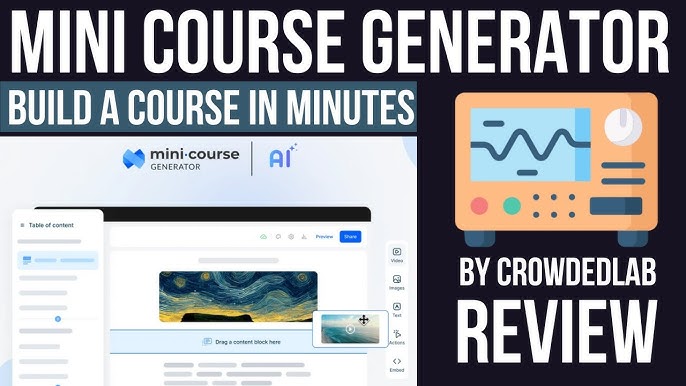
Mini Course Generator FAQs: Questions People Are Actually Asking in 2026
1. Is Mini Course Generator free to use?
Yes. MCG offers a free Basic plan that does not expire and does not require a credit card. With it, you can create up to three mini-courses, one landing page, and share them publicly. AI credits are limited on the free tier, but you can still create and publish courses manually. It is one of the more genuinely usable free plans in the course creation space.
2. How does the AI in Mini Course Generator actually work?
The AI course creator works by taking your input, whether that is a topic, an uploaded document, a PDF, or a YouTube link, and generating a structured course outline with lessons, learning objectives, and suggested quiz questions. You can then edit, rearrange, and refine the output. The AI sticks closely to your source material to minimize hallucinations. More advanced features like the AI interaction builder can generate games and exercises based on your content. AI usage is measured in credits, which are consumed based on the length and complexity of what you generate.
3. Can I use Mini Course Generator for free lead magnets?
Absolutely, and this is one of its most popular use cases. Coaches, consultants, and marketers use MCG to build free mini-courses that collect email addresses through a gated access link. The platform supports email verification gateways on paid plans, letting you offer a course in exchange for a subscriber's email. On the free plan, you can share courses via public link or embed them on your website without any gating.
4. What is the difference between the Pro and Elite plans?
The Pro plan at $49 per month is built for creators who need unlimited courses, custom domains, branding removal, and access to gateways like email verification and paywalls. The Elite plan at $99 per month adds SCORM export (for LMS compatibility), unlimited custom domains, in-app authentication for tracking learners, academy hosting for up to 1,000 learners per month, and a dedicated account manager. If you are running corporate training or need to push courses into an existing LMS, Elite is the one to consider.
5. Does Mini Course Generator support SCORM?
Yes, but only on the Elite plan at $99 per month. SCORM export lets you take a course built in MCG and upload it to any LMS that supports the SCORM standard, including Moodle, TalentLMS, and most corporate learning systems. If SCORM compatibility is essential for your workflow and budget is a concern, this is worth factoring into your plan choice.
6. How does Mini Course Generator compare to Teachable or Kajabi?
MCG is specifically built for short-form, fast microlearning rather than full multi-module courses with video, community, and coaching features. Teachable and Kajabi are better fits if you are building a comprehensive course program with a community hub or live coaching component. MCG wins on speed, simplicity, and price. Most users say a mini-course can go from idea to live in under thirty minutes, which is not something Teachable or Kajabi can match for that type of content.
7. Is there a mobile app for Mini Course Generator?
As of June 2026, MCG does not have a dedicated mobile app for course creation. The web platform is mobile-responsive, meaning your learners can consume courses comfortably on any device. But if you want to build or edit courses on your phone, you will likely find the experience limited. The team has not announced a mobile app at the time of this review, though the platform continues to evolve quickly.
8. Can I embed Mini Course Generator courses on my own website?
Yes, all plans including the free one support course embedding via iframe or JavaScript snippet. MCG also has a WordPress plugin that lets you add courses directly to a WordPress site. There is a direct link delivery option as well, where you simply share a URL with learners and they access the course in a clean, branded browser page. This flexibility in delivery is one of MCG's stronger selling points compared to platforms that lock courses behind their own branded domains.
Nubia Magazine Verdict
After spending serious time with Mini Course Generator, our honest verdict is that it earns its reputation as one of the better options in the microlearning and lead magnet course space. It is not trying to be Teachable or Articulate, and that is actually what makes it good. It does a specific job, helping you create short, interactive, professional-looking courses fast, and it does that job well.
The AI features have genuinely improved to the point where they provide real value rather than just being a marketing talking point. The free plan is one of the most usable free tiers we have seen in this category. The pricing is competitive. The support team is responsive. And the platform has a track record of consistent updates backed by transparent founder communication.
The areas where it still has room to grow are around feature discoverability, the lack of a mobile app, and the fact that some advanced features like SCORM are gated behind the most expensive plan. But for the majority of creators, coaches, and marketing teams building micro-courses and lead magnets, Mini Course Generator at its Pro tier represents strong value in 2026.
If you are on the fence, the free plan gives you everything you need to test it with zero risk. Try it, build one course, publish it, and see if it fits your workflow. Chances are, you will be impressed by how much you can accomplish before spending a single dollar.
Related Posts


0 Comments
Join the discussion and share your thoughts
No Comments Yet
Be the first to share your thoughts on this article!