Adobe Firefly Review 2026: Login, Pricing, Generator, AI, Download & FAQs


Table of Contents
Adobe Firefly has been one of the most talked about names in the AI creative space since it first launched in 2023, and by 2026 it has grown into a full suite that touches almost everything Adobe makes, from Photoshop to Premiere Pro to Express. At Nubia Magazine, we spent real time this year logging in, generating images and video, testing the pricing plans, and reading through what actual users are saying across the web before writing this review. Our goal was simple. We wanted to know if Firefly still deserves the hype it got when it launched, or if the newer competition has quietly passed it by.
Short answer, it is a capable tool if you already live inside Adobe's world, but it struggles to justify itself as a standalone product. Here is everything you need to know about Adobe Firefly in 2026, covering login, pricing, the generator itself, download options, the overall user experience, and the questions people keep typing into Google about this brand.
Quick Profile: Adobe Firefly at a Glance
Developer | Adobe Inc. |
Category | Generative AI design and content tool |
Launched | March 2023 (public beta), expanded through 2024 to 2026 |
Core tools | Text to Image, Generative Fill, Text to Video, Generate Sound Effects, Translate, Firefly Boards, Generative Match |
Platforms | Web app, mobile app, and built into Photoshop, Illustrator, Express and InDesign |
Free plan | Yes, limited monthly credits and watermarked video generations |
Paid plans | Firefly Standard $9.99/mo, Firefly Pro $19.99/mo, Firefly Premium $199.99/mo |
Best for | Adobe Creative Cloud users, marketing teams, and brand-safe commercial content |
Not ideal for | Artists wanting bold, experimental styles or standalone users outside Adobe's ecosystem |
Nubia Magazine rating | 1.7 out of 5 |
Adobe Firefly Login: How Getting In Actually Works
Logging into Adobe Firefly is straightforward if you already have an Adobe ID, which most people who have ever touched Photoshop, Lightroom or even a free Adobe Acrobat account will have. Head to firefly.adobe.com, click sign in, and use your existing Adobe account or create one with an email address or a Google, Apple or Facebook login.
Where it gets slightly annoying is when your Adobe ID is tied to an old Creative Cloud plan or a work email managed by an organization's IT team. A number of users on Adobe's own community forums and on Reddit report getting stuck in a loop where the system asks them to verify a business account before Firefly credits show up correctly. If you are signing up fresh for a personal account, the process takes under two minutes. If you are joining through a company or school license, budget extra time and maybe a support ticket.
- Personal Adobe ID: fast, usually under two minutes to get generating.
- Work or enterprise ID: slower, sometimes needs admin approval for credits.
- Mobile app login: mirrors your web account, no separate signup needed.
Adobe Firefly Pricing in 2026: What You Actually Pay
Firefly runs on a credit based pricing model. Every paid plan gives unlimited standard generations for things like basic text to image and Generative Fill, but premium features such as video generation, audio translation, lip sync and outputs from partner models draw from a monthly credit pool that does not roll over.
- Firefly Free: $0 a month. Very limited credits, watermarked or capped premium output, good only for testing the waters.
- Firefly Standard: $9.99 a month for around 2,000 premium credits, roughly enough for 20 short video clips.
- Firefly Pro: $19.99 a month for about 4,000 credits, plus Adobe Express Premium and Photoshop web and mobile access.
- Firefly Premium: $199.99 a month for around 50,000 credits, aimed at agencies and studios with heavy output needs.
- Creative Cloud bundles: Photoshop or Illustrator single app plans include a smaller Firefly credit allowance, and the Creative Cloud All Apps plan folds in a larger one at no extra charge.
The math sounds fine on paper, but this is the single biggest complaint we found across G2, Capterra and Reddit threads. Credits reset every month whether you used them or not, video and partner model generations burn through credits fast, and several reviewers said a $9.99 plan can be gone within days if you lean on video. One G2 reviewer summed it up by saying the credit system feels restrictive compared to a flat subscription. We agree. It is not that Firefly is expensive on the surface, it is that the real cost per usable output is harder to predict than competitors like Midjourney or ChatGPT's image tools.
The Firefly Generator and AI Models: What It Can Actually Do
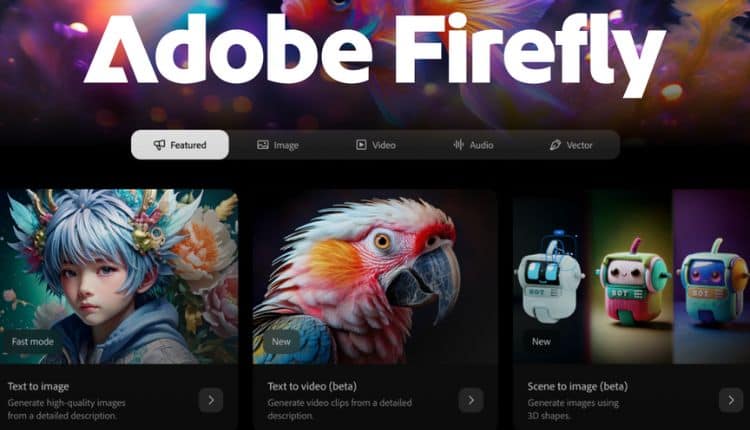
Firefly's generator covers a wide spread of tools. Text to Image remains the core, alongside Generative Fill and Expand inside Photoshop, text effects, generative recolor for vectors in Illustrator, Firefly Boards for moodboarding, and a growing video suite that now includes access to partner models like Google's and OpenAI's image and video systems, plus a partnership that brought Runway's video model into the Firefly app.
On paper this sounds like the industry's best AI models gathered in one place, which is close to Adobe's own marketing line. In practice, our testing and the wider review landscape tell a more mixed story. Firefly is genuinely strong at commercially safe, brand friendly output. It plays nicely with Photoshop layers, it respects prompts for product mockups and marketing assets, and its Content Credentials system gives buyers a paper trail for where an image came from, which matters more every year for brands worried about copyright.
Where it falls short is creative range. Multiple reviewers, including a professional motion designer who publicly tested Firefly's video model, described the output as decent but not close to what Midjourney, Runway or OpenAI's newest models can do on their own. Prompts that involve people often come back distorted, and complex or highly detailed prompts frequently need several regenerations before the result is usable. If your work is polished, brand safe, and inside the Adobe ecosystem, the generator earns its keep. If you want bold or experimental art, you will likely be disappointed.
Downloading Adobe Firefly: Web App, Mobile App and Desktop Integration
Firefly does not exist as one single downloadable program in the way Photoshop does. Instead it lives mainly as a web app at firefly.adobe.com, with a companion mobile app for iOS and Android that mirrors most of the browser experience. For desktop users, Firefly's real power shows up once it is threaded into Photoshop, Illustrator, Premiere Pro and Express, all of which are downloaded and updated through the Creative Cloud desktop app.
This means there is technically nothing to download if all you want is the browser based generator, and downloading the Creative Cloud app is only necessary if you want Firefly's tools inside Photoshop or Illustrator directly. One practical note worth repeating from Adobe's own documentation, Firefly needs an internet connection for every generation. None of its AI features work offline, even inside desktop apps that otherwise function without wifi.
User Experience: What Real Reviewers Are Saying
We read through reviews on G2, Capterra, TrustRadius and Gartner Peer Insights, plus community threads on Reddit and Adobe's own forums, to get a rounded picture beyond our own testing.
What people like
- Tight integration with Photoshop, Illustrator and Express, letting users move from a generated asset straight into manual editing.
- Commercial safety, since Firefly trains on licensed Adobe Stock and public domain content, which appeals to brand and legal teams.
- A genuinely easy interface for beginners who have never touched a design tool before.
- Useful for quick ideation, moodboards and early concept work rather than finished production assets.
What people dislike
- The credit system, described repeatedly as confusing and restrictive, with credits vanishing at the end of each billing cycle.
- Inconsistent results on detailed or complex prompts, often needing multiple regenerations.
- Distorted output on images involving people, a recurring complaint across several review platforms.
- Weak standalone value, since much of Firefly's appeal depends on already owning Creative Cloud apps.
- Video quality that reviewers call fine or decent rather than impressive next to Runway, Sora or Midjourney's newer output.
A recurring theme in the more critical reviews is a gap between marketing and delivery. Adobe positions Firefly as bringing together the industry's top AI models, and while the partner model access is real, actual output quality still lags behind dedicated specialists in image, video and illustration. For teams already paying for Creative Cloud, that gap matters less because Firefly is essentially a bonus feature. For anyone shopping around as a standalone AI tool, the gap is the whole story.
Nubia Magazine Verdict
Ease of use | 3.0 / 5 |
Output quality and creativity | 1.4 / 5 |
Pricing and credit system | 1.0 / 5 |
Customer support | 1.5 / 5 |
Value for standalone users | 1.2 / 5 |
Overall Nubia Magazine score | 1.7 / 5 |
We landed on a 1.7 out of 5 because Firefly's biggest selling points, commercial safety and Adobe integration, only pay off for a narrow slice of users who are already committed to Creative Cloud. For everyone else, the pricing feels unpredictable, the credit system punishes normal usage patterns, and the creative output does not match what competitors offer for similar or lower prices. Firefly is not a bad tool. It is a tool that oversells itself relative to what it delivers, and that gap between promise and result is what drags the score down.
If you are a designer already paying for Photoshop or Illustrator, Firefly is worth using because it is effectively bundled in and saves time on backgrounds, fills and quick concepts. If you are choosing your first AI generator from scratch, we would point you toward testing free tiers of a few tools, including Firefly, before committing any money.
Frequently Asked Questions About Adobe Firefly in 2026
1. Is Adobe Firefly free to use?
Yes, there is a free plan, but it comes with limited monthly credits and restrictions on premium features like video generation, which often arrive watermarked or capped. Most people who want to use Firefly seriously end up on a paid plan.
2. How much does Adobe Firefly cost in 2026?
Paid plans start at $9.99 a month for Firefly Standard and go up to $199.99 a month for Firefly Premium, with a Pro tier at $19.99 a month in between. Creative Cloud subscribers also get Firefly credits bundled into their existing plan.
3. Do Adobe Firefly credits roll over each month?
No. Credits reset on your billing date and any unused credits are lost, which is one of the most common complaints from users who do not generate content every single month.
4. Can I use Adobe Firefly without a Creative Cloud subscription?
Yes, standalone Firefly plans exist separately from Creative Cloud. That said, most of the value comes from pairing Firefly with Photoshop or Illustrator, so standalone users often feel like they are paying for less.
5. Is Adobe Firefly good for beginners?
Yes, the interface is one of the more approachable ones in the AI generator space, with simple prompt boxes and style presets that do not require any design background.
6. How does Adobe Firefly compare to Midjourney?
Midjourney generally produces more artistically striking and varied images and remains the benchmark for stylized art. Firefly wins on commercial licensing clarity and Adobe app integration, but tends to lose on raw creative quality.
7. Does Adobe Firefly work offline?
No. Every Firefly generation, whether it is an image, video or fill, requires an active internet connection because the models run on Adobe's servers rather than on your device.
8. Is Adobe Firefly safe to use for commercial projects?
This is Firefly's strongest point. It trains only on licensed Adobe Stock content, openly licensed images and public domain material, and Adobe offers indemnification for qualifying enterprise customers if intellectual property claims come up.
10. Can Adobe Firefly generate video, not just images?
Yes, Firefly includes a text to video and image to video model, and now also gives Pro and higher subscribers access to Runway's video model inside the Firefly app. Reviewers generally describe the video output as usable but not competitive with dedicated video generators.
Related Posts




1 Comment
Join the discussion and share your thoughts



