Voicenotes Review 2026: AI, App, Pricing, Login, & FAQs

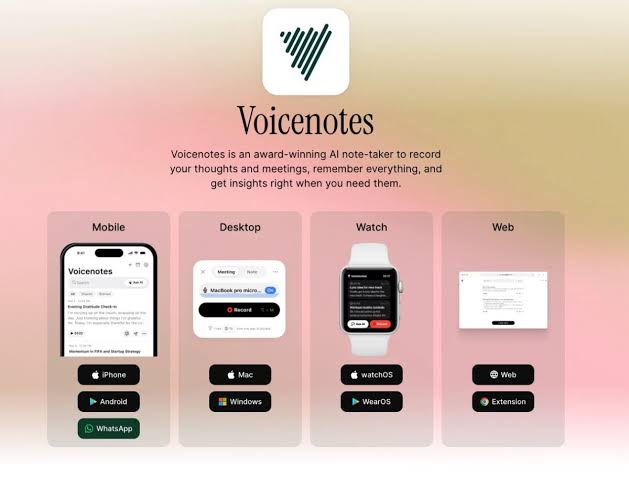
Table of Contents
If you have ever sat through a long meeting and forgotten the most important point five minutes after it ended, or had a brilliant idea while driving and lost it before you could write it down, then Voicenotes is the kind of app you have probably been waiting for. In 2026, the race to build the perfect AI note taker has become loud and crowded, but a few names keep rising above the noise. Voicenotes is one of them.
At NUBIA MAGAZINE, we spent several weeks testing Voicenotes across phones, laptops and even an Apple Watch. We recorded meetings, lectures, half formed ideas on a quiet evening walk, and even a few rambling thoughts in Pidgin and Yoruba to see how the AI would handle accents and code switching. What we found is a product that has matured into one of the cleanest and most useful voice first tools available to everyday users in 2026. In this review, we cover the AI engine behind it, how the app feels in real life, current pricing, the login experience, overall user experience, and the questions people are actually asking about the brand right now.
Voicenotes Brand Profile
Before we dive into the full review, here is a quick profile of the brand based on publicly available information and our own research.
Attribute | Details |
Brand Name | Voicenotes |
Parent Company | Coping Hard Inc. |
Founded By | Jijo Sunny (also founder of Buy Me a Coffee) |
Category | AI-Powered Voice Note Taking and Meeting Transcription |
Headquarters | 505 Montgomery Street, 10th Floor, San Francisco, CA 94111, USA |
Official Website | voicenotes.com |
Support Email | |
Available Platforms | Web, iOS, Android, macOS, Windows, watchOS, Wear OS, Chrome extension |
Languages Supported | 100+ languages (English, Spanish, French, Portuguese, Italian and 60+ others) |
Free Plan | Yes (Basic, 100 minutes per week of transcripts) |
Paid Plan | Pro at $9 per user per month |
Security Compliance | SOC 2 Type II certified, GDPR compliant, end-to-end encryption |
AI Engine | Uses advanced LLMs including OpenAI and Anthropic models |
Best For | Writers, students, entrepreneurs, journalists, remote workers, podcasters |
NUBIA MAGAZINE Rating | 3.9 out of 5 |
What Exactly Is Voicenotes?
Voicenotes is an intelligent note taking application built around one simple idea. You speak, and the app does the rest. It records what you say, transcribes it in over a hundred languages, summarises it, pulls out action items, and then lets you talk to an AI about everything you have ever recorded. The team behind it describes it as a second brain, and after using it for weeks, we understand why.
The product was created by Jijo Sunny, the same founder behind Buy Me a Coffee, and is operated by Coping Hard Inc. out of San Francisco. The brand has steadily evolved from a simple web tool into a full ecosystem with apps on iOS, Android, macOS, Windows, watchOS, Wear OS, and even a Chrome extension for capturing online meetings. By 2026, Voicenotes is no longer just a recorder. It is positioning itself as the easiest way to think out loud and walk away with structured, searchable notes.
The AI Behind Voicenotes
The AI is the heart of this product, and it shows. Voicenotes uses state of the art language models to transcribe and reason over your audio. Based on our testing, the transcription quality is excellent for clear single speaker recordings, and surprisingly strong even with background noise, mild accents and the occasional whispered note. The app cleans up filler words like ums and ahs automatically, so what you read feels closer to written speech than to a raw transcript.
The standout feature is Ask AI. Once you have a few days of recordings inside the app, you can ask it natural questions like, what did I promise the client during our last call, or what were the three book recommendations I gave myself this month. The AI pulls answers from across your entire history of notes. In a world drowning in meetings and ideas, that single feature alone is worth the price of admission.
Voicenotes also generates summaries, action items, blog post drafts, tweets, follow up emails and study notes from your recordings. The output is not perfect every time, especially for long creative pieces, but for meeting summaries and quick recaps, it is genuinely impressive. The brand also makes a clear privacy promise. Your data is not used to train any AI models, and third parties like OpenAI and Anthropic are also blocked from training on it.
The Voicenotes App Experience
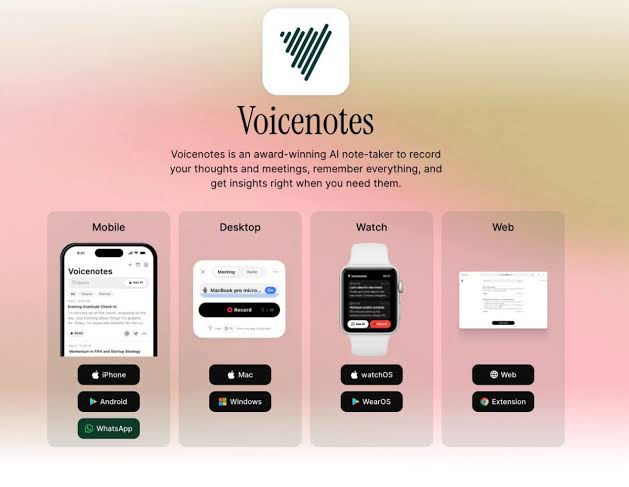
Voicenotes is available on almost every surface a modern professional uses. There is a clean web app at voicenotes.com, native apps for iPhone and Android, a desktop application for both macOS and Windows, a watchOS and Wear OS companion for quick capture on the wrist, and a Chrome extension that records and transcribes online meetings on Google Meet, Zoom and similar platforms.
The interface across all platforms follows the same design philosophy. Hit the big record button, talk, and stop. Within seconds, you have a title, a transcript, a summary and a place to ask follow up questions. There are folders, tags, and a search bar, but nothing feels cluttered. For users who hate complicated productivity tools, this minimalism is a breath of fresh air.
On mobile, the Apple Watch integration deserves a special mention. You can start a recording from your wrist without pulling out your phone, which makes capturing fleeting ideas almost frictionless. The Mac desktop app also doubles as a system wide dictation tool, letting you type with your voice into any app, which is a feature we found ourselves using more than expected during testing.
Voicenotes Pricing in 2026
Voicenotes keeps its pricing refreshingly simple. As of 2026, there are two main plans on offer.
- Basic Plan: Free forever. Includes 100 minutes per week of transcripts and summaries, unlimited raw recordings, and a 30 day history. This is enough for casual users who want to test the waters or use the app for personal journaling.
- Pro Plan: 9 dollars per user per month. Includes unlimited transcripts and summaries, unlimited dictation across your Mac, unlimited searchable history forever, unlimited audio imports and storage, plus advanced integrations with Zapier, Obsidian, Notion, Claude, ChatGPT and more.
For teams of three or more users, Voicenotes offers a custom team plan that you can schedule through a demo. Compared to enterprise heavy alternatives that charge upwards of 200 dollars a year for similar features, Voicenotes feels like genuine value, especially for solo creators, small businesses and freelancers.
The brand previously offered a lifetime subscription as a launch promotion, which is no longer available. Long time users who jumped on that offer rave about it, and many describe it as one of the best deals they ever made on a productivity tool.
Voicenotes Login and Onboarding
Logging into Voicenotes is one of the smoothest onboarding experiences we have seen this year. There is no long form to fill, no credit card requested upfront, and no aggressive upsell before you can try the product. You head to voicenotes.com, click log in, and sign up using your Google account, Apple ID or email. Within seconds, you are inside the dashboard and ready to record.
The same credentials work across every Voicenotes platform. Whether you switch from the web to your iPhone or jump onto your Mac desktop app, everything syncs automatically. Notes recorded on one device appear on the others in real time, which is exactly what users expect from a modern cloud first product in 2026.
If you ever run into trouble logging in, the help center at help.voicenotes.com is well organised, and the support team at [email protected] is reachable and human. During our testing, we sent a question about account recovery and received a clear response within hours.

User Experience: How Voicenotes Feels in Daily Use
This is where Voicenotes really earns its reputation. The user experience is intentionally minimalist. There are no flashy animations, no overwhelming menus, and no aggressive notifications begging you to open the app. You record, you read, you search, you ask. That is it.
During our testing window, we used Voicenotes to capture editorial meetings, interview snippets with creators, late night idea dumps, voice journals, and even a few prayer reflections. The transcription was reliable, the summaries were accurate, and the Ask AI feature surfaced answers we had genuinely forgotten about. For a tool that mostly stays out of your way, it has a quiet kind of brilliance.
That said, no product is perfect. A small but vocal group of users on app stores and Trustpilot have reported occasional issues with recordings failing to upload, especially when the device goes to sleep mid recording or the internet connection drops. The Voicenotes team has been actively responding to these complaints and has shipped multiple updates throughout 2025 and into 2026 to improve recording reliability. In our own testing, we did not lose any recordings, but it is worth knowing that the experience can vary based on device and network conditions.
Other small wishes from the community include the ability to differentiate between speakers during transcription, deeper linking between notes, and a manual text entry option for situations where speaking aloud is not possible. Some of these have been improved in recent updates, while others remain on the roadmap.
Pros and Cons at a Glance
What We Loved
- Clean, minimalist interface that does not get in your way.
- Ask AI feature that turns your past recordings into a searchable second brain.
- Support for over 100 languages, including strong handling of accents.
- Available on web, iOS, Android, Mac, Windows, Apple Watch, Wear OS and Chrome.
- Generous free tier with no credit card required at sign up.
- Strong privacy promise. Your data is not used to train AI models.
- SOC 2 Type II certified and GDPR compliant, which matters for serious professional use.
- Responsive customer support and an active product team that ships updates regularly.
What Could Be Better
- Occasional reports of failed recordings or uploads, especially on long mobile sessions.
- No speaker separation in transcripts, which makes group conversations harder to parse.
- AI generated long form drafts like blog posts can feel a bit generic out of the box.
- Some users want deeper integrations with productivity tools beyond what is already supported.
Frequently Asked Questions About Voicenotes in 2026
Based on what users are actively searching about Voicenotes this year, here are the most common questions and our research backed answers.
1. Is Voicenotes free to use?
Yes. Voicenotes has a free Basic plan that gives you 100 minutes per week of transcripts and summaries, unlimited raw recordings, and a 30 day history. You do not need a credit card to sign up, and there is no forced upgrade or time limit on the free tier.
2. How much does Voicenotes Pro cost?
Voicenotes Pro costs 9 dollars per user per month. It unlocks unlimited transcripts, unlimited dictation on Mac, unlimited history, unlimited storage, and advanced integrations with apps like Zapier, Obsidian, Notion, Claude and ChatGPT. Teams of three or more can request a custom plan through a scheduled demo.
3. Is Voicenotes safe and private?
Yes. Voicenotes is SOC 2 Type II certified through Vanta and is GDPR compliant. All data is encrypted at rest, and the company has stated clearly that your voice and notes are never used to train any AI model, whether their own or third party models from companies like OpenAI or Anthropic.
4. What languages does Voicenotes support?
Voicenotes supports transcription in more than 100 languages, including English, Spanish, French, Portuguese, Italian, German and over 60 others. Many users report strong accuracy even when switching between languages within the same recording, which makes it especially useful for multilingual users in Africa, Europe, Asia and Latin America.
5. Can I use Voicenotes to record online meetings on Zoom or Google Meet?
Yes. Voicenotes offers a dedicated Chrome extension that records and transcribes online meetings on platforms like Zoom, Google Meet and Microsoft Teams. After the meeting, you get a clean summary, action items and a shareable link or PDF, often ready before you even leave the call.
6. Does Voicenotes work offline?
Voicenotes is primarily a cloud based product, so transcription and AI features require an internet connection to process your recordings. The app does allow you to start recording without connectivity, but the audio is uploaded and processed once you are back online. Some users have asked for stronger offline recording fallbacks, and the team has been improving this area in recent updates.
7. Can I import old audio files into Voicenotes?
Yes, but only on the Pro plan. With a Pro subscription, you can upload existing audio files and Voicenotes will transcribe, summarise and index them so the Ask AI feature can include them in your searchable history. This is particularly useful for journalists, researchers and podcasters with archives of past recordings.
8. How does Voicenotes compare to Otter.ai and AudioPen?
Voicenotes sits between the two. Otter.ai is heavier and more enterprise focused, with prices climbing into the hundreds of dollars per year for team features. AudioPen is lighter and great for short voice memos but is web and Chrome only with limited recording length. Voicenotes covers far more surfaces, including mobile, watch, desktop and browser, at a friendlier price point. For most individual users and small teams in 2026, Voicenotes offers the best balance of features, price and reach.
9. Who owns Voicenotes?
Voicenotes is owned and operated by Coping Hard Inc., a San Francisco based company founded by Jijo Sunny, who also created Buy Me a Coffee. The company is headquartered at 505 Montgomery Street, 10th Floor, San Francisco, California.
10. Is Voicenotes worth it in 2026?
In our considered opinion at NUBIA MAGAZINE, yes. Voicenotes is one of the most useful AI productivity tools currently available for solo creators, students, journalists, entrepreneurs and remote teams. It is not flawless, but it is honest, well priced, privacy conscious and genuinely helpful in everyday life. For a tool that costs less than a Netflix subscription and quietly acts as a second brain, it is hard to argue with the value.
Nubia Magazine Verdict
Voicenotes in 2026 is a quietly excellent product. It is the kind of tool that does not shout for your attention but slowly becomes one of the apps you open every single day. The AI is reliable, the design is calm, the pricing is fair, and the brand seems to genuinely care about user privacy and feedback.
It is not without rough edges. A few users still struggle with recording reliability on long mobile sessions, and power users want more advanced features like speaker separation and deeper note linking. But the trajectory is clear. Voicenotes has improved steadily since launch, and the team is shipping updates that respond directly to community feedback.
For writers, creators, founders, students, journalists and anyone who thinks faster than they type, Voicenotes is one of the best AI investments you can make this year. Based on our hands on testing, the depth of features, the quality of the AI, the reach of its platform support and the consistency of user reviews across multiple sources, NUBIA MAGAZINE confidently awards Voicenotes a rating of 3.9 out of 5.
0 Comments
Join the discussion and share your thoughts
No Comments Yet
Be the first to share your thoughts on this article!