Top 10 Best Multi Platform Web Browsers In The world 2026

Table of Contents
The browser market in 2026 looks nothing like it did a decade ago. What was once a two-horse race between Google Chrome and Mozilla Firefox has expanded into a crowded field of privacy-first alternatives, productivity-focused upstarts, and specialized tools for journalists and activists. The top 10 best multi-platform web browsers in the world 2026 reflect this diversity, with options ranging from the dominant Chrome to niche players like Epic Privacy Browser.
Our ranking draws on benchmark testing from HighSpeedInternet.com, privacy evaluations from the Electronic Frontier Foundation, customer satisfaction data from CloudSEK, and the Magic Lasso 2026 browser comparison. We weighed performance, privacy protections, cross-platform availability, and real-world user feedback to build this list.
How We Ranked These
We evaluated each browser across five factors: raw performance in JetStream 2 and other benchmark suites, privacy and security features, cross-platform availability, user satisfaction ratings, and unique capabilities that set each browser apart. Benchmark scores came from HighSpeedInternet.com's 2026 testing on Windows and macOS hardware. Privacy assessments drew from the Electronic Frontier Foundation's Cover Your Tracks tests and Magic Lasso's independent analysis. Customer ratings reflect aggregated user reviews compiled by CloudSEK.
The Top 10 Best Multi Platform Web Browsers In 2026:
1. Google Chrome
Google Chrome remains the default browser for roughly 65% of the world's internet users, and for good reason. It tied for first place in the Magic Lasso 2026 ranking with a perfect score of 10, taking the top spot in both speed and standards compliance. On Windows, Chrome scored 761 on the JetStream 2 benchmark, the highest of any browser tested by HighSpeedInternet.com.
Chrome's dominance extends beyond raw numbers. The Chrome Web Store hosts tens of thousands of extensions, from password managers to ad blockers to productivity tools. For anyone embedded in Google Workspace, the browser's integration with Gmail, Google Drive, and Google Calendar is seamless enough that switching feels like a downgrade.
The company has also addressed one of Chrome's longstanding weaknesses: energy efficiency. Magic Lasso's 2026 testing showed major improvements in power consumption over the past 12 months, narrowing the gap with Microsoft Edge, which still holds the top spot in that category.
2. Apple Safari

Safari tied with Chrome for the overall top spot in the Magic Lasso 2026 rankings, but it wins in categories that matter to a specific audience. Apple's browser ranked first in speed, privacy, and graphics performance, and it remains the best choice for battery life on MacBooks.
Privacy is where Safari truly separates itself. The browser blocks trackers by default, blocks third-party cookies, and reduces fingerprinting, all without requiring users to dig through settings menus. On a 2018 MacBook Air, Safari took first place in two of four benchmark tests run by HighSpeedInternet.com, tying with Chrome as the fastest browser on macOS.
The catch is ecosystem lock-in. Safari works beautifully across iPhone, iPad, and Mac, but it does not exist on Windows, Android, or Linux. For Apple users, that limitation rarely matters. For everyone else, it's a dealbreaker.
3. Microsoft Edge
Microsoft Edge has completed one of the most impressive turnarounds in software history. The browser that replaced Internet Explorer's legacy now ranks third overall in the Magic Lasso 2026 tests with a score of 12, just two points behind the leaders. It holds the number one position in energy efficiency and ranks second in standards compliance.
Edge's sleeping tabs feature automatically puts inactive tabs into a low-resource state, which makes the browser noticeably more RAM-efficient than Chrome in everyday use. The integrated AI chatbot, workspaces for profile switching, and built-in vertical tabs give it features that Chrome users need extensions to replicate.
Microsoft has also expanded Edge's reach. The browser now runs on all major platforms, including Linux, and its Chromium base means it supports the full library of Chrome extensions. For Windows users, Edge is the default and increasingly the better choice.
4. Mozilla Firefox

Firefox is the only major browser not backed by a tech giant. Developed by the nonprofit Mozilla Foundation, it ranks fourth in the Magic Lasso 2026 tests with a score of 16 and holds a 4.7 out of 5 customer rating from CloudSEK.
The browser's market share has shrunk from over 30% in its heyday to single digits, but it remains the top choice for users who want privacy without sacrificing customization. Firefox offers Total Cookie Protection, which isolates cookies for each website, and container features that let users separate work, personal, and shopping sessions into distinct contexts.
Performance remains Firefox's weakness. It scored 541 on the JetStream 2 benchmark on Windows, the lowest of any major browser tested by HighSpeedInternet.com. For users who prioritize privacy over speed, that trade-off is acceptable. For everyone else, the alternatives are faster.
5. Brave
Brave has become the top privacy-focused browser in 2026, and the data backs up the claim. It achieved the best results in the Electronic Frontier Foundation's Cover Your Tracks privacy test, outperforming every other browser in the evaluation. CloudSEK users rate it 4.8 out of 5, the highest on this list.
The browser's built-in Shields feature blocks trackers and cross-site cookies by default. Because Brave does not render resource-heavy ad elements, it consumes less data and battery than its competitors. The result is a browsing experience that feels faster on the same hardware.
Brave also operates its own independent search engine, Brave Search, which does not use Google or Bing as its web crawler. The browser is available on Windows, macOS, Linux, Android, and iOS, and it includes vertical tabs and a speed reader for long-form content.
6. Opera
Opera has spent years rebuilding its reputation, and the effort is paying off. TechRadar ranked it third in its 2026 browser roundup, and HighSpeedInternet.com placed it third on both Windows and macOS. Its JetStream 2 score of 581 on Windows puts it ahead of Firefox and Vivaldi.
The browser ships with a free built-in VPN, an ad blocker, and native integration with WhatsApp and X. Opera's Lucid Mode sharpens video quality, and the browser maintains low resource consumption while offering a fast experience.
The gaming-focused Opera GX variant has developed a cult following among gamers, with features like RAM and CPU limiters and integration with streaming platforms. Standard Opera's privacy policy has drawn criticism for a lack of transparency, which is worth noting for privacy-conscious users.
7. Vivaldi

Vivaldi is the most customizable browser on the market, and it has been since its release in 2015. When every other browser was shipping identical-looking Chromium interfaces, Vivaldi let users modify virtually every button, apply full color themes, and rearrange the interface to their preferences.
The browser includes built-in ad and tracker blockers, configurable fingerprinting defenses, and per-site permission controls. Because it is Chromium-based, it supports all Chrome extensions. Unique features like web panels and workspaces give it a productivity edge that Arc has since popularized.
Vivaldi scores 566 on the JetStream 2 benchmark on Windows and holds a 4.7 out of 5 customer rating from CloudSEK. Some users find the interface dated compared to modern alternatives, but for power users who want control over every pixel, nothing else comes close.
8. Tor Browser

Tor Browser is the gold standard for anonymous browsing. It routes traffic through the Tor network, obscuring user identity and location through a series of encrypted relays. Journalists, activists, and users in restrictive regions rely on it to access information without surveillance.
The browser uses letterboxing and fingerprinting protections to prevent tracking, and it offers a strong isolation model where each website gets its own context. Built on the Firefox Extended Support Release base, Tor Browser is available for Windows, macOS, Linux, and Android.
The trade-off is speed. Routing traffic through multiple relays makes browsing significantly slower than standard browsers. Tor is not a daily driver for most people, but for its specific purpose, nothing else matches it. CloudSEK users rate it 4.6 out of 5.
9. Arc Browser
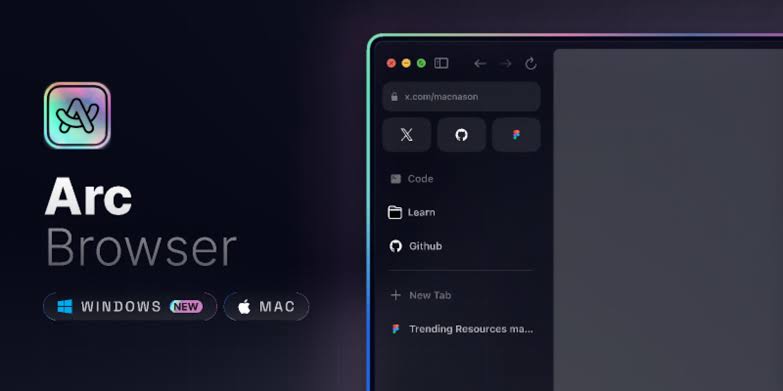
Arc Browser, developed by The Browser Company, has reimagined what a browser interface can be. Instead of a horizontal tab bar, Arc uses a sidebar-based layout with spaces for different contexts. Users can create separate spaces for work, personal browsing, and research, each with its own set of pinned tabs and profiles.
Brett In Tech ranked Arc as the second-best browser overall in his 2026 rankings, and Efficient App named it the best browser for productivity workspaces. The profile switching and workspace features have earned Arc a dedicated following among users who spend their days juggling multiple projects.
Arc is available on Windows, macOS, and mobile platforms. The Browser Company has shifted its focus to Arc's successor, Dia, which means the original browser may not see the same pace of updates going forward. For now, Arc remains a strong cross-platform choice for productivity-focused users.
10. Epic Privacy Browser
Epic Privacy Browser takes a different approach to privacy: it is always on. The browser operates in a permanent private mode that automatically clears all browsing history on exit, making it ideal for shared devices and quick sessions.
Epic includes a built-in encrypted proxy, tracking script blocking, fingerprinting protection, and auto data clearing features. It is available on Windows, macOS, Android, and iOS, and CloudSEK users rate it 4.4 out of 5. TechRadar ranked it eighth in its 2026 roundup.
The limitations are worth noting. Epic cannot synchronize data across installations, and it lacks an AI-powered assistant. Proxy speed can vary, and occasional site quirks are part of the trade-off. For users who want privacy protection without configuring settings, Epic delivers.
The best browser depends on what you value. Chrome and Safari offer the best overall performance, with the caveat that Safari is locked to Apple hardware. Microsoft Edge is the most energy-efficient option and the smart choice for Windows users. Firefox and Brave lead in privacy, with Brave taking the top spot in independent privacy tests.
Related Posts



2 Comments
Join the discussion and share your thoughts