Top 10 Best Google Workspace App In 2026

Table of Contents
Google Workspace has become the backbone of modern business operations. With over 3 billion users across its ecosystem, the suite of apps continues to evolve, integrating artificial intelligence and deeper collaboration features. But which apps deliver the most value in 2026?
To build this ranking, we analyzed usage statistics, user ratings, market share data, and integration capabilities. We looked at monthly active users, daily engagement metrics, third-party app ratings from the Google Workspace Marketplace, and how each app contributes to productivity gains reported by organizations. This list prioritizes apps that are essential for daily workflows, have strong AI integration, and offer seamless interoperability within the Workspace ecosystem. We also considered the growing importance of third-party extensions that extend Google's native capabilities.
The List Of The Top 10 Best Google Workspace App 2026:
1. Google Drive
Google Drive remains the undisputed foundation of Google Workspace, with approximately 2 billion monthly active users. It commands a 50.34 percent share of the productivity software market, making it the most widely used cloud storage platform in the world. Organizations using Google Workspace report a 35 percent increase in productivity and 20 percent faster project completion, according to survey data compiled by Patronum.
Drive's strength lies in its deep integration with every other Workspace app. Files stored in Drive are accessible directly from Gmail attachments, Google Docs, Sheets, and Slides, and can be shared with granular permission controls. The platform supports generous storage quotas across all paid plans, with Business Standard offering 2TB per user and Enterprise plans providing unlimited storage. Google has also integrated Gemini AI into Drive, allowing users to search for files using natural language queries and automatically generate summaries of shared folders.
2. Gmail
Gmail processes roughly 121 billion emails daily and serves 1.8 billion monthly active users, making it the second most-used Google Workspace app. In 2026, Gmail is far more than an email client. All paid Workspace plans now include Gemini AI for email drafting, meeting summaries, and smart replies. The AI can compose entire emails based on brief prompts, summarize lengthy threads, and suggest responses that match the user's tone.
Gmail integrates seamlessly with Google Calendar, Chat, and Meet for one-click access to meetings and conversations. Users can view their calendar side by side with their inbox, join video calls directly from email notifications, and message colleagues without leaving the interface. The Priority inbox feature, powered by machine learning, automatically surfaces the most important messages while filtering out noise. For businesses, Gmail supports custom domain email addresses, advanced spam filtering, and compliance tools including data loss prevention and eDiscovery.
3. Google Docs
Google Docs serves 1 billion monthly users and has become the standard for collaborative document creation. Its real-time collaboration eliminates version-control issues and reduces unnecessary email threads. Multiple users can edit the same document simultaneously, with changes appearing instantly and a complete version history allowing users to revert to any previous state.
Gemini AI is built directly into Docs for drafting content, summarizing documents, and managing tasks. Users can ask Gemini to generate meeting notes from a recording, rewrite paragraphs in a different tone, or translate documents into dozens of languages. The app supports seamless integration with Google Drive, Keep, and Gmail for comprehensive document workflows. Templates for business proposals, project plans, and meeting notes are available directly within the app, reducing setup time. According to testing by The Digital Project Manager, Docs remains the top choice for teams that prioritize real-time collaboration over advanced formatting features found in traditional word processors.
4. Google Meet
Google Meet holds a 4.7 out of 5 rating and supports up to 150 participants on Business Standard plans, with Enterprise plans accommodating up to 500 participants and 100,000 viewers for livestreams. Meet handles video and audio calls for teams and is integrated directly into Gmail and Calendar for one-click meeting access.
Features include screen sharing, live captions in multiple languages, breakout rooms for small group discussions, and recording saved directly to Google Drive. The standout addition in 2026 is Gemini AI-powered real-time note-taking, which captures action items, decisions, and summaries during meetings. Users who join late can ask Gemini to summarize what they missed. Meet replaced Google Hangouts for video and audio between 2020 and 2022, and has since added noise cancellation, background blur, and low-light mode. For organizations using Google Workspace, Meet eliminates the need for separate video conferencing subscriptions.
5. Google Calendar
Google Calendar is the central nervous system of time management within Workspace. It integrates with Gmail, Drive, Sites, and Meet, and supports external calendar imports from Outlook, iCal, and Exchange. Users can easily share events, meetings, tasks, and reminders, and even view availability of resources like meeting rooms and equipment.
The "Find a time" feature lets users view multiple calendars simultaneously to find free slots, eliminating the back-and-forth of scheduling. Calendar integrates with Gmail for automated event reminders extracted from email confirmations, such as flight bookings and hotel reservations. Appointment booking pages allow external clients to schedule time directly without revealing the user's full calendar. For teams, Calendar supports shared calendars for projects, departments, and company-wide events, with permissions to control who can view or edit. The ability to attach Drive files to events and add Meet links automatically makes Calendar a productivity multiplier rather than just a scheduling tool.
6. Google Sheets
Google Sheets maintains a user base in the hundreds of millions and is a core tool for data analysis within Workspace. Its real-time collaboration mirrors that of Docs, allowing multiple users to work on spreadsheets simultaneously with full version history. Gemini AI enhances Sheets with data analysis capabilities, including automatic chart generation, formula suggestions, and natural language queries where users can ask questions like "What were our top-selling products last quarter?" and receive instant answers.
Sheets supports over 750 third-party integrations through the Google Workspace Marketplace. Popular add-ons like Coupler.io, which holds a 4.9 rating with over 182,000 installs, connect apps like Facebook Ads, Google Analytics, and Salesforce directly to Sheets for automated data imports. Other add-ons enable advanced statistical analysis, project management tracking, and financial modeling. For businesses that need to move beyond basic spreadsheet functions, Sheets offers Apps Script for custom automation and macros. The platform's compatibility with Microsoft Excel files ensures smooth transitions for organizations migrating from Office.
7. Google Chat and Spaces
Google Chat provides direct messaging and group conversations, while Spaces enables topic-based discussions with file sharing, task assignment, and threaded conversations. Chat replaced Google Currents, which was shut down in July 2023, and is now integrated within the Gmail interface, eliminating the need for a separate app.
Spaces functions as a lightweight project management tool. Teams can create spaces for projects, departments, or topics, with all collaboration tools in one place. Each space includes a shared file repository, a task list with assignees and due dates, and threaded conversations that keep discussions organized. Spaces integrates tightly with Gmail, Calendar, Drive, and Meet, so users can start a video call from a space or share a document without leaving the conversation. For organizations that rely on Slack or Microsoft Teams, Chat offers similar functionality without additional cost, as it is included in all Google Workspace plans.
8. Zoom for Google Workspace
Zoom's Google Workspace integration holds a 4.7 out of 5 rating from over 18,000 reviews on the Google Workspace Marketplace. This add-on lets users schedule Zoom meetings directly from Gmail and Google Calendar, automatically pulling important information like attendees and subjects. Users can add Zoom meeting details to Google Calendar invites with a simple click.
This integration is essential for teams that frequently collaborate with external partners who use Zoom. While Google Meet is the native video conferencing solution, many organizations maintain Zoom subscriptions for client-facing calls. The integration bridges the gap between Google's ecosystem and Zoom, allowing users to stay within Workspace while leveraging Zoom's features, including breakout rooms, polling, and cloud recording. For businesses that use both platforms, this add-on eliminates the friction of switching between apps.
9. Google Keep
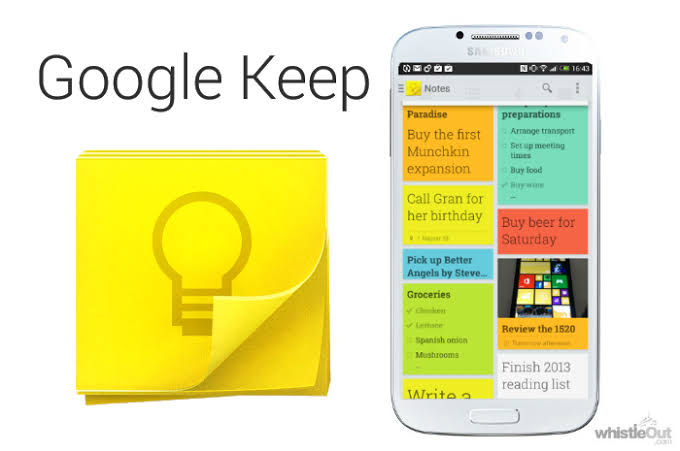
Google Keep is a note-taking app for to-do lists, quick thoughts, and reminders that syncs across all devices. It is included in all Google Workspace plans and integrates with Gmail, Docs, and other Workspace apps. Notes can include text, images, voice memos, and checklists, making it a versatile tool for capturing ideas on the go.
Users can pin important notes for quick access, set location-based reminders that trigger when arriving at a specific place, and color-code notes for organization. The drag-and-drop functionality allows users to drag notes directly into Google Docs to build documents from ideas. Keep also integrates with Google Calendar, where reminders from Keep appear alongside calendar events. For teams, Keep notes can be shared and collaborated on in real time. While not as feature-rich as dedicated note-taking apps like Notion or Evernote, Keep's simplicity and deep Workspace integration make it the most accessible option for quick capture and organization.
10. Form Publisher
Form Publisher is a third-party app available on the Google Workspace Marketplace with a 4.7 out of 5 rating and over 2 million installs. It generates templated documents from Google Forms submissions, creating PDF, Google Docs, Sheets, Slides, Microsoft Word, Excel, and PowerPoint documents. The app allows users to get documents approved and signed directly from form submissions.
This add-on demonstrates the power of Google Workspace's extensibility through third-party integrations. Common use cases include generating invoices, certificates, contracts, and reports automatically when a form is submitted. Form Publisher supports conditional logic, so different templates can be applied based on form responses. For organizations that process high volumes of form submissions, such as HR departments handling onboarding paperwork or schools issuing certificates, Form Publisher eliminates manual document creation and reduces errors. It is one of the highest-rated and most-installed apps on the Marketplace, reflecting strong user satisfaction.
Google Workspace continues to evolve, with AI integration becoming a standard feature across the suite. The apps on this list represent the core tools that businesses rely on daily, along with a few third-party extensions that fill critical gaps. For organizations evaluating their productivity stack in 2026, these ten apps offer the best combination of functionality, integration, and value.
Related Posts



0 Comments
Join the discussion and share your thoughts
No Comments Yet
Be the first to share your thoughts on this article!
