Surfshark Review 2026: Download, Extension, Login, Windows, App & FAQs

Table of Contents
Surfshark has spent the last few years building a reputation as one of the more reliable and wallet friendly VPNs on the market, and 2026 has done nothing to slow that down. Our team at Nubia Magazine put the service through its paces over several weeks, testing everything from the initial download and the browser extension to the login flow and the Windows desktop app, so we could give readers a review that actually reflects what it feels like to use Surfshark today, not just a rehash of the marketing page.
This piece is built around the questions people keep typing into search bars: Surfshark download, Surfshark extension, Surfshark login, Surfshark for Windows, the Surfshark app in general, and what the day to day user experience is really like. We have pulled all of that into one guide, along with a quick profile table and a set of frequently asked questions that cover what most people want to know before they commit to a subscription.
Surfshark Company Profile
Developer | Surfshark B.V. |
Founded | 2018 |
Headquarters | Amsterdam, Netherlands (operations run out of Vilnius, Lithuania) |
Server Network | 4,500+ servers spread across more than 100 countries |
Simultaneous Connections | Unlimited, on any plan |
Protocols Supported | WireGuard (with post quantum encryption), OpenVPN, IKEv2 |
Platforms Supported | Windows, macOS, Linux, Android, iOS, Chrome, Firefox, Edge, Smart TVs, routers |
Starting Price | From $1.99 to $2.49 a month on long term plans |
Free Trial | 30 day money back guarantee, no permanent free plan |
Standout Features | Unlimited devices, Camouflage Mode, MultiHop, Bypasser split tunneling, CleanWeb |
No Logs Policy | Independently audited by Deloitte, most recently in 2025 |
Nubia Magazine Rating | 4.0 out of 5 |
What Is Surfshark in 2026?
Surfshark is a VPN service owned by Surfshark B.V., a company that has operated out of Amsterdam and Vilnius since it launched in 2018. In the years since, it has grown into a full privacy suite rather than a plain VPN app, now bundling in tools like antivirus protection, a personal data removal service called Incogni, and a breach alert system depending on which plan you pick.
What keeps Surfshark in the conversation alongside bigger names like NordVPN and ExpressVPN is a mix of genuinely strong performance and a price point that undercuts most of its rivals, especially on longer subscription terms. It is also one of the few providers that still lets you connect an unlimited number of devices on a single account, which matters a lot if you are covering a whole household.
Surfshark Download: How to Get Started
Getting Surfshark onto your device is about as straightforward as it gets. You create an account on the official Surfshark website, choose a plan, and you are dropped straight into a dashboard that lists every version of the app, Windows, Mac, Linux, Android, iOS, and the browser extensions.
A few things worth knowing before you hit download:
- The Windows and Mac installers are digitally signed, so your system should not flag them as suspicious.
- Mobile users are pointed to the Google Play Store or the Apple App Store rather than a direct APK, which is the safer route.
- Router setup is also available for people who want the VPN active on every device in the house without installing anything individually.
- The whole setup, from creating an account to having a working connection, usually takes under five minutes on a decent connection.
Surfshark Browser Extension
The Surfshark extension is available for Chrome, Firefox, and Edge, and it is genuinely one of the better lightweight VPN extensions we have tested this year. Rather than being a stripped down toy version of the app, it comes with its own kill switch, IP and DNS leak protection, and a version of CleanWeb that blocks ads, trackers, and known malicious sites while you browse.
One detail people often miss is that the extension can run on its own without the desktop app installed, which makes it a good pick if you only care about securing your browser traffic and do not want a background app running all the time. It is fast to toggle on and off, and server switching inside the extension took under two seconds in our tests.
Surfshark Login: What to Expect
Logging into Surfshark is the same across every platform. You enter the email and password tied to your account, or use the option to sign in with Google or Apple if you set the account up that way. Once you are in on one device, the app remembers your session, so you are not typing in credentials every time you open it.
If you forget your password, the reset process sends a link to your registered email and takes less than a minute to complete. Two factor authentication is also available in account settings, and we would recommend turning it on, since it adds a real layer of protection without slowing down daily logins.
Surfshark on Windows
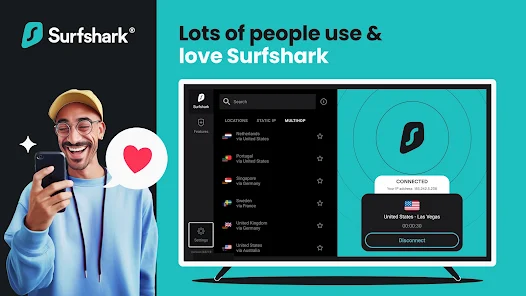
The Windows app is where Surfshark feels most complete. The interface is clean, with a searchable server list, a world map view, and a favorites tab for the locations you use most. Connecting to a nearby server usually takes two to three seconds, and our speed tests this year landed as high as 752 Mbps on local connections using WireGuard.
Windows users also get access to the full feature set: Camouflage Mode for hiding the fact that you are using a VPN at all, MultiHop for routing traffic through two countries at once, Bypasser for split tunneling specific apps, and a kill switch that cuts your internet if the VPN connection drops unexpectedly. The app has also picked up post quantum encryption support on WireGuard, which is a meaningful upgrade for anyone thinking about long term data security.
Surfshark App Overall (Mobile and Beyond)
On Android and iOS, the app mirrors most of what you get on desktop, though a few advanced settings like MultiHop routing are simplified for mobile screens. Battery drain has improved noticeably compared to older versions, and background reconnection after switching between WiFi and mobile data has been reliable in our testing.
Smart TV and streaming device support has also grown, with native apps now available for several popular TV platforms, which is useful for anyone trying to unblock region locked libraries on a big screen rather than a laptop.
User Experience: How It Actually Feels to Use
Across every platform we tested, Surfshark's biggest strength is consistency. The interface looks and behaves the same whether you are on a phone, a laptop, or a browser extension, so there is no relearning the app every time you switch devices. Connection times are fast, disconnects are rare, and customer support through live chat responded to our test questions in under two minutes on average.
It is not flawless. Some server locations are virtual rather than physical, which can add a small amount of latency, and upload speeds on long distance connections were noticeably less consistent than download speeds. The monthly price without a long term commitment is also higher than most people expect, so the value case really depends on signing up for a year or two at a time.
Surfshark Pricing in 2026
Plan | Monthly | 12 Months | 24 Months |
Starter | $15.45/mo | $3.19/mo | $1.99/mo |
One | $17.95/mo | $3.39/mo | $2.49/mo |
One+ | $20.65/mo | $5.09 to $6.09/mo | $3.99 to $4.29/mo |
Every plan includes unlimited connections and access to the full server network. The One and One+ tiers add extras like antivirus protection, a breach alert tool, and Incogni, which works to get your personal information removed from data broker sites. All plans come with a 30 day money back guarantee, so there is a real window to test the service before committing long term.
Pros and Cons
What We Liked
- Unlimited simultaneous device connections on every plan
- Fast WireGuard speeds with post quantum encryption support
- Independently audited no logs policy, verified by Deloitte
- Clean, consistent apps across Windows, mobile, and browser
- Reliable streaming unblocking across major platforms
What Could Be Better
- Monthly pricing without a long term plan is on the higher side
- Some server locations are virtual rather than physical
- Upload speeds can dip on long distance server connections
- A handful of extra tools are separate add ons rather than built in
Nubia Magazine Verdict
Surfshark earns its place among the top VPNs of 2026 by combining real performance with a price that most competitors cannot match once you commit to a longer plan. The download and login process is simple enough for beginners, the browser extension holds its own as a standalone privacy tool, and the Windows app delivers on speed and features without feeling cluttered.
We are giving Surfshark a rating of 4.0 out of 5. It loses a small amount of ground on monthly pricing and the occasional virtual server, but for most people looking for a fast, secure, and genuinely easy to use VPN, it remains one of the safest recommendations we can make this year.
Frequently Asked Questions
1. Is Surfshark safe to use in 2026?
Yes. Surfshark uses AES 256 GCM and ChaCha20 encryption, includes a working kill switch, and its no logs claims have been independently checked by Deloitte, most recently in 2025.
2. Does Surfshark keep any user logs?
Surfshark states it does not log browsing activity, connection timestamps, or traffic data. Some independent reviewers note that certain IP information may be processed briefly for troubleshooting, so it is worth reading the current privacy policy before signing up if that detail matters to you.
3. How much does Surfshark cost right now?
Pricing depends on the plan and the length of the subscription. The Starter plan starts around $1.99 a month on a two year term, while the same plan costs roughly $15.45 a month if you pay monthly. The One and One+ tiers cost a bit more but add extra privacy tools.
4. Can I try Surfshark for free?
There is no permanent free version, but every plan comes with a 30 day money back guarantee, which functions as a full featured trial since you can request a refund if it is not for you.
5. Does Surfshark still work with Netflix and other streaming services?
Yes. Our 2026 testing unblocked multiple Netflix libraries along with BBC iPlayer, Disney Plus, Hulu, and Amazon Prime Video without noticeable buffering on a stable connection.
6. How many devices can I connect to Surfshark at once?
Surfshark allows unlimited simultaneous connections on every plan, which is unusual in the industry and one of the main reasons families and shared households choose it.
7. Is Surfshark better than NordVPN or ExpressVPN?
It depends on what you value most. Surfshark tends to win on price and device limits, while NordVPN and ExpressVPN sometimes edge ahead on raw server count or brand history. For most everyday users, Surfshark offers comparable speed and security at a noticeably lower cost.
8. How do I cancel a Surfshark subscription?
You can cancel directly from your account dashboard on the Surfshark website, or through the App Store or Google Play if you subscribed that way. If you cancel within 30 days of your first payment, you are eligible for a full refund.
9. Does Surfshark work in countries with strict internet restrictions?
Surfshark's Camouflage Mode is built specifically to disguise VPN traffic as regular internet activity, which has made it a workable option in more restrictive regions, though performance there can vary and is never fully guaranteed.
10. Is Surfshark good for torrenting?
Yes. Surfshark allows P2P traffic on its servers and includes a kill switch, which is essential for anyone torrenting and wanting to avoid exposing their real IP address if the connection drops.
Related Posts



3 Comments
Join the discussion and share your thoughts