MUBR Review 2026: Website, App, Alternatives, Download, Free Version & FAQs

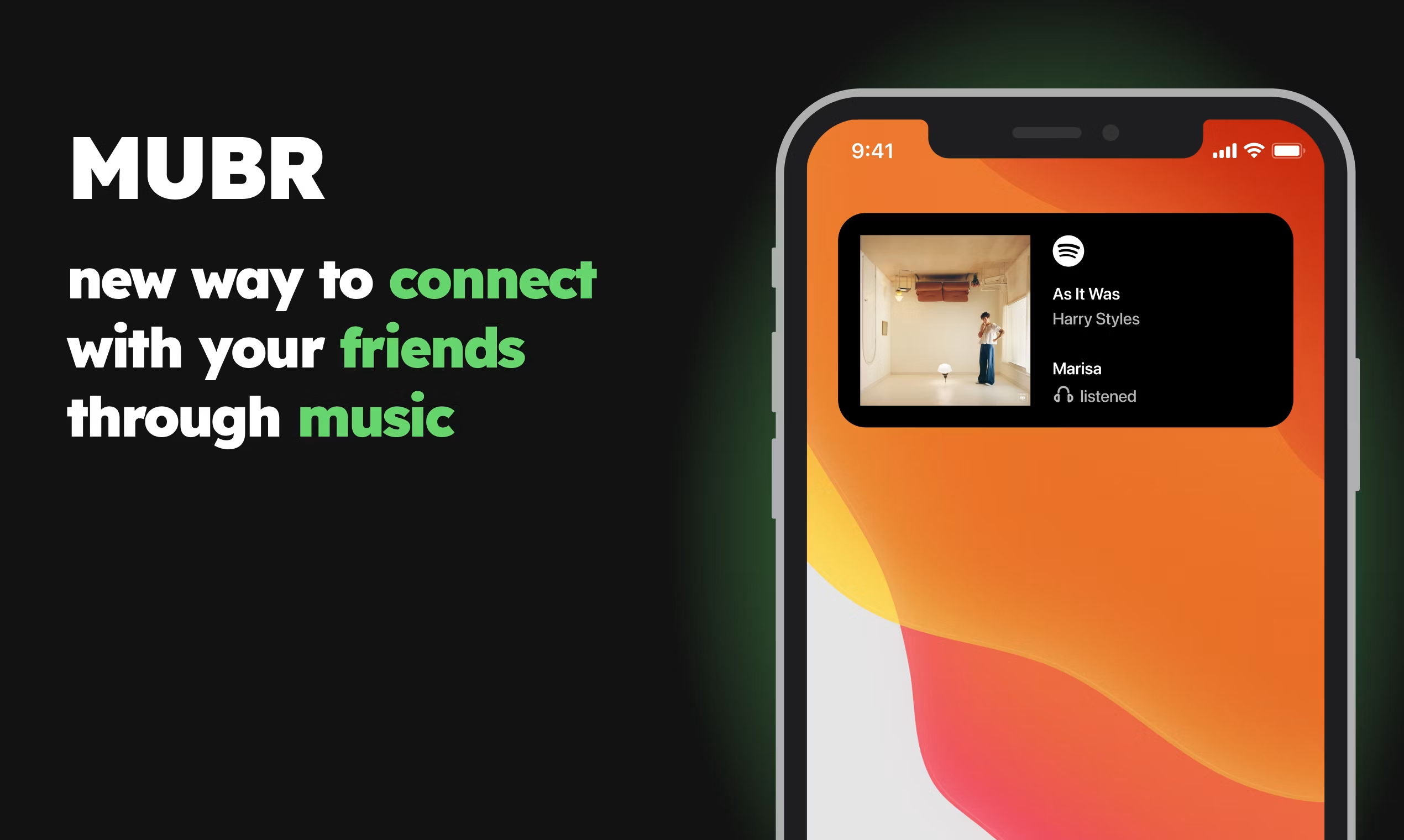
Table of Contents
Brand Profile
MUBR APP - BRAND PROFILE | |
App Name | MUBR (see what friends listen) |
Developer / Team | Island Storm Labs (3-person team: Kirill Ilichev, Sergei Bakaev, Anton Ponikarovskii) |
Category | Music / Social Networking |
Launched | 2023 |
Platforms | iOS (App Store) and Android (Google Play) |
App Size | Approx. 38.62 MB (Android) |
Supported Music | Spotify, Apple Music |
Free Version | Yes (limited features) |
Premium Version | Yes (monthly subscription) |
Website | mubr.app |
Support Email | |
Total Users (as of 2023) | 1.8 million+ worldwide |
Nubia Magazine Rating | 3.2 / 5 |
App Store Rating | 4.0 / 5 (based on 6,754+ reviews) |
What Is MUBR?
If you have spent any time scrolling TikTok in the last couple of years, there is a decent chance you have come across a video showing someone's phone home screen with a small widget displaying what their friend is currently listening to. That widget is almost certainly MUBR.
MUBR is a music-sharing app built around a simple but genuinely clever idea: let people see what their friends, partners, or family members are playing on Spotify or Apple Music, right on their home screen or lock screen without ever opening an app. It was developed by a three-person bootstrapped team, Island Storm Labs, and launched in 2023. The founders went from concept to a working app in just three weeks. Within months, over 1.8 million people had downloaded it, largely thanks to a TikTok influencer who featured it on New Year's Eve and sent downloads through the roof.
By mid-2026, MUBR has settled into a more mature phase. The initial hype has cooled somewhat, but the app still has an active user base, and the team has continued to push updates. That said, the question many people are now asking is not whether MUBR is a good idea, but whether the actual execution has caught up with the concept. We spent time with the app, the website, and a wide range of real user feedback to give you a thorough answer.
MUBR Website Experience
The MUBR website, found at mubr.app, is clean and minimal. It does its job as a landing page, directing you to the App Store or Google Play. There is a brief explanation of what the app does, some screenshots, and links to the privacy policy and terms of service hosted on the islandstormlabs.com domain.
That said, the website does not do a lot more than that. There is no blog, no detailed FAQ section, no onboarding guides, and no changelog. For a product that regularly receives questions about how the widget works or why it requires the app to stay open in the background, the website feels like a missed opportunity to answer those questions before users hit frustration.
The support contact is an email address ([email protected]), which works fine for a small indie team, though users have noted on the App Store that responses can be slow. A proper support portal or knowledge base would go a long way here.
Website score on its own: functional but bare. It works, but it does not give you confidence that this is a polished product operation behind the scenes.
The MUBR App in 2026
The app itself is where most of the action happens, and it is genuinely a mixed bag. Let us break it down honestly.
What Works Well
The core concept still lands. When MUBR works as intended, it is genuinely fun. You add the widget to your home screen, share your invite link, and within minutes you can see exactly what your friend is playing on Spotify. For couples in long-distance relationships, it has become something of a cult feature. The MUBR pie chart, which visualizes your most-listened-to artists and genres in a colorful block format, is a hit on social media and one of the app's most shared features.
The Tinder-style discovery feed is a decent bonus too. It recommends new tracks based on your listening habits, and while it is not as refined as Spotify's own recommendation engine, it adds some browsing value beyond just seeing what your friends are playing.
Setup is reasonably painless. You download the app, connect Spotify or Apple Music, add the widget, and share your link. Most people can get it running in under five minutes on a good day.
What Still Needs Work
Here is where things get a bit uncomfortable to report, but user feedback is clear and consistent enough that it would be dishonest to ignore.
First, the widget requires MUBR to be running in the background to show live updates. This defeats a significant part of the point of having a widget at all. Multiple users across the App Store and Google Play have flagged this, and it remained an issue in the most recent version we tested in 2026.
Second, the free version is quite restricted. The core feature, seeing friends' listening activity update in real time, is locked behind a monthly premium subscription. Without it, updates come only a few times a day, which makes the app feel like a teaser for a paid product rather than a genuinely free tool. Some users have described this as a bait-and-switch, and it is not hard to see why.
Third, stability is still inconsistent. Reviews mention Apple Music errors, songs failing to load, duplicated tracks appearing in playlists, and notifications being excessive to the point of annoyance. Fullscreen ads have also been reported, which is particularly jarring in a social tool where you expect a clean experience.
The billing situation has also caused some grief. There are documented cases of users being charged after cancelling free trials, and at least one account of a phone being effectively locked until a payment was made. These are serious red flags that the team needs to address with more transparency.
How to Download MUBR
MUBR is available as a free download on both major platforms:
- iOS: Search 'MUBR' on the App Store, or go to apps.apple.com (App ID: 1641005124)
- Android: Search 'MUBR' on Google Play, or go to play.google.com (package: xyz.mubr)
- APK: An APK is available via Uptodown and Softonic for users who prefer sideloading (version 1.0.20, scanned clean by VirusTotal as of January 2026)
The app itself is free to download. No payment is required to install or set up the basic widget. Premium features require an in-app monthly subscription. The app is approximately 38.62 MB on Android.
Free Version vs Premium: Is It Worth Paying?
This is honestly one of the more contentious points about MUBR right now. The free version lets you install the widget, connect your streaming service, and share your invite link. What it does not give you is real-time updates, which is the main reason people download the app.
Without premium, music activity refreshes only a couple of times per day. If your goal is to see what your partner is listening to in the moment, the free version essentially does not deliver that. You would need to subscribe to get the live functionality.
Premium is offered as a monthly subscription and auto-renews unless cancelled at least 24 hours before the renewal date. Cancellation must be done through your iTunes Account Settings (for iOS users). The pricing has not been publicly listed on the website, but users have referenced a $30 charge appearing after failed cancellation of a free trial, suggesting a premium tier in that ballpark.
Our honest take: the concept is worth paying for if the app ran reliably. Right now, the combination of performance issues and a paywall for the core feature is a tough sell. A one-time purchase model would likely go down much better with this audience.
MUBR Alternatives in 2026
If MUBR is not landing right for you, or you are looking to compare before downloading, here are the alternatives most people reach for:
- Last.fm: The OG music scrobbling service. It tracks everything you listen to and lets friends follow your activity. No widget, but very reliable and free. Still active and well-maintained in 2026.
- Spotify's built-in Friend Activity: If everyone in your circle uses Spotify, the desktop app's friend activity panel does something similar natively. Not available on mobile, which is a major limitation.
- Anthems: A newer music-sharing app that popped up on Product Hunt as a direct MUBR alternative, focused on sharing music taste without relying on link forwarding.
- SoundCloud: Not a direct replacement, but useful for sharing and discovering tracks socially, especially in indie and electronic music circles.
- Airbuds: Another widget-based music sharing app available for iOS that has been gaining attention as a MUBR competitor with a slightly different approach to the social music space.
Each option above handles things differently, and your best choice depends on which streaming platform you use and how important the live, widget-based experience is to you.
User Experience in 2026: What Real Users Are Saying
We pulled feedback from the App Store, Google Play, Product Hunt, and JustUseApp to get a broad picture of what the experience actually looks like for everyday users. Here is where things stand.
The most positive feedback consistently comes from people using it as a couples or best-friend app. The idea of seeing your partner's music in real time, especially in long-distance situations, is something users respond to emotionally. Several reviews compare it fondly to the MySpace era of music sharing, where your profile song said something meaningful about where your head was at.
The app has a JustUseApp safety score of 24.6/100 and a legitimacy score of 121.2/100, assessed from over 6,754 reviews combined with an App Store average of 4.0 out of 5. That 4.0 rating on paper looks strong, but the actual text of reviews paints a more complicated picture.
Recurring complaints include: the widget not working unless the app is open, real-time updates being premium-only, excessive push notifications, fullscreen ads interrupting use, and billing issues after free trials. Positive comments tend to praise the concept and the social closeness it creates when it works.
The gap between those two types of reviews tells the story well. There is a real audience for this kind of app. The question is whether the team can get the execution to match what people want from it.
Nubia Magazine Rating Breakdown
NUBIA MAGAZINE RATING BREAKDOWN | |
Concept & Originality | 4.5 / 5 |
App Design & Interface | 3.0 / 5 |
Website Experience | 2.8 / 5 |
Free Version Value | 2.5 / 5 |
Premium Subscription Value | 2.9 / 5 |
App Performance & Stability | 2.8 / 5 |
User Experience Overall | 3.0 / 5 |
OVERALL NUBIA RATING | 3.2 / 5 |
Frequently Asked Questions About MUBR (2026)
These are the questions people are actively searching about MUBR going into the second half of 2026. We have answered each one based on real research and current user feedback.
1. Is MUBR free to use?
MUBR is free to download on both the App Store and Google Play. However, the free version is fairly limited. Real-time music updates, which is the main feature most people download the app for, require a premium subscription. The free tier only refreshes activity a couple of times per day, which most users find too infrequent to be useful. You can try the app without paying, but you will likely hit the paywall quickly if you want the full experience.
2. Does MUBR work with Apple Music or only Spotify?
MUBR supports both Spotify and Apple Music. When setting up the app, you connect whichever service you use, and it will start pulling your listening activity from there. However, several users with Apple Music have reported an 'unknown error' when trying to connect their account, suggesting Apple Music integration is slightly less stable than Spotify in the current version.
3. Why is my MUBR widget not working or updating?
This is one of the most common complaints in 2026. The MUBR widget requires the app to be running in the background on your phone for it to display live updates. If MUBR is closed, the widget stops updating. This is a known limitation that the team has not fully resolved. Make sure the app has background app refresh enabled in your phone's settings, and keep it running. Some users also find that restarting the app clears widget display issues.
4. How do I cancel my MUBR subscription and avoid being charged?
If you signed up via iOS, you need to cancel through your iPhone's Settings app by going to your Apple ID, then Subscriptions, and turning off auto-renew for MUBR. You must do this at least 24 hours before your current billing period ends. Cancelling inside the MUBR app itself does not cancel the Apple subscription. There have been user reports of charges occurring after what they believed was a cancellation, so it is worth double-checking through Apple's own settings to confirm the subscription is actually off.
5. Is MUBR safe? Does it collect my data?
MUBR does collect data related to your music listening activity in order to share it with your connected friends. The app has a privacy policy available at islandstormlabs.com. The Android APK has been scanned clean by VirusTotal as of January 2026. That said, you are essentially granting the app access to your Spotify or Apple Music listening history, so it is worth reading the privacy policy if data sharing is a concern for you. The app currently has a JustUseApp safety score of 24.6 out of 100, which is worth keeping in mind.
6. What are the best alternatives to MUBR in 2026?
The most recommended alternatives right now are Last.fm for comprehensive music tracking, Airbuds for a similar widget-based experience on iOS, and Anthems for a social sharing approach without the widget focus. If everyone in your friend group uses Spotify on desktop, the built-in Friend Activity sidebar is also a free option, though it does not have a mobile widget. Each alternative has trade-offs depending on which streaming platform you prefer and how social you want the experience to be.
7. Does MUBR have a website or only an app?
MUBR has a website at mubr.app that serves as the official landing page. It links to the App Store and Google Play, and includes the privacy policy and terms of service. However, the website is quite minimal and does not have a support portal, blog, or detailed help documentation. For direct support, the team can be reached at [email protected], though response times have been reported as inconsistent.
8. Who made MUBR and when was it launched?
MUBR was created by a small three-person team called Island Storm Labs. The founders are Kirill Ilichev (CEO), Sergei Bakaev (CTO), and Anton Ponikarovskii (CMO). The team built the app from idea to launch in just three weeks and officially launched in 2023. They grew to 1.8 million users largely through TikTok virality, with a major spike after a TikTok influencer featured the app on New Year's Eve. The team has stated ambitions to expand MUBR beyond music sharing into platforms like YouTube, Netflix, and Twitch in the future.
Final Verdict: Should You Download MUBR in 2026?
MUBR gets a 3.2 out of 5 from Nubia Magazine, and honestly, that score feels fair. It is not a bad app. The idea behind it is genuinely good, and when it works, it delivers something that feels personal and a little nostalgic in a way that most social apps have stopped trying to do. Knowing what your person is listening to right now, without either of you having to say anything, is a quietly meaningful feature.
But the execution has real gaps that are hard to overlook in 2026. A widget that needs the app open defeats much of the purpose. A paywall on the core real-time feature makes the free version feel underpowered. Performance inconsistencies, billing complaints, and intrusive ads chip away at the goodwill the concept builds. The website offers very little support infrastructure for what is now a fairly large user base.
If you are a couple or have a best friend you want to stay connected with over music, MUBR is still worth trying. Download it for free, test the widget, see if the vibe works for you. Just go in with realistic expectations about what the free version can do, be careful with trial subscriptions, and make sure to cancel through Apple's settings if you decide it is not for you.
The bones of something genuinely good are here. We are hoping the team continues to close the gap between the promise and the product.
Related Posts




0 Comments
Join the discussion and share your thoughts
No Comments Yet
Be the first to share your thoughts on this article!