Coze Review in 2026: Login, AI, App, Free Plan, Website & FAQs

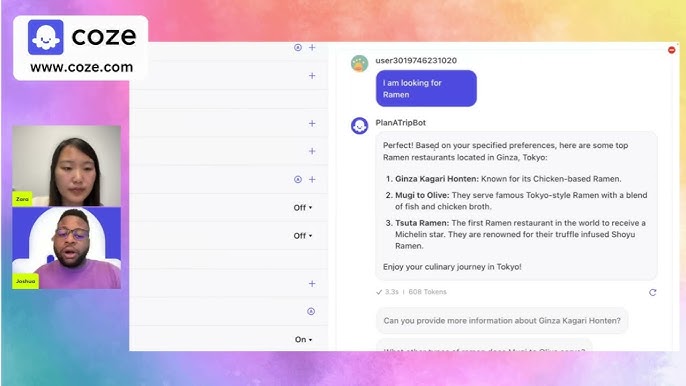
Table of Contents
Every few months a new AI tool promises to change how we work, and most of them quietly disappear. Coze is one of the few that has stuck around, and in 2026 it is arguably bigger than ever. Our team at Nubia Magazine spent weeks inside the platform, building bots, breaking workflows, reading user complaints and testing the free plan to its limits, so you do not have to. Here is our honest, properly researched verdict.

Coze Profile at a Glance
Platform Name | Coze |
Owner / Parent Company | ByteDance (the company behind TikTok and CapCut) |
Launched | 2023 |
Official Website | coze.com |
What It Does | No code platform for building, testing and publishing AI chatbots and agents |
AI Models | Multiple large language models, including OpenAI GPT models and ByteDance's own Seed models |
Pricing | Free plan available; Pro plan around 9.99 dollars per month; Enterprise options |
Open Source | Yes, partially. Coze Studio and Coze Loop went open source in July 2025 (Apache 2.0) |
Publishing Channels | Telegram, Discord, Slack, WhatsApp, Messenger, LINE, websites and APIs |
Best For | Creators, small businesses, freelancers and developers building AI agents without heavy coding |
Nubia Magazine Rating | 4.2 / 5 |
What Exactly Is Coze?
Coze is ByteDance's no code AI agent builder. In plain English, it lets you create your own chatbot or AI assistant by dragging blocks around a screen instead of writing code. You pick a model, give your bot a personality, plug in knowledge from your own documents, connect plugins like web search or YouTube, and then publish the finished bot to Telegram, Discord, Slack or your own website.
Since launching in 2023, the platform has grown into a full ecosystem. There is a plugin store, a template library, a visual workflow builder for complex automations, and an API for developers who want to go deeper. In 2025 ByteDance surprised everyone by open sourcing the core of the platform, Coze Studio and Coze Loop, which means you can now run your own private copy of Coze on your own server if you want full control.
Coze Login and Getting Started
Signing up is painless. You visit coze.com, register with your email or a Google account, and you are inside the builder within a minute or two. There is no credit card wall, no forced onboarding call, none of the friction that plagues enterprise software. Searches like Coze login and Coze sign in spike every month, and from what we found, most login complaints come down to browser cache issues or people confusing the international coze.com site with the separate Chinese version of the platform.
Once logged in, the workspace is clean. Your agents, workflows, knowledge bases and plugins are organized in a sidebar, and the bot creation screen splits neatly into a configuration panel and a live preview chat where you test your bot as you tweak it.
The AI Behind Coze
This is where Coze earns most of its reputation. Instead of locking you into one model, Coze lets you build with several of the best large language models from a single dashboard, and you can compare how different models handle the same prompt while debugging. ByteDance has also been steadily pushing its own Seed models into the platform, and they have improved noticeably in reasoning and multi step task handling.
In our testing, response quality was consistently strong for customer service bots, content assistants and research style agents. The knowledge base feature, which lets your bot answer questions from documents you upload, worked reliably as long as the documents were well organized. The workflow builder is the real power tool here, letting you chain models, plugins, conditions and code blocks into automations that would normally require a developer.
Is There a Coze App?
A question we see constantly is whether Coze has a dedicated mobile app. The honest answer is that the building experience lives on the web, and that is where it works best. The screen real estate of a desktop genuinely matters when you are wiring up a workflow with a dozen nodes.
Where Coze shines on mobile is distribution. Bots built on Coze publish directly to the apps already on everyone's phone, including Telegram, Discord, WhatsApp, Messenger, LINE and Slack. So your audience never needs to download anything new to use what you build, which in our view is smarter than forcing yet another app on people.
Is Coze Free? The Pricing Reality
Yes, and this remains the platform's biggest magnet. The free plan lets you build and publish working bots with access to genuinely capable AI models, which is rare in 2026 when most competitors hide everything good behind a subscription. The free tier runs on credits, so a bot that handles heavy traffic or runs expensive workflows will eventually hit limits.
The Pro plan, priced around 9.99 dollars per month, removes most of those ceilings, adds more compute credits and speeds things up. Compare that to a 20 dollar ChatGPT Plus subscription and the value argument basically makes itself, because with Coze you are paying for a full automation platform, not just a chat window. Enterprise plans exist for bigger organizations, and the self hosted open source route is technically free apart from your own server and model API costs.
Website and User Experience
The coze.com website and builder feel modern and fast. New users can go from signup to a published bot in under thirty minutes by starting from a template, which is impressive for a tool this deep. The drag and drop workflow canvas is satisfying to use, and the live preview chat means you never publish blind.
It is not perfect. The sheer number of features can overwhelm complete beginners, some plugin documentation feels thin, and a few users report that complex workflows occasionally need re-testing after platform updates. Official documentation has improved a lot since the early days, and the community around the open source repositories on GitHub has become a genuinely useful support channel.
What We Liked
The free plan is generous and actually usable. Multi model access from one dashboard saves real money. Publishing to Telegram, Discord, Slack and websites takes minutes, not days. The plugin store and template library shortcut most common projects. The open source release means no vendor lock in for those who want full control.
What Could Be Better
Data privacy concerns linger because of ByteDance ownership, which matters for businesses handling sensitive information. The learning curve gets steep once you move past simple bots. Credit limits on the free plan can surprise you if your bot suddenly gets popular. Support on the free tier is mostly self service.
Nubia Magazine Verdict
Coze in 2026 is one of the best value propositions in the AI agent space, full stop. It packs serious capability into a free plan, the Pro tier undercuts almost every rival, and the open source release was a genuine power move that gives users an exit door most platforms never offer. We held back a higher score because of the privacy questions that come with ByteDance ownership and the learning curve that hits once your ambitions grow.
If you are a creator, freelancer or small business that wants to put a smart AI agent in front of customers without hiring a developer, Coze deserves a place at the top of your shortlist. Nubia Magazine rates Coze 4.2 out of 5.
Frequently Asked Questions About Coze (2026)
1. Is Coze free to use in 2026?
Yes. Coze still runs a free tier that lets you build and publish AI agents without paying anything upfront. The free plan comes with usage limits in the form of credits, so heavy bots that run complex workflows all day will hit a ceiling. For hobby projects, testing and small communities, the free plan is genuinely usable and not just a teaser.
2. Who owns Coze?
Coze is owned by ByteDance, the Chinese tech company behind TikTok and CapCut. The international version runs on coze.com, while the Chinese version (Kouzi) operates separately. ByteDance backing is part of why Coze can offer strong AI models at low prices, though it is also the reason some users raise data privacy questions.
3. How do I log in to Coze?
Head to coze.com and sign in with your email or a supported social login such as Google. The login process is quick, and once you are in, your bots, workflows and knowledge bases are all saved to your workspace. If you ever get stuck at login, clearing your browser cache or switching browsers fixes most of the common complaints we found.
4. Does Coze have a mobile app?
Coze is primarily a web platform, and that is where the full agent builder lives. The bots you create, however, can be published to platforms people already use on mobile every day, including Telegram, Discord, WhatsApp, Messenger, LINE and Slack. So while you will do most of your building on desktop, your users can chat with your bots from any phone.
5. What AI models does Coze use?
Coze gives you access to several large language models from one dashboard, which has long been one of its biggest selling points. Depending on your region and plan, you can build with leading models including OpenAI's GPT models, and ByteDance has been pushing its own models, like the Seed family, into the platform as well. You can compare models side by side while debugging your agent.
6. Is Coze open source?
Partially, yes, and this was big news. In July 2025 ByteDance open sourced Coze Studio and Coze Loop under the Apache 2.0 license. That means developers and companies can now self host the agent builder on their own servers, modify it and even use it commercially. The hosted version at coze.com remains a managed product with free and paid plans.
7. How much does Coze Pro cost?
The Pro plan has been sitting around the 9.99 dollars per month mark, which is cheaper than most rival subscriptions in this space. Pro raises your usage limits, gives you more compute credits for workflows and plugins, and offers faster responses. Enterprise options exist for companies that need custom agreements around data and scale.
8. Is Coze safe to use?
For general bot building, yes, Coze is a legitimate platform used by a large global community. The honest caveat is ownership. Because ByteDance runs the hosted service, businesses handling sensitive customer data should read the privacy policy carefully or consider the self hosted open source version, which keeps everything on your own infrastructure.
9. Can I make money with Coze?
Indirectly, yes. Plenty of freelancers and agencies use Coze to build customer service bots, lead capture agents and automation workflows for clients, then charge for the service. Coze itself is the tool, not the marketplace, so your earnings come from what you build and who you build it for.
10. What are the best Coze alternatives in 2026?
The names that come up most often are Dify, Flowise, Botpress, Voiceflow and Chatbase. Dify and Flowise appeal to the open source crowd, while Voiceflow and Botpress lean more toward polished business deployments. Coze still wins on price and the sheer convenience of its plugin store and one click multi platform publishing.
Related Posts



0 Comments
Join the discussion and share your thoughts
No Comments Yet
Be the first to share your thoughts on this article!