TickTick Review 2026: Download, App, Login, Free Plan, Extension & FAQs


Table of Contents
If your to do list has turned into a graveyard of half finished tasks, you are not alone. Every year, millions of people go looking for an app that can hold their whole life together without feeling like extra homework. TickTick keeps coming up in those searches, and in 2026 it is still one of the most talked about productivity apps on the market.
At Nubia Magazine, we spent real time inside TickTick before writing this review. We downloaded it on phone and desktop, tested the free plan against the paid one, tried the browser extension, logged in and out on different devices, and paid attention to the small details that most "best app" lists tend to skip. Here is our honest, properly researched take on TickTick in 2026, along with a full profile of the app and answers to the questions people keep typing into Google.
What Is TickTick and Who Is It For
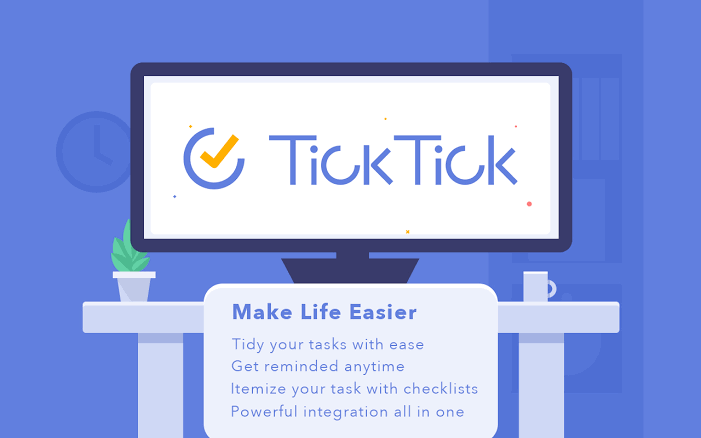
TickTick is a task management app built by Appest Inc. It works as a to do list, a calendar, a habit tracker, and a light project manager all rolled into one. You can create simple checklists for grocery runs, set recurring tasks for bills, plan a work week in calendar view, or track a new gym habit, and all of it lives in one app instead of five.
It suits students juggling assignments, freelancers tracking client deadlines, small teams that need shared lists without the overhead of a full project management tool, and honestly anyone who just wants their day to feel less chaotic. If you have tried apps like Todoist, Any.do, or Microsoft To Do and felt something was missing, TickTick is usually the next one people try.
TickTick Profile at a Glance
App Name | TickTick |
Developer | Appest Inc. |
Category | Task Management, To Do List, and Calendar App |
First Released | 2013 |
Platforms | iOS, Android, Windows, macOS, Linux, Web App, Chrome Extension, Apple Watch, Wear OS |
Pricing | Free plan available. Premium plan costs about $2.99 a month or roughly $35.99 billed yearly |
Standout Features | Smart date recognition, Pomodoro timer, habit tracker, Eisenhower Matrix, calendar views, Focus mode |
Best For | Individuals, students, and small teams who want an all in one productivity app |
Login Options | Email and password, Google, Apple ID, Facebook, and single sign on for work accounts |
Offline Access | Yes, tasks sync once you are back online |
Official Website | ticktick.com |
Nubia Magazine Rating | 3.7 out of 5 |
How to Download TickTick in 2026
Getting TickTick onto your devices is straightforward. It is available on nearly every major platform, which is part of why it has held onto its fan base for so long.
- iPhone and iPad: search "TickTick" on the Apple App Store
- Android phones and tablets: search "TickTick" on the Google Play Store
- Windows and Mac: download the desktop app directly from ticktick.com
- Linux: a native build is available from the official site for users on Ubuntu and other distributions
- Web browser: no download needed, you can use the full app at ticktick.com from any browser
- Wearables: companion apps exist for Apple Watch and Wear OS devices
The download itself is small and quick on every platform we tried. Installation on desktop took under a minute, and the mobile apps installed without any unusual permission requests.

Inside the App: Features That Matter
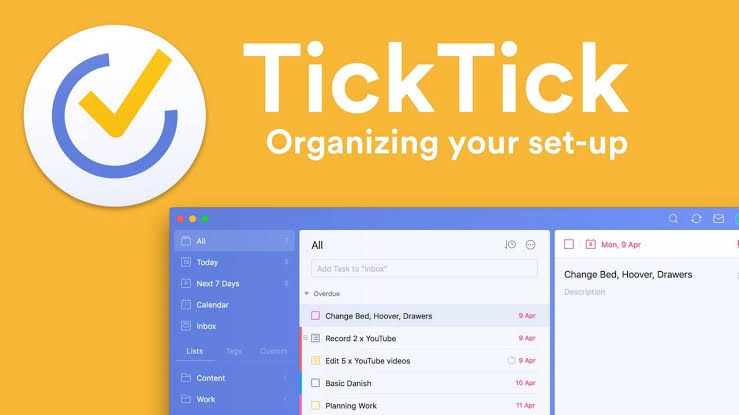
Once you are in, TickTick's layout feels familiar fast. The main screen shows your task list, and a side menu gives you quick access to calendar view, habits, Pomodoro timer, and any custom lists you build.
Smart Task Entry
Type something like "Call mom every Sunday at 6pm" and TickTick will pick out the date, time, and recurrence on its own. This alone saves a surprising amount of time once you get used to it.
Calendar Views
You can switch between day, week, month, and a compact list view. The calendar can also pull in events from Google Calendar, Outlook, and other calendar apps so you are not checking two places for your schedule.
Pomodoro Timer and Focus Mode
A built in Pomodoro timer lets you work in focused bursts, and it logs how much time you actually spend on each task. For anyone who struggles with procrastination, this small feature ends up being one of the most used parts of the app.
Habit Tracker
Separate from tasks, the habit tracker lets you log daily routines like drinking water, journaling, or exercising, and shows your streak so you can see progress over time.
Eisenhower Matrix and Priority Tags
Tasks can be tagged by priority and sorted into an Eisenhower style matrix, which is genuinely useful if your to do list tends to spiral out of control.
TickTick Login: What to Expect
Setting up an account takes a couple of minutes. You can sign up with an email address and password, or skip that step entirely by logging in with Google, Apple ID, or Facebook. Work accounts can also use single sign on where the organization has set it up.
Once you are logged in on one device, your tasks sync automatically to every other device tied to that account. We tested this by adding a task on the web app and watching it show up on mobile within seconds. If you ever get locked out, the app supports a standard password reset flow through email, and there is no unusual verification hurdle to worry about.
Is TickTick Free? Breaking Down the Pricing
Yes, TickTick has a genuinely usable free plan, and this is one of the reasons it keeps winning over new users. The free version includes unlimited tasks, up to two calendars, basic reminders, tags, and the Pomodoro timer.
If you want more, TickTick Premium runs about $2.99 a month, or roughly $35.99 if you pay yearly. Premium unlocks unlimited calendar subscriptions, more storage for attachments, extra list and folder limits, custom themes, and detailed task statistics.
Compared to competitors, this pricing sits on the affordable end. Todoist Pro, for example, costs more per year for a similar set of upgrades. The catch is that TickTick does not offer a free trial of Premium, so you are deciding upfront whether the extra features are worth paying for without a proper test drive.
The TickTick Browser Extension
The Chrome extension is a smaller but genuinely handy part of the TickTick experience. Once installed, it sits in your browser toolbar and lets you turn an email, a webpage, or a random thought into a task without switching apps.
- Add any webpage as a task with one right click
- Turn emails into tasks directly from Gmail
- See a running count of overdue and today's tasks right on the extension icon
- Open TickTick in a side panel while you keep browsing
It is also available for other Chromium based browsers, and a similar add on exists for Firefox. We found it especially useful for research heavy work, where you tend to open a dozen tabs and forget half of what you meant to do with them.
User Experience: What Nubia Magazine Actually Thinks
TickTick's interface is clean without feeling empty. New users can find their way around within the first few minutes, which is not always true for apps that try to pack in this many features. Syncing between devices was fast and reliable throughout our testing period, and we did not run into the lag or crashes that show up in some older reviews of the app.
That said, it is not flawless. A few Premium features feel like they should be part of the free tier, and some long time users have pointed out that certain updates take a while to reach every platform at the same pace. The lack of a free trial for Premium is also a fair complaint, since it asks you to commit before you fully know what you are paying for.
What We Liked
- Clean, intuitive interface that does not overwhelm new users
- Genuinely useful free plan, not just a stripped down demo
- Cross platform sync that actually works in real time
- Built in Pomodoro timer and habit tracker save you from downloading separate apps
- Affordable Premium pricing compared to direct competitors
Where It Falls Short
- No free trial for the Premium plan
- Some collaboration features feel basic next to dedicated project management tools
- A few advanced features are locked behind Premium that some users feel should be free
Nubia Magazine Verdict
TickTick earns a solid 3.7 out of 5 from Nubia Magazine. It is not trying to be the flashiest productivity app on the market, and it does not need to be. What it offers is a dependable, well rounded tool that covers tasks, habits, and time management in one place, at a price that will not make you flinch.
If you want an app that does one thing perfectly, TickTick might feel like slight overkill. But if you want a single home for your to do list, your calendar, and your daily routines, it remains one of the smartest picks available in 2026.
Frequently Asked Questions About TickTick in 2026
1. Is TickTick free to use?
Yes. TickTick has a free plan that covers unlimited tasks, two calendars, reminders, and the Pomodoro timer. You only need to pay if you want extras like unlimited calendar subscriptions or custom themes.
2. How much does TickTick Premium cost in 2026?
TickTick Premium costs about $2.99 per month, or around $35.99 when billed annually. There is currently no free trial for Premium, so you pay upfront to test the extra features.
3. Is TickTick available on both iPhone and Android?
Yes. TickTick has native apps for iOS and Android, along with desktop apps for Windows, Mac, and Linux, plus a full web app and a Chrome extension.
4. Can I log into TickTick with my Google account?
Yes. Besides email and password, TickTick supports login through Google, Apple ID, and Facebook, along with single sign on for some work accounts.
5. Does the TickTick Chrome extension cost extra?
No, the Chrome extension is free to install and use. It lets you turn webpages and emails into tasks without opening the full app, and it works with both the free and Premium plans.
6. Is TickTick good for team collaboration?
TickTick supports shared lists and task assignment, which works well for small teams and families. It is not built to replace dedicated project management software for larger teams with complex workflows.
7. Does TickTick work offline?
Yes. You can add and edit tasks without an internet connection, and everything syncs automatically once your device reconnects.
8. Is TickTick better than Todoist in 2026?
It depends on what you need. TickTick packs in more built in tools, like the Pomodoro timer and habit tracker, at a lower price. Todoist tends to feel simpler and has been pushing further into AI features. Many users pick TickTick when they want more tools in one app, and Todoist when they want a cleaner, more minimal experience.
9. Can I cancel TickTick Premium at any time?
Yes. Premium subscriptions can be cancelled at any time through your account settings or through the app store you subscribed with. You will keep Premium access until the current billing period ends.
10. Is my data safe on TickTick?
TickTick uses standard encryption for data in transit and offers two factor authentication for account security. As with any cloud based app, we recommend using a strong, unique password and enabling two factor authentication where possible.
Related Posts



0 Comments
Join the discussion and share your thoughts
No Comments Yet
Be the first to share your thoughts on this article!