Remio AI Review in 2026: Pricing, Download, Features, Extension, & FAQs

Table of Contents
If you have spent any time in the AI productivity space lately, the name Remio has probably crossed your path. It tends to come up in the same breath as Notion, Obsidian, and Evernote, except with a strong twist: Remio markets itself as a private, local-first AI that quietly captures everything you read, watch, and write so you never have to dig for information again. We spent several weeks testing it across web pages, PDFs, meetings, Slack threads, and emails, and we ran it on both a Mac and a Windows machine.
At Nubia Magazine, we have reviewed a long list of AI knowledge tools this year, and Remio occupies a somewhat unusual middle ground. It is not just a note app, not just a web clipper, and not just a chatbot. It tries to be the connective tissue between all three. That ambition is exactly what makes it interesting, and also where it sometimes stumbles. Here is our full, no fluff verdict.
Remio AI Profile at a Glance
Before getting into the testing notes, here is a quick reference table for everything you need to know about the brand.
Product Name | Remio AI |
Parent Company | Everdent |
Category | AI Personal Knowledge Management / Second Brain |
Founders | Derrick Van Schalkwyk and Jos Van Der Westhuizen |
Attribute | Details |
Headquarters | Singapore (governing jurisdiction) |
Funding | $4.5 million Series Seed (Khosla Ventures, Version One Ventures, The Venture Reality Fund, Moai Capital) |
Platforms Supported | Windows 10+ (x64), macOS (M-Chip Apple Silicon), iOS, Android, Chrome extension |
Pricing Model | Freemium (Free, Pro, Plus, Max, BYOK) |
Starting Price | Free; Pro from $11.6/month with annual billing |
Free Trial | Yes, 7 to 14-day free trial on Pro and BYOK plans |
Core AI Models | OpenAI, Anthropic, Google Gemini, xAI, DeepSeek, OpenRouter (via BYOK) |
Storage Type | Local-first (data stored on user device) |
Official Website | remio.ai |
Nubia Rating | 3.9 / 5 |
What Exactly Is Remio AI?
Remio is an AI powered personal knowledge hub built by Everdent, a Singapore based startup that previously worked in the virtual reality space before pivoting to AI. The product positions itself as a so called second brain. The idea is simple. You browse, you read, you sit in meetings, you receive emails. Remio quietly captures all of that in the background, organizes it, and then lets you ask questions across the entire library in plain English.
Think of it as your personal ChatGPT, but one that actually knows what you read last Tuesday, what was said in that 9 am sales call, and what your boss wrote in a Slack message three weeks ago. The selling point is that all of this happens on your own device, with no cloud lock in unless you choose it.
During testing, we found that Remio works across three main surfaces. There is the desktop app for Windows and Apple Silicon Macs, a Chrome extension that handles the in browser capturing, and mobile apps for iOS and Android. The mobile apps are mostly meant for voice notes and quick captures on the go.
Key Features We Tested
1. Auto Capture and Web Clipping
This is the headline feature, and honestly the one that converted us. The Chrome extension runs silently and decides, using AI, which pages from your browsing history are actually worth saving. You do not need to bookmark anything. After about three days of normal browsing, our test account had a clean library of around 60 saved pages with the navigation bars, ads, and cookie banners stripped out.
You can also turn this off, blacklist specific domains using wildcards, or manually highlight a section to force a save. For users with privacy concerns about social media, banking, or healthcare sites, this granular control matters.
2. Ask Remio (the AI Search)
Ask Remio is the Q and A function, and this is where it starts to feel different from a regular chatbot. You can type something like, what was the main objection raised in last week sales review meeting, and it pulls the answer with citations back to the original meeting transcript. We tested it across mixed sources, including PDFs, YouTube transcripts, and Gmail, and the citations were accurate roughly 85 percent of the time in our use case.
3. Meeting Assistant and Voice Recording
Remio captures and transcribes meetings without needing to invite a bot into the room. It records system audio and generates summaries, action items, and searchable transcripts. We tested it on a one hour Zoom call and the transcript was clean enough to be usable, although we did need to correct a few proper nouns manually.
4. Local File Indexing
Point Remio at a folder of PDFs, Word docs, or PowerPoints, and it indexes them into the same knowledge base. There is no upload. The files stay where they are. This was a big deal for one of our editors who works with research papers and was hesitant about putting client documents on a cloud server.
5. Email and Slack Integration
Gmail and Outlook sync is supported on the free tier, which is generous. Slack integration is also available. The AI can summarize a thread, draft a quick reply, or pull insights from old conversations. The Outlook sync was added in early 2026 and works well for users who live inside Microsoft 365.
6. Smart Write and Knowledge Blending
These are the newer creative features. Smart Write does auto completion and style matching, and Knowledge Blending pulls insights from your library into a fresh draft. Both are useful but still feel like they are evolving. We would not yet rely on Smart Write for a final deliverable, but it is decent for drafts.
7. Nano Banana 2 Image Generation
Yes, that is the real name. Remio added image generation to Pro and higher plans, allowing you to create infographics and design assets directly from notes. Output quality is solid for casual use but not at the level of a dedicated tool like Midjourney.
Remio AI Pricing in 2026
Remio runs a freemium model with five tiers as of May 2026. Pricing has shifted a few times this year due to seasonal promotions, but the structure below reflects current annual rates with the standing 30 percent discount on annual plans.
Plan | Monthly Price | Annual Price | Best For |
Free | $0 | $0 | Light users testing the platform |
Pro | Standard rate | From $11.6/month ($139/year) | Daily knowledge workers |
Plus | Standard rate | From $34.9/month ($419/year) | Heavy AI users and researchers |
Max | Standard rate | From $116/month ($1399/year) | Power users and small teams |
BYOK | $14.9 | Discounted annual rate | Privacy-first users with own API keys |
A few important notes. AI credits do not roll over between billing cycles. Power users on the standard Pro plan have reported burning through credits faster than expected, which is the main reason the BYOK option exists. With BYOK, you connect your own API key from OpenAI, Anthropic, Gemini, xAI, or OpenRouter, and you pay only Remio for the software, while AI usage is billed directly through your provider account. For privacy conscious users or anyone with existing API quotas, BYOK is genuinely the most sensible plan.
There is also a 7 to 14 day free trial available on the Pro and BYOK plans, and student discounts are offered for verified .edu email addresses.
How to Download Remio AI
Getting Remio installed is straightforward, but the process varies slightly by platform.
• Desktop (Windows and macOS): Visit remio.ai/download and grab the installer. The desktop app currently runs on Windows 10 or higher (64 bit) and Macs with Apple Silicon chips, that is M1, M2, M3, and M4 systems. Intel based Macs and Linux are not supported at this time.
• Chrome extension: Search for Remio on the Chrome Web Store and click Add to Chrome. The extension is what handles the silent web capture and works alongside the desktop app, but you can also use it on its own for lighter use.
• Mobile (iOS): Available on the Apple App Store by searching Remio Mobile.
• Mobile (Android): Available on the Google Play Store, with a direct APK download offered on the official site for users in regions where Play access is limited.
After installation, you will need to create a free account using an email address. The setup wizard walks you through enabling auto capture, connecting your Gmail or Slack, and choosing an AI model. The whole process took us about four minutes.
The Remio Chrome Extension Explained
The Chrome extension deserves its own section because it is the engine behind most of what makes Remio useful day to day. It is published on the Chrome Web Store and has been generally well reviewed by early users, although it does ask for broad permissions, including access to all the websites you visit. That is unavoidable given what it does, but it is worth being aware of.
In practice, the extension does three things. First, it auto captures the body content of web pages, filtering out menus, ads, and login forms. Second, it lets you highlight passages with one click and save them as structured notes. Third, it provides instant AI summaries of long articles and YouTube videos, with clickable timestamps that jump you to the right point in the video.
A newer feature called Floating Window Mode now extends support beyond Chrome to Arc, Atlas, Comet, and Microsoft Edge, which is useful if you have moved away from mainstream Chrome. For privacy, the extension is designed to send captured data straight to your local device, bypassing Remio servers entirely when you are signed in to the desktop app.
User Experience: What It Actually Feels Like to Use Remio
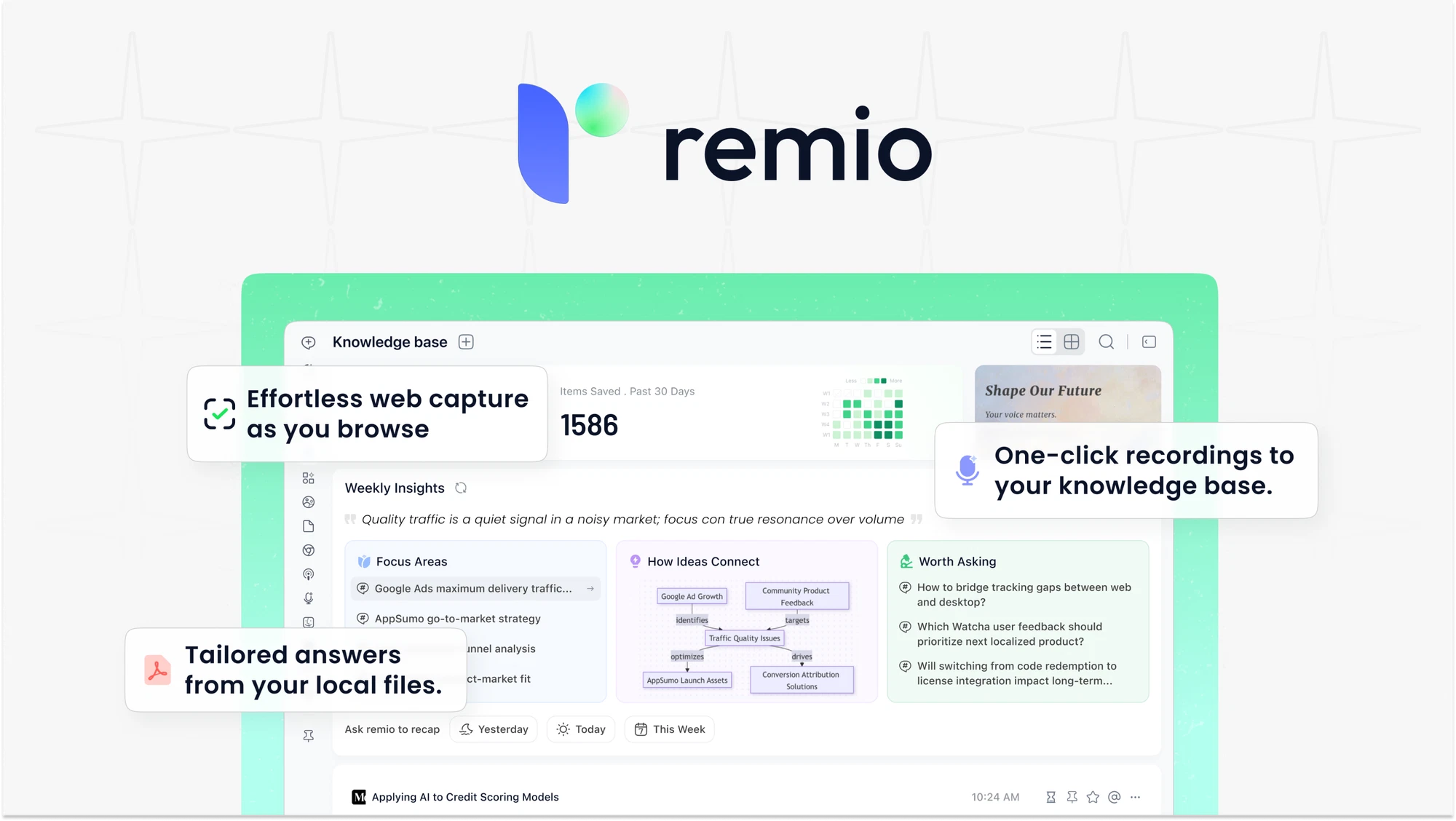
Here is where opinions matter. On a fresh install, Remio feels clean and uncluttered. The sidebar is intuitive, the search bar is always within reach, and the Unprocessed page, where new captures land before you triage them, is a thoughtful design choice that encourages you to actually review what you save.
The learning curve is real but short. Most users will feel productive within an hour. Power features like collections, two way linking, and prompt libraries take longer to master. If you are coming from Obsidian or Notion, the mental model is familiar enough that you will not feel lost.
Where we ran into friction was the credit system. On the standard Pro plan, asking Remio to summarize and cross reference a week worth of meetings can chew through credits faster than expected, especially if you are routing queries through a premium model like Claude or GPT 4. Several AppSumo reviewers have flagged the same issue, and the company has acknowledged it. The honest workaround is to either upgrade to Plus or Max, or move to BYOK and use your own key.
Performance wise, the desktop app is responsive on modern hardware. Large libraries with thousands of captured pages do slow down slightly during search, and Mac users on older M1 machines reported occasional sync hiccups. Windows performance has been catching up since the v2.x release.
Customer support is mostly handled through email and a community forum. Response times during our testing ranged from a few hours to about two business days, which is reasonable for a startup of this size.
Pros and Cons
What We Liked
• Auto capture genuinely saves time once it learns your habits
• Local-first storage with optional BYOK gives real privacy control
• Citations on AI answers make it easy to verify what Remio tells you
• Integrations with Gmail, Outlook, Slack, and YouTube cover most knowledge work
• Meeting transcription that does not require an external bot in the call
• Generous free tier with 500 AI credits per month and unlimited captures
• Active development with frequent feature updates throughout 2026
What Could Be Better
• Credit consumption on Pro can feel aggressive for power users
• No Intel Mac or Linux support yet, which excludes a portion of users
• Full cross device sync is still listed as upcoming rather than shipped
• No real team collaboration features, this is a solo tool at heart
• Some advanced features like Smart Write are still maturing
• Customer support can be slow during peak periods
• No SOC 2 or major enterprise compliance certifications yet
Who Is Remio AI Best For?
Based on our testing, Remio works best for individual knowledge workers rather than teams. Specifically, it shines for researchers handling many academic papers, product managers juggling competitive analysis across dozens of sources, students compiling lecture materials and PDFs, writers and journalists managing scattered references, and consultants who need to recall client conversations and emails on demand.
It is less suited for collaborative teams that need shared workspaces, enterprise environments that require strict compliance certifications, or users on Linux and Intel Macs who simply cannot run the desktop app.
Nubia Magazine Verdict
Remio is one of the more thoughtfully designed AI knowledge tools we have tested this year. The local first approach, the silent auto capture, and the BYOK option together feel like a genuine response to the fatigue many people have with cloud based AI tools that ask you to upload everything. The integrations are practical, the AI search works as advertised most of the time, and the pricing is reasonable when you choose the right plan for your usage pattern.
That said, it is not yet a finished product. The credit system on the standard Pro tier needs rebalancing, the lack of Linux and Intel Mac support is a real limitation, and team features are essentially absent. The promise of full cross device sync has been hovering on the roadmap for longer than we would like.
If you are a solo knowledge worker who values privacy and is willing to either pay for a higher tier or bring your own API key, Remio is one of the strongest options on the market right now. If you are looking for a team tool or expect enterprise grade compliance out of the box, you will want to wait or look elsewhere.
Our final score is 3.9 out of 5. Solid, promising, and worth trying on the free tier before committing to a subscription.
Frequently Asked Questions About Remio AI
These are the questions readers and users are asking most often as of 2026, pulled from reviews, forums, and our own research.
1. Is Remio AI free to use?
Yes, Remio offers a free plan that includes 500 AI credits per month, unlimited webpage capture, unlimited local file parsing, integrations with Gmail, Outlook, and Slack, and access to the mobile app. The free tier is genuinely usable for light to moderate users. Paid plans start at around $11.6 per month with annual billing.
2. Does Remio AI work on Windows or only Mac?
Remio supports both Windows 10 or higher (64 bit) and macOS systems running on Apple Silicon chips (M1, M2, M3, M4). Intel based Macs and Linux are not currently supported. The Chrome extension, however, works on any browser based on Chromium, including Arc, Edge, Atlas, and Comet.
3. How does Remio AI protect my privacy?
Remio is built on a local first architecture, meaning your captured data is stored on your own device rather than on Remio servers. The Chrome extension also sends captures directly to your local app, bypassing the cloud. For maximum privacy, the BYOK plan lets you connect your own AI API key so that prompts go directly to your chosen provider, such as OpenAI or Anthropic, without touching Remio infrastructure.
4. What is BYOK and should I use it?
BYOK stands for Bring Your Own Key. It means you connect your own AI API key from providers like OpenAI, Anthropic, Google Gemini, xAI, or OpenRouter, and Remio uses that key to handle AI tasks. You pay only for the Remio software, and your AI usage is billed by your provider. It is ideal for users with existing API quotas, privacy concerns, or heavy usage that would otherwise burn through Remio credits quickly.
5. Can Remio AI summarize YouTube videos and meetings?
Yes. Remio auto captures YouTube video transcripts and generates timeline based summaries with clickable timestamps so you can jump straight to a specific point. For meetings, Remio records system audio without needing a bot in the call, then provides transcripts, summaries, and action items. Both features work well in our testing, though proper nouns and accents sometimes need manual correction.
6. How is Remio AI different from Notion, Obsidian, or Evernote?
The biggest difference is automation. Notion and Obsidian require you to manually create and organize notes, while Evernote relies on a cloud based web clipper. Remio runs silently in the background, captures everything worth saving without your input, and lets you ask questions across the entire library using AI. It is closer in spirit to a personal ChatGPT trained on your own life rather than a traditional note app.
7. What happens to my AI credits if I do not use them?
Unused AI credits do not roll over to the next billing cycle. They expire at the end of each month. This is one of the more common complaints from users, and it is part of the reason why the BYOK plan is popular for anyone whose usage is uneven from month to month.
8. Is there a free trial for the Pro plan?
Yes. Remio offers a 7 to 14 day free trial on both the Pro and BYOK plans. The Pro trial includes a fixed amount of AI credits, currently 1,000. The BYOK trial gives you full access to features without the extra credits since you use your own API key. Each user is entitled to one free trial in their lifetime.
9. Does Remio AI work offline?
Yes, partially. Because your data is stored locally, you can browse, search, and read your captured notes offline. AI features that require a model call, such as Ask Remio or summarization, do require an internet connection unless you are running a local LLM through BYOK.
10. Is Remio AI safe and trustworthy?
Remio is backed by Khosla Ventures and other reputable investors, which adds credibility, and the local first design reduces the surface area for data breaches. However, the company is still a startup and does not yet hold major enterprise compliance certifications such as SOC 2. For individual users, this is fine. For enterprise deployment with sensitive data, you may want to wait for further compliance milestones or stick with BYOK to limit exposure.
The Bottom Line
Remio is not perfect, but it is one of the few AI productivity tools we have tested this year that feels designed with the user actually in mind rather than the marketing deck. If you have ever wished you could just ask your computer what it was you read last week, Remio is the closest thing currently available. Start on the free plan, see whether the auto capture habit clicks for you, and then decide whether the Pro, Plus, or BYOK route makes the most sense for your work.
As always, Nubia Magazine will continue to track the product as it evolves. If significant updates land, we will revisit this rating.
0 Comments
Join the discussion and share your thoughts
No Comments Yet
Be the first to share your thoughts on this article!