Mastering Audio Extraction: Converting YouTube Videos to MP3 with Wondershare Filmora

Table of Contents
Converting YouTube videos to MP3 format is a common practice for users who wish to enjoy audio content offline, create personalized playlists, or utilize audio tracks for various projects. Wondershare Filmora, a comprehensive video editing software, offers a reliable solution for this purpose. This article explores the process of converting YouTube videos to MP3 using Filmora, discusses legal considerations, and highlights additional features that enhance the user experience.
Understanding MP3 Format: Benefits and Use Cases
The MP3 format, short for MPEG-1 Audio Layer III, revolutionized audio compression and sharing since its introduction in the early 1990s. This guide explores its key benefits and various use cases.
Benefits of MP3 Format
- Efficient Compression: Reduces file size significantly while maintaining decent audio quality, ideal for large music libraries and easy sharing.
- High Compatibility: Supported by virtually all devices, ensuring seamless playback across platforms.
- Good Audio Quality: Provides high-quality sound at higher bit rates (128 kbps to 320 kbps), balancing file size and fidelity.
- Easy Sharing: Small file sizes make MP3s perfect for online distribution via email, cloud storage, and social media.
- Streaming Sturdiness: Essential for online music streaming services, enabling smooth playback even on slower connections.
Use Cases for MP3 Format
- Personal Music Collections: Manage large libraries efficiently on mobile devices.
- Podcasts and Audiobooks: Ideal for downloadable, portable audio content.
- Educational Material: Distributes lectures and language modules easily.
- Media Production: Used for background music and voiceovers in multimedia projects.
Navigating Legalities: What You Need to Know Before Converting YouTube to MP3
Before you start converting YouTube videos to MP3, it’s essential to understand the legal implications involved. While downloading content for personal use might seem harmless, converting copyrighted videos without the proper authorization is illegal in many countries and can violate YouTube’s terms of service.
YouTube’s terms of service prohibit downloading content unless a download button or link is provided by the platform itself. This is why it’s crucial to only convert YouTube videos that you have the rights to, such as your own videos, content that is in the public domain, or videos with a Creative Commons license. Using third-party services to convert copyrighted material without permission can expose you to legal action.
To stay on the right side of the law, always ensure you have permission to use the content before converting YouTube videos to MP3, or use content that is freely available for redistribution.
Step-by-Step Guide: How to Use Wondershare Filmora for MP3 Conversion
Wondershare Filmora provides a user-friendly interface and robust features that make converting YouTube videos to MP3 straightforward. Here’s a step-by-step guide on how to perform the conversion:
- Import the YouTube Video
- Launch Filmora and select the “Import” option to add the desired YouTube video to the media library.
- Add the Video to the Timeline
- Drag and drop the imported video onto the timeline to begin the editing process.
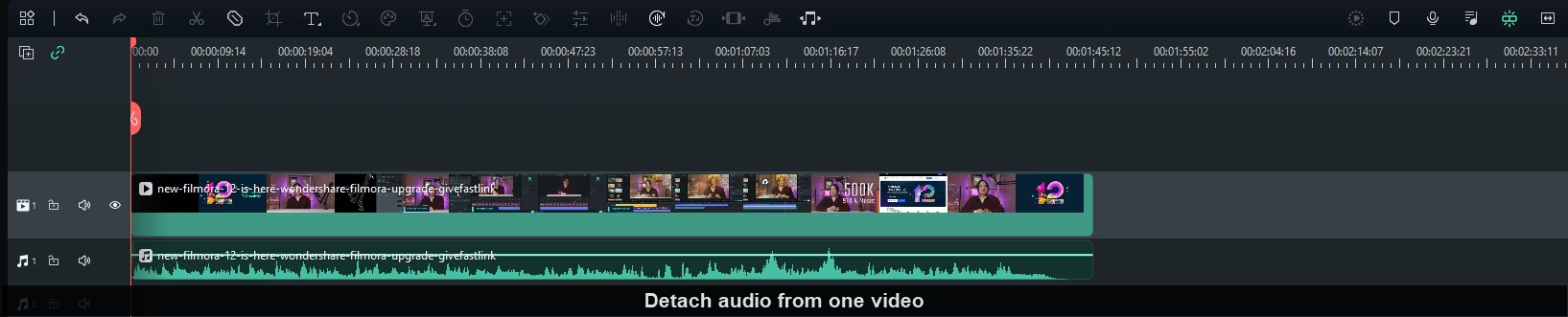
- Detach the Audio
- Right-click on the video clip in the timeline and select “Detach Audio.” This action separates the audio track from the video, placing it on a separate audio track in the timeline.
- Edit the Audio (Optional)
- Filmora offers various audio editing tools, such as trimming, fading, and adjusting volume levels. Users can enhance the audio quality using features like Auto Normalization and AI Audio Denoise to remove background noise and maintain consistent volume levels.
- Export the Audio as MP3
- Click on the “Export” button, choose the “MP3” format from the list of available formats, and specify the desired quality settings. Finally, click “Export” to save the audio file in MP3 format.
Optimizing Audio Quality: Tips and Best Practices
Ensuring High-Quality Audio
- Choose High Bit Rate: For higher audio fidelity, select a bit rate of at least 192 kbps.
- Use Quality Source Files: Ensure your original audio files are of high quality to avoid degrading sound.
- Avoid Over-Compression: Excessive compression can distort audio; find a balance between file size and quality.
- Normalize Levels: Maintain consistent volume levels across tracks for a polished finish.
Troubleshooting Common Issues
- Distorted Sound: Check for clipping and reduce input levels during recording.
- Background Noise: Use noise reduction tools to eliminate static and hum.
- Sync Problems: Ensure frame rates match between audio and video for proper alignment.
- Audio Dropouts: Verify that your audio equipment and connections are secure and functioning correctly.
- File Compatibility: Convert problematic files to commonly supported formats like MP3 or WAV using conversion tools.
Enhancing Audio Quality with Filmora Advanced Features
Wondershare Filmora not only facilitates the extraction of audio from videos but also offers advanced tools to enhance audio quality:
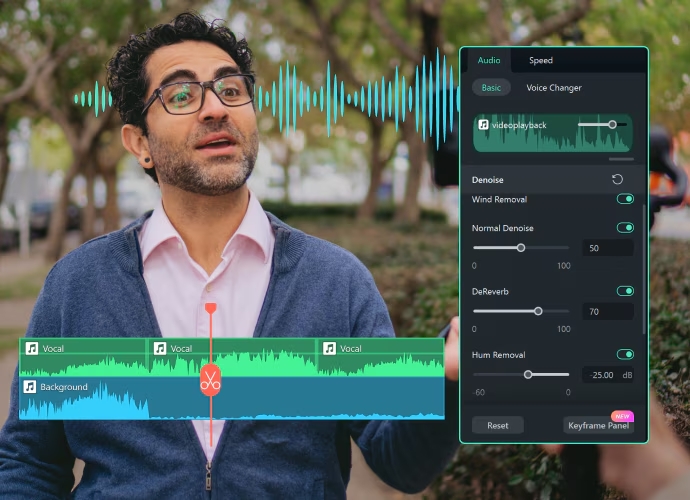
Auto Normalization: One of the most useful features in Filmora is the Auto Normalization tool. This feature automatically adjusts the audio levels of your track, making loud sections quieter and soft sections louder, achieving a more balanced and uniform sound.
AI Audio Denoise: Background noise can often be a major issue if the original recording wasn’t done in a controlled environment. Filmora AI Audio Denoise tool uses advanced artificial intelligence to automatically detect and remove unwanted background noise, such as static, hums, or environmental sounds.
Final Thoughts: Why Wondershare Filmora Is Your Go-To for MP3 Conversion
Wondershare Filmora makes converting YouTube videos to MP3 easy and efficient, offering a user-friendly platform to extract high-quality audio. Whether you’re creating playlists, repurposing content, or just enjoying music offline, Filmora provides a seamless solution with powerful tools like Auto Normalization and AI Audio Denoise to enhance sound quality.
With its intuitive interface and advanced features, Filmora is an excellent choice for both beginners and experienced editors. Just remember to respect copyright laws and use content you’re authorized to convert.
Try Filmora today to experience hassle-free MP3 conversion and elevate your audio projects with ease!
Related Posts

Receptor Grade IGF-1 LR3: Extended Molecular Signaling and Peptide Research
Receptor Grade IGF-1 LR3 is a modified IGF-1 analog studied for its prolonged receptor engagement, altered binding affinity, and role in growth and metabolic signaling research.

Top 10 Best Automobile Technology Companies In Dubai 2026

Uniting SIM Cards and Temporary Numbers: How Mobile Communication Became More Flexible
How SIM cards and internet telephony evolved side by side, from full-size cards to eSIM and cloud PBXs, and how flexible virtual numbers and specialized services now cover business communication needs.

Top 10 Best Robotics Companies In Japan 2026
122 Comments
Join the discussion and share your thoughts