Grain AI 2026 Review: Pricing, Login, Download, App, & FAQs

Table of Contents
If you have spent any part of 2026 sitting through video calls and trying to remember what was actually said two days later, you have probably stumbled across Grain. The tool keeps showing up in sales playbooks, customer success Slack channels, and on the laptops of UX researchers who would rather listen to their users than scribble notes the entire time. So at Nubia Magazine, we decided to spend several weeks really using Grain across different meeting styles, comparing notes with users on G2 and Reddit, and pulling apart its pricing structure to see whether the hype matches the experience.
This is our full Grain AI 2026 review, covering pricing, login, download, the app itself, the overall user experience, and the FAQs people are searching for right now. We have rated Grain a solid 4.0 out of 5.0, and below is exactly how we got there.
Brand Profile: Who Is Grain AI
GRAIN AI: BRAND PROFILE AT A GLANCE | |
|---|---|
Brand Name | Grain (also known as Grain AI) |
Legal Entity | Grain Intelligence, Inc. |
Founders | Mike Adams (Co-founder & CEO) and Jake Adams (Co-founder) |
Year Founded | 2018 |
Headquarters | San Francisco, California, United States |
Industry | AI Meeting Intelligence, SaaS, Enterprise Software |
Core Product | AI-powered meeting recorder, transcriber, and conversation intelligence platform |
Notable Investors | Tiger Global Management, Zoom Video Communications, Slack Fund, Unusual Ventures |
Official Website | www.grain.com |
Login Portal | app.grain.com |
Free Plan | Yes, available with limited monthly recordings |
Paid Plans (Starting) | Starter at $15 per user per month (billed annually) |
Top Plan | Business at $33 to $48 per user per month, plus custom Enterprise pricing |
Supported Platforms | Web app, Mac desktop app, Windows desktop app, Chrome extension, Zoom, Google Meet, Microsoft Teams |
Key Integrations | HubSpot, Salesforce, Slack, Notion, Zapier, ChatGPT, Claude, Glean |
Languages Supported | 100+ languages for transcription |
Best For | Sales teams, customer success, UX researchers, growing B2B teams |
Nubia Magazine Rating | 4.0 / 5.0 |
Grain, legally known as Grain Intelligence, Inc., was founded by brothers Mike Adams and Jake Adams. The company started as a way to capture short, shareable video clips from Zoom calls and has since evolved into a full conversation intelligence platform. It pulled in a notable Series A round led by Tiger Global Management, with Zoom and Slack Fund also putting money on the table, which speaks to how seriously the meeting tools ecosystem takes the product.
Today, Grain positions itself as an AI notetaker built for growing teams. It records, transcribes, summarises, and enriches meetings, then lets you push the data into tools like HubSpot, Salesforce, ChatGPT, and Claude. In simple terms, it sits quietly in your meetings and turns every conversation into structured, searchable, shareable insight.
Grain AI Pricing in 2026: What You Actually Pay
Pricing is one of the first things our team checked, because Grain has refreshed its plans more than once over the past year. As of 2026, Grain runs a four-tier structure: a genuinely usable Free plan, a Starter plan, a Business plan, and a custom Enterprise plan.
Free Plan
The Free plan is more generous than most competitors in the same space. You get unlimited meeting recordings, AI-generated summaries, and a monthly cap on AI-highlighted moments. For freelancers, solo founders, and anyone who only needs basic transcripts, the Free plan can comfortably stretch for months without forcing an upgrade. This was a pleasant surprise during our testing.
Starter Plan
Starter sits at $15 per user per month when billed annually. This is where Grain starts to feel like a real productivity tool rather than a recorder. You unlock unlimited AI highlights, shareable video clips, HubSpot CRM sync, and basic team collaboration features. For a solo account executive or a small CS team, this is the sweet spot.
Business Plan
Business is priced between $33 and $48 per user per month depending on billing cycle and configuration. It adds AI-generated notes templates, deeper CRM enrichment, deal insights, AI coaching tools, advanced analytics, and priority support. Sales managers running multiple reps will likely find this tier worth the jump, but smaller teams may struggle to justify the price.
Enterprise Plan
Enterprise pricing is custom. You get dedicated security reviews, SSO, advanced admin controls, and tailored onboarding. There is no public number, so you have to talk to Grain directly. This is standard for the category.
Honest take from Nubia Magazine: Grain’s pricing is fair when compared to Gong, Avoma, or Fathom, but the value really kicks in if you are using HubSpot or Salesforce daily. If your team only meets occasionally, the per-seat model can feel steep next to per-minute alternatives like Otter.
Grain AI Login: How to Access Your Account
Logging into Grain is one of the simpler parts of the experience, which we appreciated. The official login portal is app.grain.com. From the homepage at grain.com, you simply click "Sign in" in the top right corner and you are taken straight to the authentication screen.
Login Options
- Google Sign-In: By far the most common path. One click using your Google Workspace account and you are in.
- Microsoft Sign-In: Works seamlessly for teams using Outlook and Microsoft Teams.
- Email and password: Available for users who prefer not to link a Google or Microsoft account.
- Single Sign-On (SSO): Reserved for Business and Enterprise plans, with SAML support for organisations that need it.
During testing, we did not run into any login loops or two-factor authentication hiccups. If you forget your password, the reset flow is standard and the email arrives within a minute. One small note for anyone using a VPN: occasionally the session will time out faster than expected, but that is a fairly minor issue and usually resolves on the next sign-in.
Grain AI Download: Getting the App on Your Device
Grain offers more than just a browser experience. You can download a dedicated desktop app for both Mac and Windows directly from grain.com or from inside your account dashboard.
How to Download Grain
- Step 1: Sign in at app.grain.com.
- Step 2: Click the download prompt on your dashboard or visit grain.com/download.
- Step 3: Choose between the Mac (.dmg) or Windows (.exe) installer.
- Step 4: Run the installer and grant the app microphone, screen, and accessibility permissions when prompted.
- Step 5: Sign in inside the desktop app using the same credentials.
There is also a Chrome extension and a calendar integration that automatically pulls in upcoming meetings. The desktop app stood out for one specific reason during our review: it can transcribe directly from your computer’s audio without sending a bot into the call. That is a real differentiator. No more awkward "recording bot has joined" notifications popping up in front of clients.
Grain does not currently have a dedicated iOS or Android app for full meeting capture, which we noted as a gap. Mobile users mainly access the platform through the responsive web app, and that experience is decent but clearly designed for desktop-first workflows.
Inside the Grain App: Features That Matter
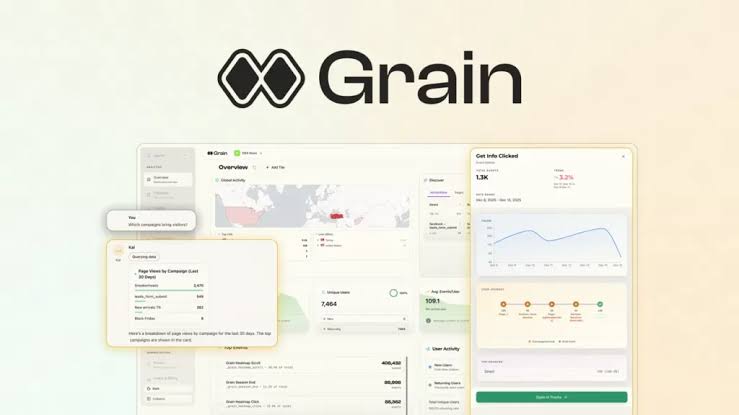
Once you are inside the Grain app, the interface feels modern, clean, and refreshingly uncluttered. Here is what you can actually do with it in 2026.
AI Meeting Notes and Transcripts
Grain automatically records and transcribes meetings with speaker identification across more than 100 languages. Transcripts arrive in clean Markdown, which is brilliant if you plan to push them into another tool. In our tests, accuracy was strong for clear English speakers but dipped a little with heavy accents or fast crosstalk, which is consistent with most AI transcription tools today.
Smart Summaries and Action Items
After every meeting, Grain produces a structured summary, a list of action items, and an optional follow-up email draft. The summaries are short and focused rather than a wall of text, which is exactly what you want at 4pm on a Friday.
Highlights, Clips, and Stories
This is the original Grain magic. You can highlight any moment in a transcript, turn it into a short video clip, and share it in Slack, an email, or a CRM record. "Stories" let you stitch multiple clips into a narrative for things like onboarding, win/loss reviews, or product feedback reels.
Ask Grain and AI Agents
Grain now lets you query your entire meeting library using natural language, and it returns answers with precise citations back to the transcript. You can also pipe enriched transcripts directly into ChatGPT and Claude, which is genuinely useful for teams that already work with those tools.
CRM Sync and Workflow Automation
HubSpot and Salesforce sync is the headline integration, and it works well. Notes, action items, and properties update automatically. Beyond that, Grain plays nicely with Slack, Notion, Zapier, and Glean.
Coaching and Deal Intelligence
On Business and above, Grain becomes a sales coaching tool. Managers can review reps’ calls, build playbooks, track keywords across the team, and surface deal risks. This is the layer that competes with Gong and Chorus.
Grain AI User Experience: How It Actually Feels to Use
The user experience is where Grain quietly earns its reputation. We rated it 4.0 out of 5.0 because, while it is not flawless, it gets the basics very right and removes a lot of the small frustrations that plague other meeting tools.
What We Loved
- Setup is genuinely fast. From signup to first recorded meeting was under five minutes.
- The desktop app captures audio without joining as a bot, which is a real client-facing advantage.
- Transcripts and summaries are clean, skimmable, and structured for sharing.
- The clip and Stories feature is still the best in class for sharing customer moments.
- Integrations with HubSpot, Salesforce, ChatGPT, and Claude feel polished, not bolted on.
What Could Be Better
- The Business plan price jump is significant, and some teams will feel it.
- Bulk export of transcripts is still less intuitive than it should be.
- Heavily technical or jargon-filled meetings sometimes need a quick human edit on the summary.
- There is no full mobile app, which limits Grain’s usefulness for users on the move.
- Customisation of meeting templates and notes formatting is more limited than power users would like.
Across the board, Grain feels like a tool built by a team that has actually sat through a lot of bad meetings. The product respects your time, which is the highest compliment we can give a productivity tool in 2026.
Frequently Asked Questions About Grain AI in 2026
Below are the questions Nubia Magazine readers and search users keep typing into Google about Grain AI. Here are clear, no-nonsense answers.
1. Is Grain AI free to use in 2026?
Yes. Grain offers a free plan with unlimited meeting recordings and basic AI summaries, plus a monthly cap on AI-highlighted moments. It is one of the most generous free tiers in the meeting intelligence category, and many individual users will not need to upgrade at all.
2. How much does Grain AI cost per user?
Grain’s paid plans start at $15 per user per month for the Starter plan when billed annually. The Business plan ranges between $33 and $48 per user per month depending on configuration, and Enterprise pricing is custom. There is no public Enterprise number, so larger teams need to contact the Grain sales team.
3. Is Grain AI safe and secure to use for client meetings?
Yes. Grain uses enterprise-grade security, supports SSO and SAML on Business and Enterprise plans, and is SOC 2 compliant. Recordings are encrypted in transit and at rest, and admins have granular control over who can access what. We still recommend always letting your meeting participants know they are being recorded, both for ethics and for legal compliance in your region.
4. Does Grain AI work with Zoom, Google Meet, and Microsoft Teams?
Yes, Grain integrates with all three. You can either use the Grain meeting bot to join calls or use the desktop app to capture audio directly from your computer without a bot showing up in the meeting room. The bot-free option is a popular choice for client-facing teams.
5. How do I download the Grain AI app?
Visit grain.com and sign in. From your dashboard, click the download link or go to grain.com/download to grab the Mac or Windows installer. There is also a Chrome extension. Grain does not have a fully featured mobile app yet, so iOS and Android users mostly rely on the responsive web version.
6. Can Grain AI integrate with ChatGPT and Claude?
Yes. This is one of the standout updates from the past year. Grain enriches your transcripts and lets you push them directly into ChatGPT, Claude, or any other AI tool of choice. You can also use Ask Grain inside the platform itself to query your entire meeting history with natural language and get answers with citations.
7. Is Grain AI better than Otter, Fireflies, or Fathom?
It depends on what you need. Otter is cheaper for simple transcription. Fathom offers a strong free tier for solo users. Fireflies is good for budget-conscious teams. Grain wins for sales and customer success teams that need video clips, CRM sync, AI coaching, and deeper conversation intelligence. If your workflow lives in HubSpot or Salesforce, Grain is hard to beat.
8. How accurate is Grain AI’s transcription?
Generally very good for clear English speakers and well-structured meetings. Accuracy can dip slightly with heavy accents, multiple people talking at once, or technical jargon, which is consistent across the AI transcription industry. Grain supports more than 100 languages, and quality keeps improving with every model update.
9. Can I cancel my Grain AI subscription anytime?
Yes. You can cancel from your account settings at any time. If you are on an annual plan, your access continues until the end of your billing cycle. There are no hidden cancellation fees, which is increasingly rare in SaaS pricing today.
10. Who owns Grain AI and where is the company based?
Grain is operated by Grain Intelligence, Inc., a San Francisco-based company founded by brothers Mike Adams (CEO) and Jake Adams. The company has raised funding from Tiger Global Management, Zoom, Slack Fund, and Unusual Ventures, which gives it a serious runway and credibility in the meeting intelligence space.
Nubia Magazine Verdict
After weeks of testing, dozens of recorded meetings, and a deep dive into pricing, login flows, the desktop app, and the broader user experience, Nubia Magazine rates Grain AI 4.0 out of 5.0.
Grain is not the cheapest tool in the category, and it is not flawless. It lacks a true mobile app, the Business plan jumps significantly in price, and very technical meetings still need a quick human review. But what Grain does well, it does very well. The recording experience is clean, the AI summaries are sharp, the clip and Stories feature is unmatched, and the integrations with HubSpot, Salesforce, ChatGPT, and Claude feel like they were built with intention.
If you are part of a sales team, customer success team, UX research squad, or any growing company that lives inside meetings, Grain is absolutely worth the trial. Start on the Free plan, see how it fits, and upgrade only when the value becomes obvious. That is the most Nubia Magazine way to test any tool, and Grain holds up.
0 Comments
Join the discussion and share your thoughts
No Comments Yet
Be the first to share your thoughts on this article!